




01. Edit your form online
Type text, add images, blackout confidential details, add comments, highlights and more.

Type text, add images, blackout confidential details, add comments, highlights and more.

Draw your signature, type it, upload its image, or use your mobile device as a signature pad.

Send it via email, link, or fax. You can also download it, export it or print it out.
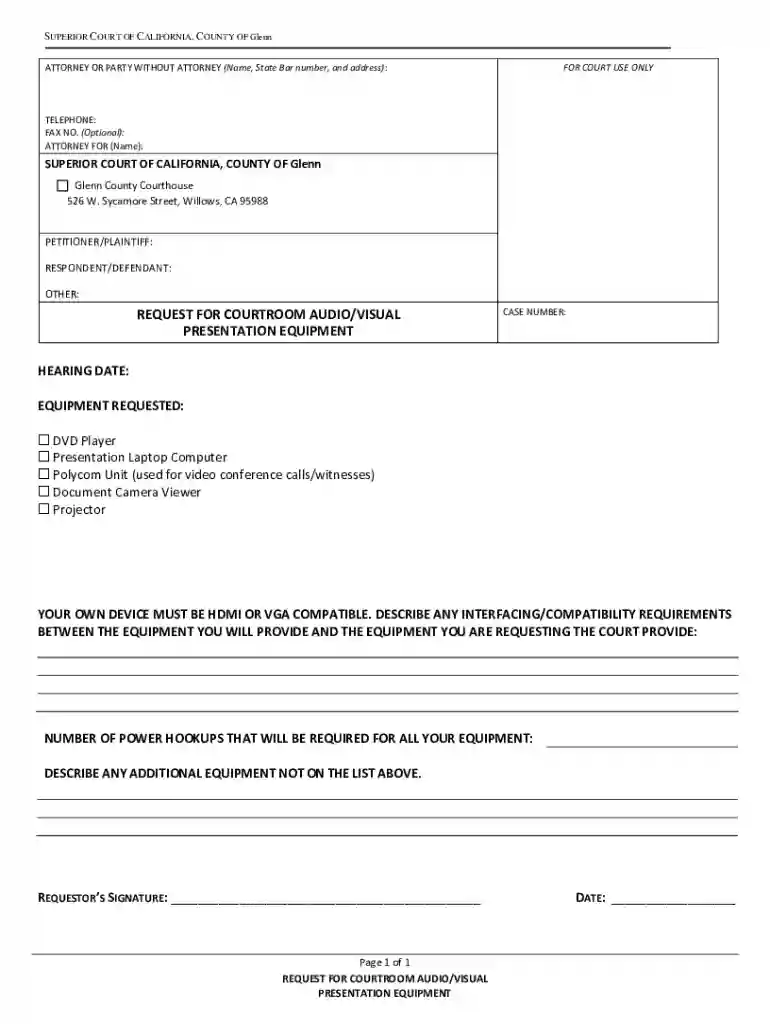
The "Request for Courtroom Audio Visual Presentation Equipment" is an official form utilized within the judicial system, specifically designed to facilitate the use of technological resources, such as DVD players, projectors, and other relevant devices, within courtroom settings. This form ensures that all technological equipment is available and compatible with the courtroom's existing infrastructure, enhancing presentations and ensuring the effective delivery of audio and visual material during legal proceedings.
In a broader legal context, the form represents a crucial logistical component that supports court procedures by empowering litigators to effectively present evidence and arguments through enhanced technological means. The streamlined process safeguards the timely preparation and execution of courtroom needs, ultimately working to uphold the integrity and functionality of the judicial system.
Several critical elements define the structure and content of the "Request for Courtroom Audio Visual Presentation Equipment." These elements ensure that the form gathers comprehensive information, aligning with court protocols and standards.
Petitioner and Respondent Information: Collects identifying details such as full names, contact information, and affiliations to ensure the correct allocation and coordination of equipment requests.
Requested Equipment Details: Lists specific items like DVD players and projection systems. It covers compatibility requirements to guarantee seamless integration with existing courtroom technology.
Power and Connectivity Needs: Documents the technical specifics of power sources and connections, ensuring that all requested equipment is operable upon arrival.
Signature Line for the Requester: Validates the request through an authorized signature, confirming that the individual understands the responsibilities and terms dictated by the equipment's use.
Filling out the "Request for Courtroom Audio Visual Presentation Equipment" involves several methodical steps to ensure accuracy and completion.
Gather Necessary Information: Compile all relevant information regarding the participants (i.e., the petitioner and respondent), including contact details and case identification numbers.
Select Required Equipment: Identify and select the necessary audio/visual gear needed for the courtroom setting. Check compatibility requirements with the courtroom's existing technology infrastructure to avoid logistical issues.
Detail Power and Connectivity Requirements: Indicate power outlets and connectivity options required for the equipment's operation. This step ensures the venue can accommodate technological needs without interruptions.
Add Signature and Date: Conclude by providing a signature and date on the designated portion of the form, validating the request and committing to the terms of equipment use.
The "Request for Courtroom Audio Visual Presentation Equipment" is mainly used by legal professionals, including attorneys, paralegals, and legal firms, involved in cases requiring the presentation of extensive audio/visual evidence. It can also be utilized by court personnel to facilitate internal procedural arrangements within the courtroom setting.
Such users must be well-acquainted with the legal protocols involved in courtroom technology use and be prepared to adhere to the guidelines and deadlines associated with the form submission process. The strategic use of this form maximizes the effectiveness of legal proceedings by integrating advanced technology into traditional court settings.


There are several important terms that users of the form should be familiar with to accurately complete and submit the request:
Compatibility Requirements: Refers to the necessary conditions that must be met for new equipment to work with existing courtroom technology without needing structural adjustments.
Power Needs: Describes the electrical constraints and requirements essential for equipping and maintaining functional and uninterrupted use of all devices listed.
Audit Trail: A documented history of interactions with the equipment once employed, ensuring accountability and traceability for the requester's records.
Securing this form involves a straightforward process typically managed through the respective court's administrative office or official website. The form may be available for download in digital format, or it might be obtainable in person from the court's clerk office.
Online: Many courts provide downloadable versions of the form on their official websites. Users can fill it electronically and print it for physical submission.
In-Person: Alternately, individuals can visit the courthouse and request the form from the administrative office. This method ensures real-time guidance from court staff, reducing potential errors in form completion.
The legal utilization of this request form is governed by a framework of regulations ensuring the proper and ethical deployment of technology in courtrooms. This aspect maintains not only the effective functioning of proceedings but also respects legal standards and privacy considerations.
Legal uses aim at enhancing the clarity and persuasiveness of evidence presented during trials and hearings. Ensuring compliance with the established guidelines prevents misuse and allocation of resources, reinforcing the lawful balance and order within the court's operational framework.
Real-world scenarios provide insight into the practical application and benefits offered by courtroom audio/visual technology:
High-Profile Trials: In cases involving significant media attention, high-quality projection and sound systems aid in presenting exhibits to a large audience without compromising detail.
Complex Legal Evidence: Cases requiring detailed graphical data or video evidence benefit from using high-definition screens and audio systems, allowing for an accurate interpretation by jurors and judges.
Each scenario underscores the role technology plays in modern courtrooms, emphasizing the need for well-prepared and managed requests to guarantee availability at trial.
At DocHub, your data security is our priority. We follow HIPAA, SOC2, GDPR, and other standards, so you can work on your documents with confidence.




Equipment Requests and SetUp (48 hours advance notice) An audiovisual equipment request can be made by emailing us at audiovisual@kentlaw.iit.edu. Upon
Nov 4, 2021 This Guide establishes procedures for issuing administrative policy, procedures, and instructions in the form of directives relating to
REQUEST FOR COURTROOM AUDIO/VISUAL. PRESENTATION EQUIPMENT. CASE NUMBER: HEARING DATE: EQUIPMENT REQUESTED: □ DVD Player. □ Presentation Laptop Computer.


