
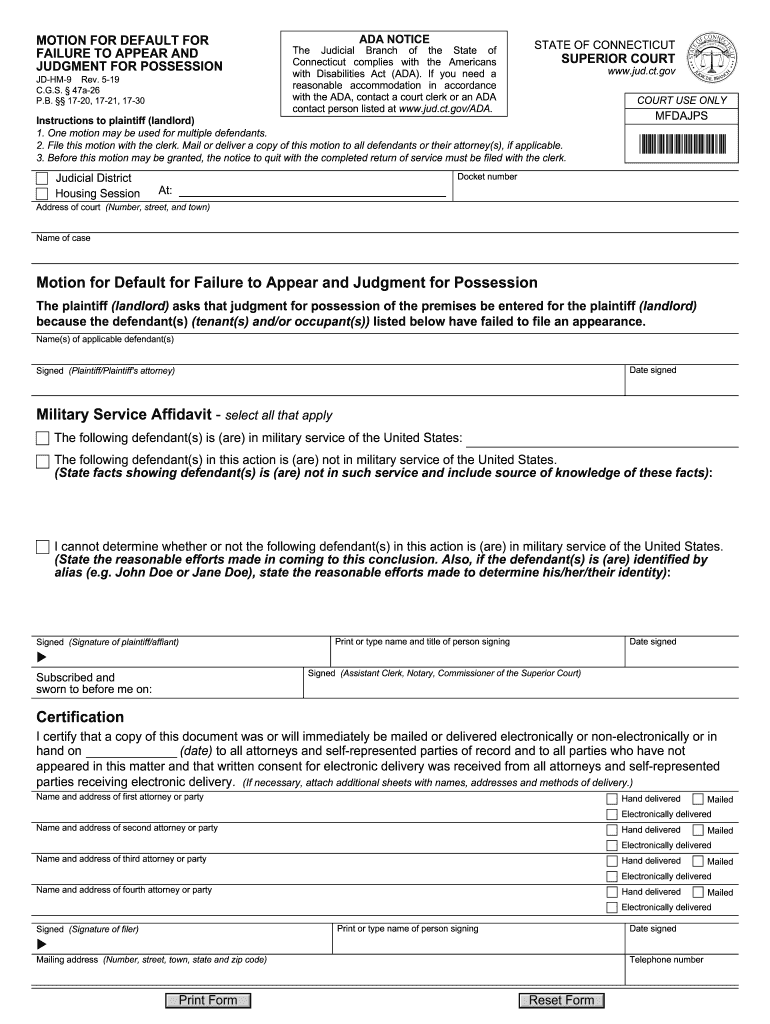







Definition and Meaning of JD-HM-9 Rev
The JD-HM-9 Rev is a legal motion for default judgment used in housing cases within Connecticut. Typically filed by landlords, this form addresses situations where tenants have failed to appear in court. The purpose of this document is to secure a court judgment in favor of the landlord due to the tenant's nonappearance. Housing cases can include eviction proceedings or disputes over lease agreements. By understanding its function, users can effectively navigate the legal process involved in landlord-tenant disputes.
Context and Purpose
- Legal Context: The form is applicable specifically within the ambit of housing law in Connecticut.
- Primary Purpose: To obtain a legal ruling when the defendant, often a tenant, does not appear in court.
- Use Cases: Situations where a landlord needs to move forward legally without tenant participation.
Key Elements of the JD-HM-9 Rev
Understanding the core components of the JD-HM-9 Rev is crucial for correctly filling out this legal document. Each segment has a specific legal implication that can affect the outcome of the judgment.
Main Sections
- Plaintiff and Defendant Information: Details of the landlord and tenant, address, and case identification numbers.
- Certification of Military Service: Information to certify whether the defendant is in military service, as required by the Servicemembers Civil Relief Act.
- Notice Requirements: Proof that the defendant has been properly notified of the proceedings.
- Request for Default Judgment: The section where the plaintiff formally requests that the court grant the default judgment due to the defendant's absence.
How to Use the JD-HM-9 Rev
Effective usage of the JD-HM-9 Rev involves a step-by-step approach to ensure all legal protocols are followed, protecting the interests of all parties involved.
Step-by-Step Completion
- Gather Necessary Information: Collect all pertinent details, including contact information and case numbers.
- Military Service Verification: Confirm and document the military service status of the tenant as required.
- Provide Notice: Ensure that all notification procedures are completed as per legal requirements.
- Submit the Form: Use appropriate channels to submit the completed form to the court for processing.
Detailed Process Steps
- Verification and Notices: Collect evidence of all notifications sent to the tenant.
- Form Completion: Follow instructions carefully to fill all sections of the form comprehensively.
- Legal Review: Consider consulting with legal professionals to verify that all sections comply with state laws.
Who Typically Uses the JD-HM-9 Rev
The JD-HM-9 Rev is primarily utilized by landlords and property managers involved in rental property administration in Connecticut. Knowledge of the form's usage can benefit various stakeholders in the housing sector.


Primary Users
- Landlords: Individuals or entities managing rental properties and needing resolution in legal disputes.
- Property Managers: Representatives handling property affairs on behalf of landlords or property owners.
- Legal Professionals: Attorneys specializing in real estate or housing law assisting clients in court cases.
Legal Use of the JD-HM-9 Rev
Correct legal usage of the JD-HM-9 Rev is essential to ensure compliance and avoid legal repercussions. Understanding these legal nuances helps in utilizing the form effectively within judicial settings.
Legal Requirements
- Court Procedures: Adhere strictly to Connecticut state housing court rules.
- Proper Notification: Ensure all notification and service requirements for defendants are fulfilled as per legal requirements.
- Ethical Use: Utilize the form only when legally justified, avoiding potential misuse in non-genuine cases.
Important Terms Related to JD-HM-9 Rev
Several legal terms and definitions relate to the JD-HM-9 Rev, crucial for comprehending the form's application and implications.
Terminology
- Default Judgment: A binding decision by a court in favor of one party due to the absence of the other.
- Certificated Military Status: Required affirmation of whether a defendant is currently in active military service.
- Notice of Petition: Document providing official notification of legal proceedings to a defendant.
Steps to Complete the JD-HM-9 Rev
Completing the JD-HM-9 Rev accurately is vital to ensure the form is valid and carries its intended legal weight. Following a structured approach can aid in error-free submission.
Completion Guide
- Identify Case Details: Begin by inputting all known case information.
- Certification: Conduct military status verification and include in the form.
- Fill Default Judgment Section: Articulate clear reasons justifying the default judgment request.
- Verify and Submit: Double-check all entries for accuracy and submit through designated court channels.
State-Specific Rules for the JD-HM-9 Rev
Since the JD-HM-9 Rev is governed by Connecticut laws, awareness of state-specific regulations is essential to its correct utilization.
Connecticut-Specific Guidelines
- Filing Procedures: Familiarize with Connecticut judicial branch requirements for filing motions.
- Notice Delivery Methods: Follow approved methods for delivering notice to defendants according to Connecticut laws.
- Court Protocols: Adhere to all local court protocols regarding default judgments and tenant rights.




