






Definition and Purpose of the SU07 Sponsor Form
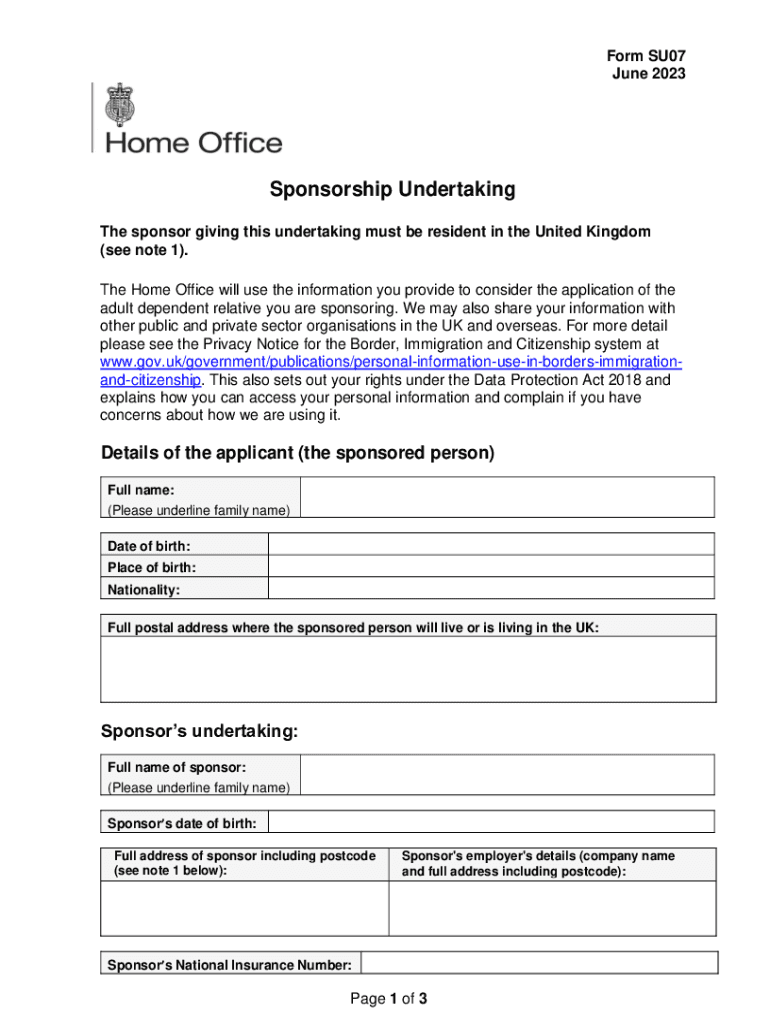
The SU07 sponsor form, officially recognized as a Sponsorship Undertaking form, is primarily used in the UK by individuals who are looking to sponsor an adult dependent relative. This form commits the sponsor to ensure the maintenance, accommodation, and welfare of the dependent without recourse to public funds. It outlines the sponsor's legal obligations over a specified period and serves as proof of financial responsibility.
Key Components of the SU07 Form
- Sponsor's Information: Personal details of the individual providing support, including full name, address, and contact information.
- Applicant's Information: Details of the dependent relative, including their personal information and relationship to the sponsor.
- Declaration of Support: A section where the sponsor commits to financial support, ensuring no dependency on public benefits.
How to Obtain the SU07 Sponsor Form Online
To fill out and sign the SU07 sponsor form available online, users can access platforms like DocHub. They facilitate not only filling and signing documents digitally but also ensure security and ease of access across devices.
Accessing the Form
- Visit a Reliable Platform: Utilize a trusted document management service like DocHub.
- Import Form: Upload the SU07 form from your local device or cloud storage such as Google Drive or Dropbox.
- Edit Online: Directly edit the form using the platform's tools.
Steps to Complete the SU07 Sponsor Form Online
Completing the SU07 sponsor form online involves a series of steps, ensuring that the sponsor accurately provides the required information.
- Begin with Personal Details: Enter the sponsor's and applicant's full details. Make sure to use names as they appear on legal documents.
- Confirm Relationship: Specify the relationship to the dependent relative being sponsored.
- Financial Declaration: Outline financial support details, ensuring the dependent will not resort to public funds.
- Review and Edit: Use tools to check for completeness and accuracy.
- Secure Digital Signature: Apply a legally binding electronic signature.
Legal Use and Compliance with the SU07 Sponsor Form
The form must comply with UK immigration laws, especially focusing on the conditions for adult dependents' sponsorship.
Legal Considerations
- Verification of Financial Stability: The sponsor must demonstrate adequate financial means.
- Data Protection Compliance: Ensure all personal data included complies with GDPR standards.
- Binding Commitment: Understand the legal implications of the undertaking, which include long-term financial responsibility.
Who Typically Uses the SU07 Sponsor Form
Individuals residing in the UK willing to sponsor a relative can use this form, usually:
- UK Residents: Citizens or permanent residents wishing to sponsor family members.
- Adult Dependents: Applicants over 18 years needing financial and accommodation assistance.

Common Scenarios
- Elderly Parents: UK residents sponsoring elderly parents who need care.
- Dependent Relatives: Individuals with health conditions requiring continuous support.
Key Elements to Include in the SU07 Sponsor Form
Each section of the SU07 form must be completed carefully to meet legal standards.
Critical Elements
- Complete Personals: Full legal names and contact details.
- Financial Undertaking: Detailed financial information to assure adequate support.
- Commitment Duration: Duration of the anticipated sponsorship.
Digital vs. Paper Version of the SU07 Sponsor Form
The choice between digital and paper versions of the form depends on preference and access.
Digital Version Advantages
- Accessibility: Easily accessible online from any device.
- Efficiency: Fast and error-free completion using online validation tools.
- Security: Encrypted form submission ensures data protection.
Paper Version Drawbacks
- Manual Errors: Higher risk of incomplete information and human error.
- Physical Submission Delays: Potential delays due to postal operations and manual handling.
Examples and Real-World Scenarios for SU07 Form Usage
Practical applications of the SU07 sponsor form include scenarios like:
- Sponsoring Elderly Relatives: Individuals backing elderly parents with health issues.
- Supporting Younger Siblings: Offering financial backing for siblings unable to support themselves due to disabilities.
Case Studies
- Family Reunification: A UK citizen successfully sponsors their dependent mother, providing assurances of accommodation and healthcare.
- Legal Precedents: Instances where sponsorships have been challenged legally for lack of compliance with form requirements, emphasizing the importance of accurate, truthful information.