




Here's how it works

01. Edit your form online
Type text, add images, blackout confidential details, add comments, highlights and more.

02. Sign it in a few clicks
Draw your signature, type it, upload its image, or use your mobile device as a signature pad.

03. Share your form with others
Send it via email, link, or fax. You can also download it, export it or print it out.
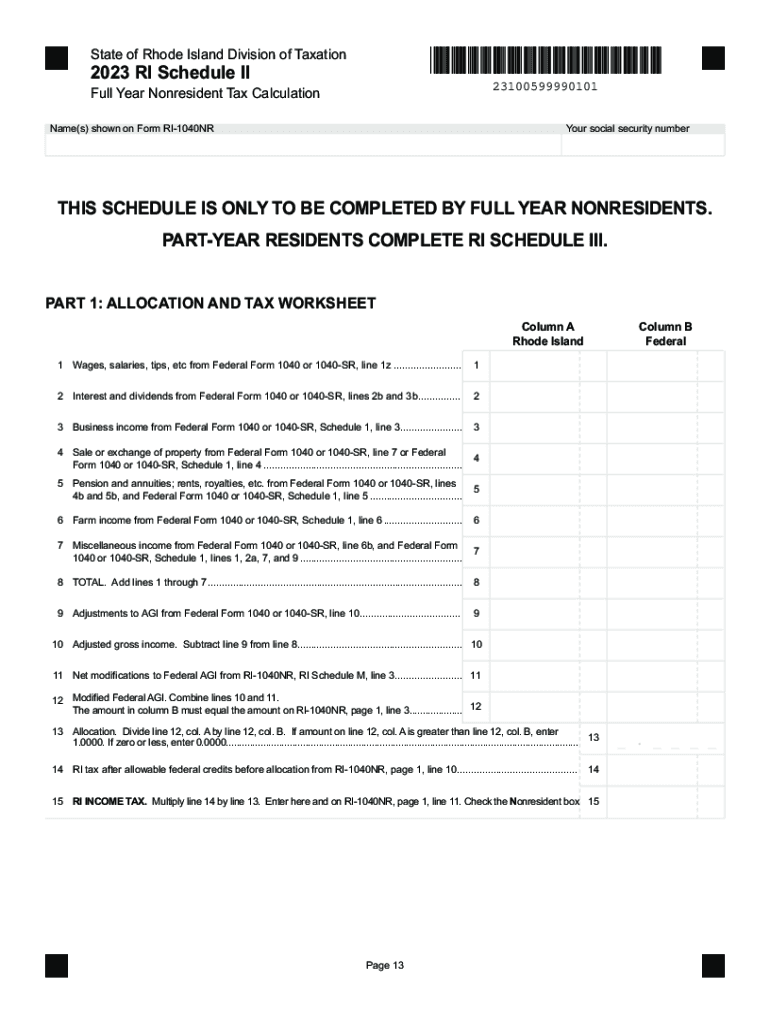
How to use or fill out the 2023 RI Schedule II form online

- Click ‘Get Form’ to open the 2023 RI Schedule II in our editor.
- Begin by entering your name(s) as shown on Form RI-1040NR and your social security number in the designated fields at the top of the form.
- Proceed to Part 1: Allocation and Tax Worksheet. Fill in each line with the corresponding amounts from your Federal Form 1040 or 1040-SR, ensuring accuracy for lines 1 through 8.
- Complete lines 9 through 15 by following the instructions provided, making sure to calculate adjustments and allocations correctly.
- Move to Part 2 if applicable. Input your wages, total days worked, and any nonworking days as specified. Calculate your allocation percentage based on the provided formulas.
- Finally, review all entries for accuracy before submitting. Use our platform’s features to save or share your completed form easily.
Start filling out your form online for free today!
Fill out 2023 Rhode Island Schedule II online
It's free
It's free
See more 2023 Rhode Island Schedule II versions
We've got more versions of the 2023 Rhode Island Schedule II form. Select the right 2023 Rhode Island Schedule II version from the list and start editing it straight away!
Got questions?
We have answers to the most popular questions from our customers. If you can't find an answer to your question, please contact us.
Contact us
How to make a form fillable online?
To convert a PDF to fillable online, upload your document to docHub. docHub online editor instantly converts any PDF document to a fillable format online. You can fill your PDF with our various tools and features. To fill the form with text, choose the Text button and start typing.
Where can I fill out forms online for free?
Use docHub eSignature to fill out a PDF form and sign it Sign up for a free docHub account to fill and sign PDFs. Some PDF forms are fillable and some arent.
How to create an online request form?
How to Create a Request Form Define Your Use Case and Requirements. Start Building Your Form. Add and Customize Form Fields. Personalize the Form Design. Set Up Notifications and Approvals. Publish and Share Your Form. Test and Manage Submissions.
What is the online form?
An online form is an electronic application in which data is entered by the person filling it out for recording and further processing via predefined data fields. Such electronic forms can be found, for example, on websites or as attachments in e-mails.
Security and compliance
At DocHub, your data security is our priority. We follow HIPAA, SOC2, GDPR, and other standards, so you can work on your documents with confidence.
Learn more


