




Here's how it works

01. Edit your mvr 33a online
Type text, add images, blackout confidential details, add comments, highlights and more.

02. Sign it in a few clicks
Draw your signature, type it, upload its image, or use your mobile device as a signature pad.

03. Share your form with others
Send north carolina veteran plate via email, link, or fax. You can also download it, export it or print it out.
How to use or fill out mvr 33a with our platform

- Click ‘Get Form’ to open the mvr 33a in the editor.
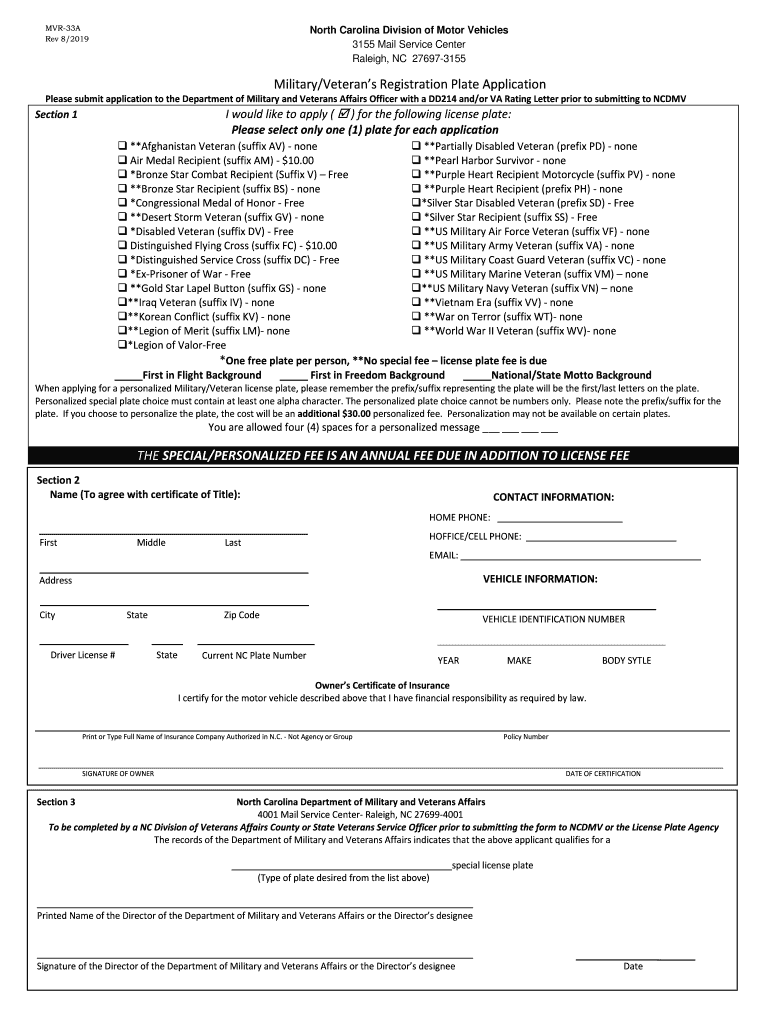
- Begin with Section 1, where you will select the type of military/veteran license plate you wish to apply for. Check only one box that corresponds to your eligibility.
- If you want a personalized plate, remember to include at least one alpha character in your choice and note the additional fee. You have four spaces for your personalized message.
- Proceed to Section 2 and fill in your personal information, including your name, contact details, and vehicle information. Ensure all fields are completed accurately.
- In this section, also provide details about your insurance company and policy number. Don’t forget to sign and date the certification.
- Finally, Section 3 must be completed by a NC Division of Veterans Affairs officer. Ensure they sign off before submitting the form.
Start using our platform today for free to streamline your mvr 33a application process!
Fill out mvr 33a online
It's free
It's free
See more mvr 33a versions
We've got more versions of the mvr 33a form. Select the right mvr 33a version from the list and start editing it straight away!
Security and compliance
At DocHub, your data security is our priority. We follow HIPAA, SOC2, GDPR, and other standards, so you can work on your documents with confidence.
Learn more


