Type text, add images, blackout confidential details, add comments, highlights and more.

02. Sign it in a few clicks
Draw your signature, type it, upload its image, or use your mobile device as a signature pad.

03. Share your form with others
Send it via email, link, or fax. You can also download it, export it or print it out.

How to use or fill out form mvr 33a 2012 with our platform
Ease of Setup
DocHub User Ratings on G2
Ease of Use
DocHub User Ratings on G2
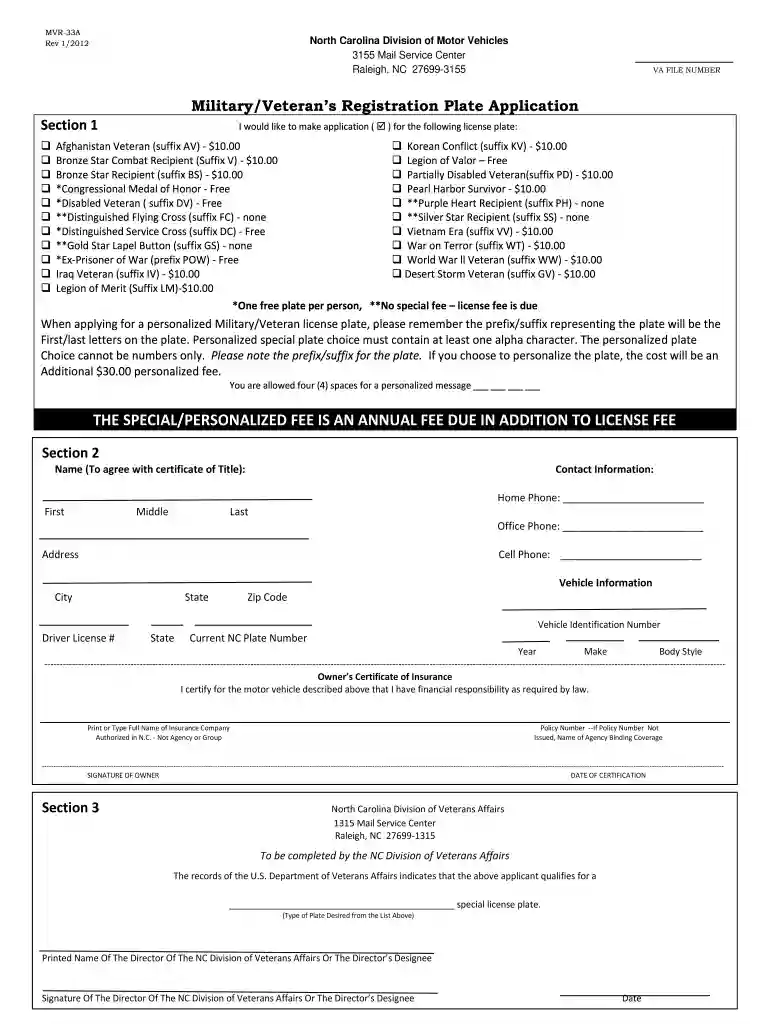
Click ‘Get Form’ to open the MVR-33A application in the editor.
In Section 1, select the type of military/veteran license plate you wish to apply for by checking the appropriate box. Note any associated fees.
If you want a personalized plate, ensure it contains at least one alpha character and enter your desired message in the four available spaces.
Proceed to Section 2 and fill in your name as it appears on your vehicle's title, along with your contact information including home, office, and cell phone numbers.
Complete the vehicle information section by providing details such as Vehicle Identification Number (VIN), driver license number, current NC plate number, year, make, and body style.
In the Owner’s Certificate of Insurance section, provide the name of your insurance company and policy number. Ensure you sign and date this section.
Section 3 will be completed by the NC Division of Veterans Affairs. Leave this section blank for their input.
Start filling out your MVR-33A form online for free today!
Cookie consent notice
This site uses cookies to enhance site navigation and personalize your experience.
By using this site you agree to our use of cookies as described in our Privacy Notice.
You can modify your selections by visiting our Cookie and Advertising Notice.