




Here's how it works



How to use or fill out cover sheet - Arizona Corporation with our platform

- Click ‘Get Form’ to open the cover sheet in the editor.
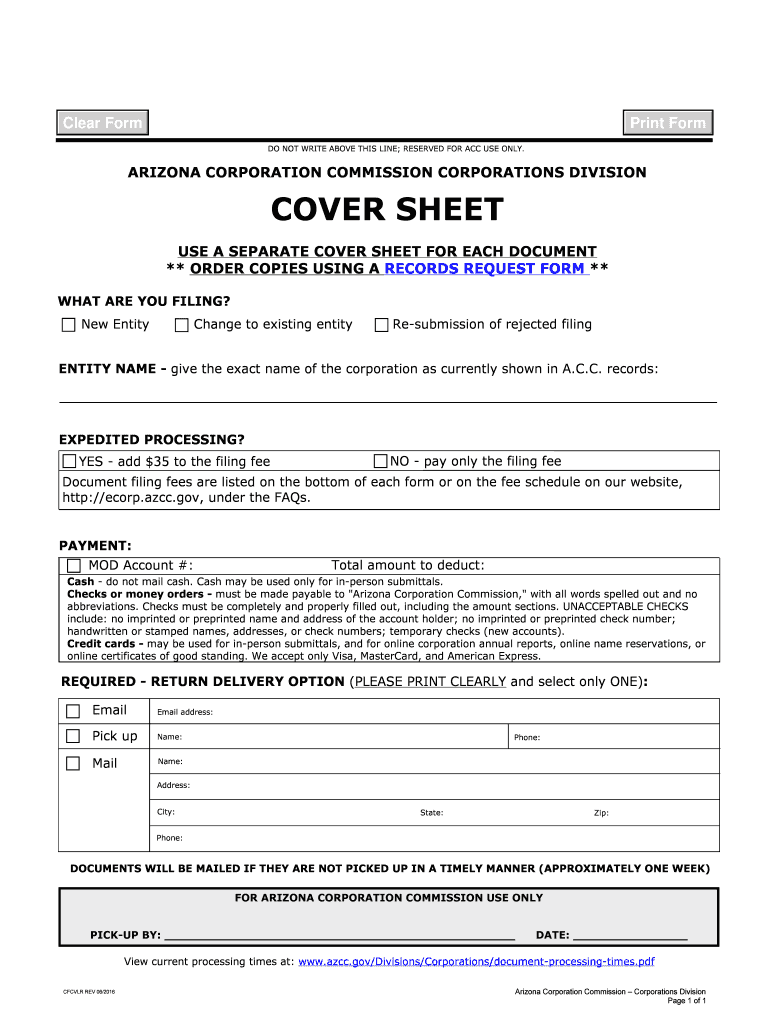
- Indicate what you are filing by selecting one of the options: New Entity, Change to existing entity, or Re-submission of rejected filing.
- Enter the exact name of the corporation as it appears in A.C.C. records in the ENTITY NAME field.
- Choose whether you require expedited processing by selecting YES or NO. If YES, remember to add $35 to your filing fee.
- Fill in your MOD Account number and total amount to deduct for payment.
- Select your preferred return delivery option (Email, Pick up, or Mail) and provide the necessary details such as email address or mailing address.
Start using our platform today for free to streamline your document editing and submission process!
It's free
See more cover sheet - Arizona Corporation versions
Got questions?
How do I sign my azcc cover sheet on iOS?
With DocHub, you can quickly sign your azcc cover sheet or any other paperwork on iOS, even without setting up additional programs. You can access your DocHub account from any web-connected browser and fill out and sign your form in any preferred method with just a couple of clicks.
Can I sign my cover sheet - Arizona Corporation while I edit it?
If you edit your cover sheet - Arizona Corporation with DocHub, you simply will not need to look for other applications or services to sign it. An electronic signature is a component of DocHub’s comprehensive editing toolset, which enables you to implement changes in your form without switching between platforms. Simply complete your form, double-check the correctness of the information and place your electronic signature at the end to make it submission-ready within a few minutes.
Does Arizona require an annual report for corporations?
What are the publication requirements for corporations in Arizona?
How do you know if a business name is taken in Arizona?
Security and compliance
At DocHub, your data security is our priority. We follow HIPAA, SOC2, GDPR, and other standards, so you can work on your documents with confidence.
Learn more


