Type text, add images, blackout confidential details, add comments, highlights and more.
02. Sign it in a few clicks
Draw your signature, type it, upload its image, or use your mobile device as a signature pad.
03. Share your form with others
Send it via email, link, or fax. You can also download it, export it or print it out.
How to use or fill out 3602 ez with our platform
Ease of Setup
DocHub User Ratings on G2
Ease of Use
DocHub User Ratings on G2
Click ‘Get Form’ to open the 3602 ez in the editor.
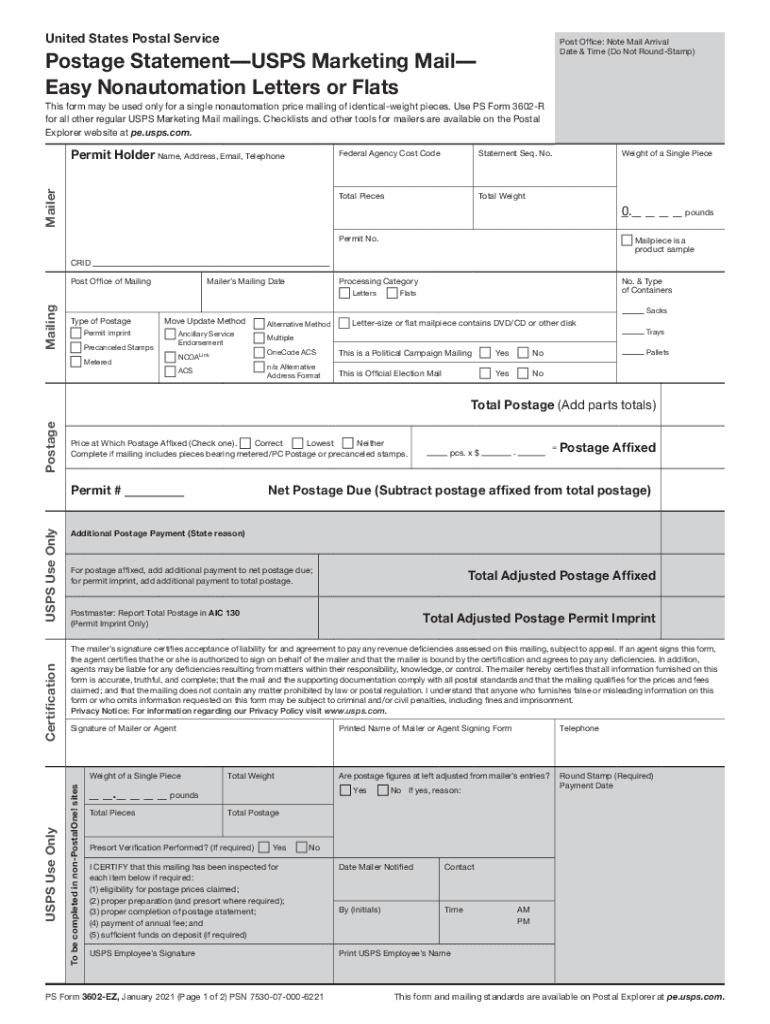
Begin by filling out the Mailer section, including your name, address, email, and telephone number. Ensure all fields are completed accurately.
Proceed to the Mailing section. Enter the total pieces and total weight of your mailing. If applicable, indicate if the mailpiece is a product sample.
In the Postage section, complete either Part B for letters or Part E for flats. Fill in the number of pieces at each presort level and calculate total postage based on provided rates.
Review your entries for accuracy. Sign in the Certification section to confirm that all information is truthful and complete.
Start using our platform today to streamline your form completion process for free!
Does it cost anything? Fees vary, depending on whether the Certificate of Mailing is purchased with an Individual Article or an Individual Article with Firm Mailing Book. Fees are in addition to regular postage.
What qualifies as USPS marketing mail?
Mailers use USPS Marketing Mail to send: Printed matter, flyers, circulars, advertising (including Every Door Direct Mail (EDDM) and Every Door Direct Mail - Retail). Newsletters, bulletins, and catalogs. Small parcels.
Is a certificate of posting free?
You can request a free proof of posting at a Collect+ store or Post Office when you hand over your letter or parcel for posting. You can also obtain a digital proof of posting on the Royal Mail App.
How much does it cost for a certificate of mailing?
The fee for a certificate of mailing from the USPS is $1.50 in addition to the postage costs. This provides proof of the date the mailpiece was presented to the Postal Service.
How much is the PS 3665 fee?
The Certificate of Mailing extra service costs $2.10 when sending a single piece, and $0.61 per piece when sending three or more pieces with PS Form 3665. These fees are in addition to the cost of postage.
Related Searches
3602 ez postage statement3602 ez usps3602-NZPS Form 3602-NZUsps form 3602 ezPS Form 3602-RUSPS bulk mail form onlinePs form 3602 nz pdf
Security and compliance
At DocHub, your data security is our priority. We follow HIPAA, SOC2, GDPR, and other standards, so you can work on your documents with confidence.
A USPS Certificate of Mailing is proof from the United States Postal Service that you mailed something on a certain date. This certificate costs $1.50 for each package and is ideal for time-sensitive shipments where you may have to provide proof that you mailed it before a set deadline.
What is a USPS 3602?
Postage StatementUSPS Marketing Mail Easy Nonautomation Letters or Flats. This form may be used only for a single nonautomation price mailing of identical-weight pieces. Use PS Form 3602-R for all other regular USPS Marketing Mail mailings.
Related links
Postage StatementUSPS Marketing Mail
PS Form 3602-EZ, July 2023 (Page 1 of 2) PSN 7530-07-000-6221. This form and mailing standards are available on Postal Explorer at pe.usps.com. United StatesRead more
Commercial - USPS Marketing Mail Machinable Letters
Documentation: ▫ Postage statement: Regular: PS Form 3602-R, PS Form 3602-EZ. Nonprofit: PS Form 3602-N, PS Form 3602-NZ. ▫ Supporting documentationRead more
Cookie consent notice
This site uses cookies to enhance site navigation and personalize your experience.
By using this site you agree to our use of cookies as described in our Privacy Notice.
You can modify your selections by visiting our Cookie and Advertising Notice.