Usps form 3602 r1 january 2013-2026

Get Form
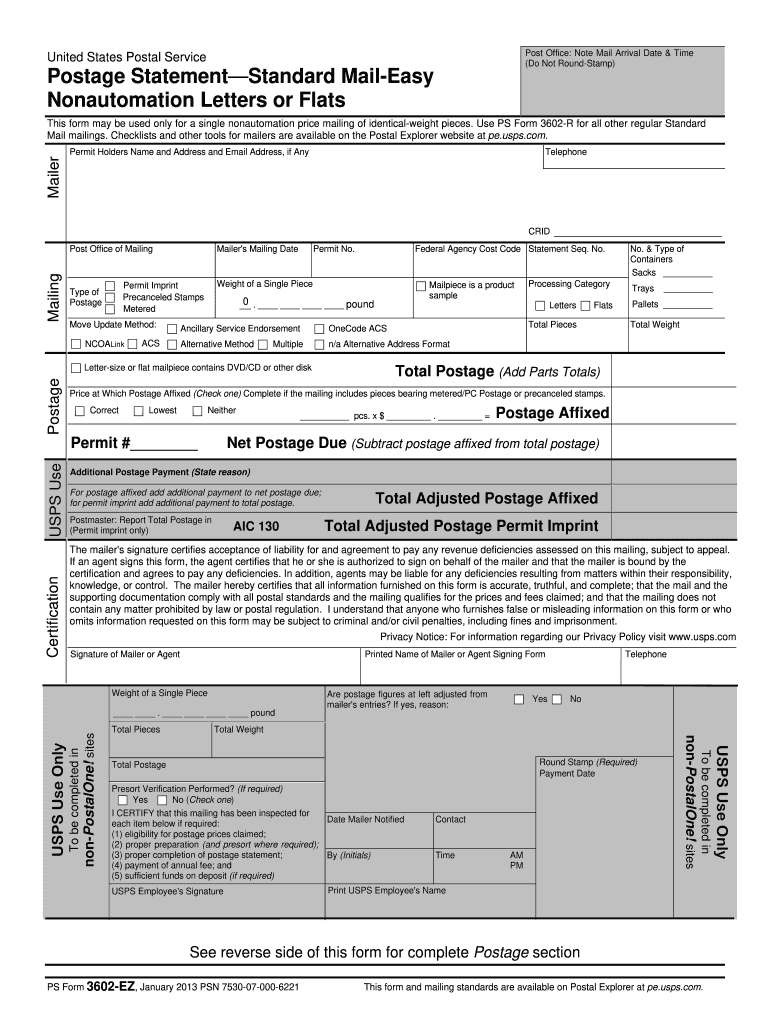
usps form 3602 r1 january 2013 Preview on Page 1

Here's how it works

01. Edit your form online
Type text, add images, blackout confidential details, add comments, highlights and more.
02. Sign it in a few clicks
Draw your signature, type it, upload its image, or use your mobile device as a signature pad.
03. Share your form with others
Send it via email, link, or fax. You can also download it, export it or print it out.

How to use or fill out usps form 3602 r1 january 2013 with our platform

Form edit decoration
9.5
Ease of Setup
DocHub User Ratings on G2
9.0
Ease of Use
DocHub User Ratings on G2
  1. Click ‘Get Form’ to open it in the editor.
  2. Begin by filling out the Mailer section, including your name, address, and email. Ensure all fields are accurate for smooth processing.
  3. In the Mailing section, enter the Post Office of Mailing and your Mailing Date. Select the Move Update Method applicable to your mailing.
  4. Complete the Postage section by indicating the total pieces and weight. Use the appropriate categories for letters or flats as per your mailing type.
  5. Calculate Total Postage by adding up all parts totals. If using metered postage, check the corresponding box and provide details.
  6. Sign in the Certification section to confirm accuracy and compliance with postal standards. Include your printed name and contact information.

Start using our platform today to fill out USPS Form 3602 R1 easily and for free!

See more usps form 3602 r1 january 2013 versions

We've got more versions of the usps form 3602 r1 january 2013 form. Select the right usps form 3602 r1 january 2013 version from the list and start editing it straight away!
Versions Form popularity Fillable & printable
2021 4.9 Satisfied (33 Votes)
2021 4.1 Satisfied (76 Votes)
2020 4.3 Satisfied (65 Votes)
2015 4.4 Satisfied (557 Votes)
2013 4 Satisfied (26 Votes)
2012 4 Satisfied (31 Votes)
2006 4 Satisfied (28 Votes)
be ready to get more

Complete this form in 5 minutes or less

Get form

Got questions?

We have answers to the most popular questions from our customers. If you can't find an answer to your question, please contact us.
Contact us
PS Form 3602-EZ is a simplified postage statement designed specifically for small business mailers who are mailing USPS Marketing Mail letters, and flats. To download a print-only version of PS Form 3602-EZ, click on Postage Statements in the left frame of Postal Explorer.
For Authorization for Nonprofit Status, Use PS Form 3624. In order to qualify for Nonprofit USPS Marketing Mail prices, a nonprofit authorization with the Postal Service must be obtained by submitting PS Form 3624, Application to Mail at Nonprofit USPS Marketing Mail Prices, with supporting documentation.
Payroll Adjustment Emergency Salary Issued. Emergency salary issued to an employee for payroll adjustment, this is collected through the Automated Salary Advance Collection (ASAC) system. Requires PS Form 2240, Pay, Leave, or Other Hours Adjustment Request.
How to Apply. Online: You can apply for a refund with a free USPS.com account. At a Post Office: You can also go to any Post Office and fill out Part I of Form 3533 (in duplicate) and submit it along with your original customer copy of Label 11.
Can I complete a customs form at the Post Office? If you didnt complete your customs form online or are using postage stamps on a package that requires a customs form, visit your local Post Office branch, fill out form PS 2976-R, and present your package at the counter to have the clerk create your label.

Security and compliance

At DocHub, your data security is our priority. We follow HIPAA, SOC2, GDPR, and other standards, so you can work on your documents with confidence.

Learn more
ccpa2
pci-dss
gdpr-compliance
hipaa
soc-compliance