




Here's how it works

01. Edit your what age does safeway hire online
Type text, add images, blackout confidential details, add comments, highlights and more.

02. Sign it in a few clicks
Draw your signature, type it, upload its image, or use your mobile device as a signature pad.

03. Share your form with others
Send how old do you have to be to work at safeway via email, link, or fax. You can also download it, export it or print it out.
How to use or fill out Safeway job application form with our platform

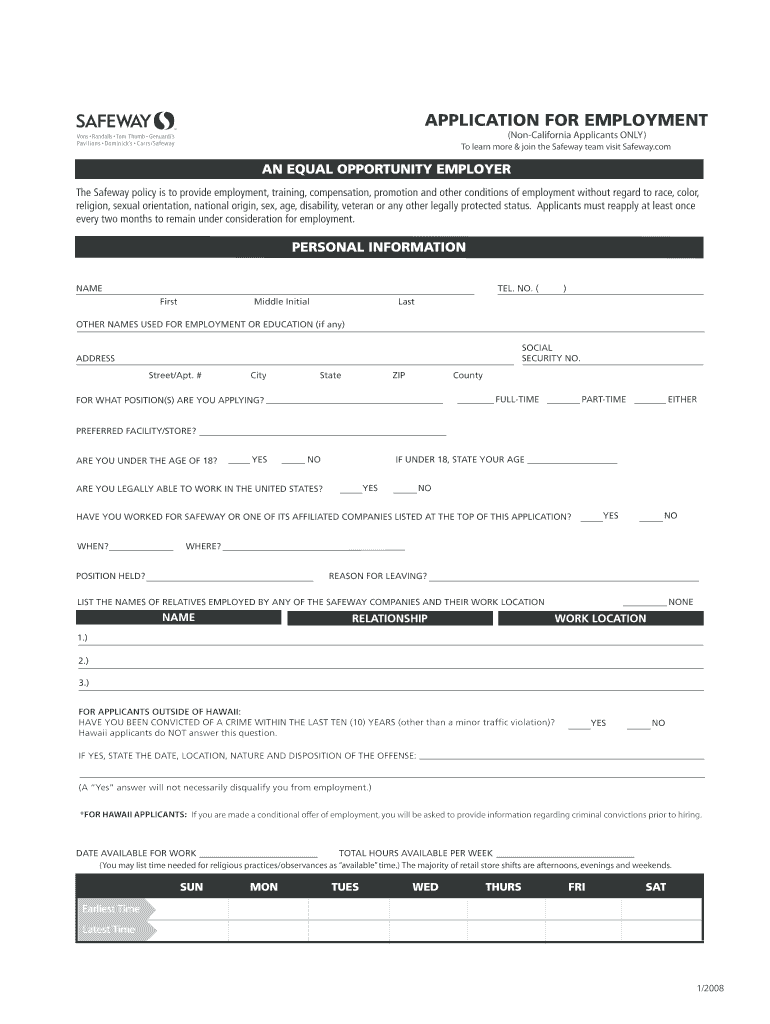
- Click ‘Get Form’ to open the Safeway Employment Application in the editor.
- Begin by filling out your personal information. Enter your name, telephone number, and address in the designated fields. Ensure accuracy as this information is crucial for contact purposes.
- Indicate the position you are applying for by selecting either full-time, part-time, or either option. Specify your preferred facility or store if applicable.
- Complete the education section by listing schools attended along with dates and degrees obtained. This helps showcase your qualifications.
- In the employment history section, list your previous jobs over the last seven years. Include details such as company names, positions held, and reasons for leaving.
- Review all sections carefully before signing and dating the application at the end to certify that all information is accurate.
Start using our platform today to fill out your Safeway job application form online for free!
Fill out safeway job application form online
It's free
It's free
See more safeway job application form versions
We've got more versions of the safeway job application form form. Select the right safeway job application form version from the list and start editing it straight away!
| Versions | Form popularity | Fillable & printable |
|---|---|---|
| 2008 | 4.9 Satisfied (48 Votes) |
Security and compliance
At DocHub, your data security is our priority. We follow HIPAA, SOC2, GDPR, and other standards, so you can work on your documents with confidence.
Learn more


Related forms
Have a dependent or minor child(ren) together, or a spouse is pregnant
The document provides instructions for completing the Florida Supreme Court Approved Family Law Form 12.901(b)(1), which ...
Can I drive in California with an out-of-state driver's license?
The document is an application form for retesting the Electrician Certification Exam in California. It requires personal ...

Vermont fuel assistance eligibility review
The document is a Vermont Fuel Assistance Eligibility Review form that collects personal and household information from ...

Sample of south dakota state university scholarships application freshman form
The document is a scholarship application brochure for South Dakota State University (SDSU) aimed at high school seniors ...
Certificate of conformance form 328 08 09 f4 of f4 sop 8111
The document outlines the quality systems procurement clauses for ILC Dover, detailing the requirements for a Certificat ...
Lab requisition
The document is a laboratory requisition form for biochemical genetics and cystine testing at the University of Californ ...