




Here's how it works



How to use or fill out Can I drive in California with an out-of-state driver's license? with our platform

- Click ‘Get Form’ to open it in the editor.
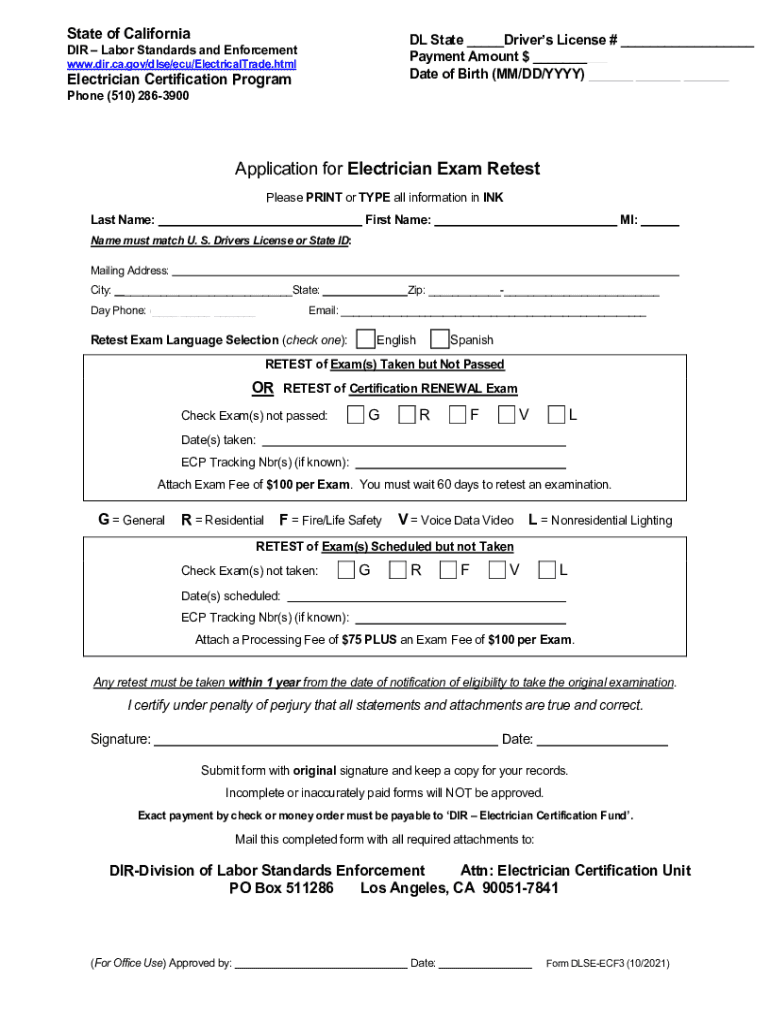
- Begin by entering your Driver’s License State and Number in the designated fields. Ensure accuracy as this information must match your official documents.
- Fill in your Date of Birth using the MM/DD/YYYY format. This is crucial for identity verification.
- Complete your personal details including Last Name, First Name, Middle Initial, Mailing Address, City, State, Day Phone, Zip Code, and Email. Make sure all entries are clear and legible.
- Select your preferred language for the retest exam by checking either English or Spanish.
- Indicate whether you are applying for a retest of exams not passed or scheduled but not taken by checking the appropriate boxes and providing any necessary dates and tracking numbers.
- Attach the required payment fee as specified in the form instructions before submitting.
- Finally, sign and date the form to certify that all information provided is true. Submit it with original signature and keep a copy for your records.
Start filling out your form online for free today using our platform!
It's free
See more Can I drive in California with an out-of-state driver's license? versions
Got questions?
Can I use DocHub to create legal eSignatures on my california drivers license out of state?
Yes, you can use DocHub for signing any business and private paperwork, including your california drivers license out of state. All electronic signatures you create with our service are legally binding and court-admissible, as DocHub complies with standards required by ESIGN and UETA. Save your completed form with a detailed Audit Trail if necessary.
Do I need to install software to modify my out of state license california?
When you edit your out of state license california with DocHub, you only require a stable web connection and virtually any web browser installed on your device. No need to set up any third-party software or research tutorials. Simply open a tab with DocHub, drag and drop your file, and edit it on the spot.
Security and compliance
At DocHub, your data security is our priority. We follow HIPAA, SOC2, GDPR, and other standards, so you can work on your documents with confidence.
Learn more


