




Here's how it works

01. Edit your hawaiianairlines com cao online
Type text, add images, blackout confidential details, add comments, highlights and more.

02. Sign it in a few clicks
Draw your signature, type it, upload its image, or use your mobile device as a signature pad.

03. Share your form with others
Send hawaiian airlines cao via email, link, or fax. You can also download it, export it or print it out.
How to use or fill out hawaiianairlines com cao with our platform

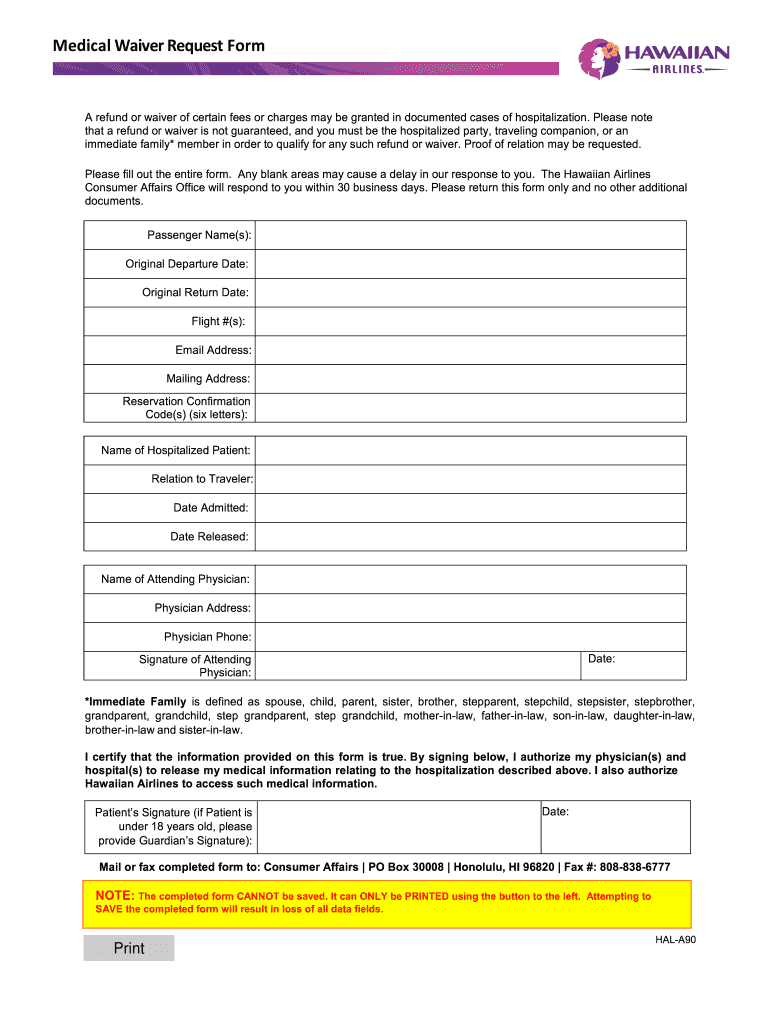
- Click ‘Get Form’ to open the Medical Waiver Request Form in the editor.
- Begin by entering the Passenger Name(s) in the designated field. Ensure that all names are spelled correctly to avoid any processing delays.
- Fill in the Original Departure Date and Original Return Date. Use the date picker for accuracy.
- Input your Flight #(s) as listed on your reservation. This helps in identifying your travel details.
- Provide your Email Address and Mailing Address for communication purposes regarding your request.
- Enter the Reservation Confirmation Code(s), which is a six-letter code found in your booking confirmation.
- Complete the section for Name of Hospitalized Patient, Relation to Traveler, Date Admitted, and Date Released accurately.
- Fill in the Name of Attending Physician, their Address, and Phone number. Ensure this information is current for verification.
- Obtain the Signature of Attending Physician and enter the Date of signature. This is crucial for validating your request.
- Finally, certify that all information provided is true by signing at the bottom. If under 18, include Guardian’s Signature.
Start using our platform today to fill out your form easily and efficiently!
Fill out hawaiianairlines com cao online
It's free
It's free
See more hawaiianairlines com cao versions
We've got more versions of the hawaiianairlines com cao form. Select the right hawaiianairlines com cao version from the list and start editing it straight away!
Security and compliance
At DocHub, your data security is our priority. We follow HIPAA, SOC2, GDPR, and other standards, so you can work on your documents with confidence.
Learn more


Related forms
Louisiana Minor Work bPermitb - WorkNet Staffing
The document outlines the requirements for obtaining a vacation work permit or employment certificate for minors under 1 ...

Contract Card Credit produse standard 01082014 - CardDeCredit ro - carddecredit
The document is a credit card contract between Raiffeisen Bank and the primary cardholder, detailing the terms and condi ...

Business Associate Agreement
The Business Associate Agreement outlines the terms and conditions under which Medical Faculty Associates, Inc. (Covered ...
Maryland statement of organization form
The document outlines the Statement of Organization for Campaign Finance Entities in Maryland, detailing the requirement ...

Permission to hunt of private land form
The document is a 'Permission to Hunt on Private Land Form' that outlines the legal requirements for hunting on privatel ...

Form IT-640 START-UP NY Telecommunication Services Excise Tax Credit Tax Year 2025
The document outlines the procedures and requirements for claiming the START-UP NY Telecommunication Services Excise Tax ...

Backflow Preventer Test Instructions and Form
The document is a Backflow Test & Maintenance Report that details the testing and maintenance of backflow prevention ass ...
Vendor intake setup form - Business and Technology Services
The document is a Supplier Intake Form for the San Diego Community College District, which outlines the process for new ...