



Here's how it works



How to use or fill out 9 line medevac card printable with our platform

- Click ‘Get Form’ to open the 9 line medevac card in the editor.
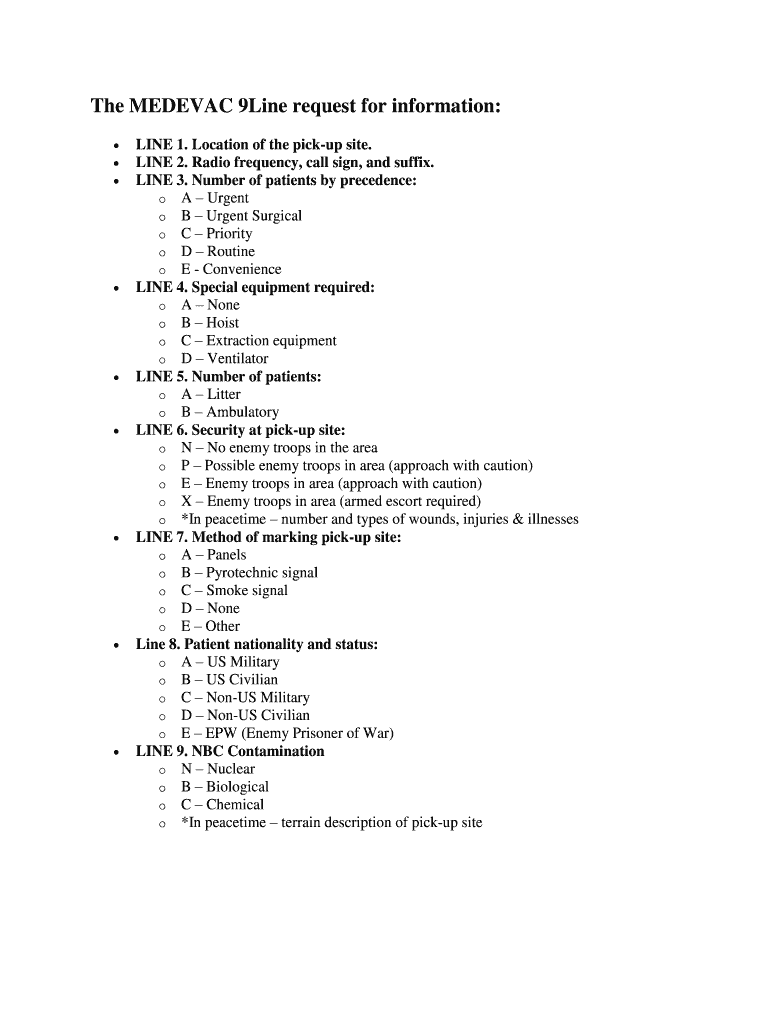
- Begin with LINE 1, where you will enter the location of the pick-up site. Ensure this is precise for effective communication.
- For LINE 2, input the radio frequency, call sign, and suffix. This information is crucial for coordinating with medical teams.
- In LINE 3, indicate the number of patients by precedence using the provided categories (A-E). Choose based on urgency.
- LINE 4 requires you to specify any special equipment needed. Select from options A-D based on patient needs.
- For LINE 5, state the number of patients as either litter or ambulatory. This helps in resource allocation.
- In LINE 6, assess security at the pick-up site and select from options N-X to inform about potential threats.
- LINE 7 asks for your method of marking the pick-up site. Choose an appropriate option from A-E.
- For LINE 8, identify patient nationality and status using categories A-E to ensure proper handling upon arrival.
- Finally, complete LINE 9 by indicating any NBC contamination risks or providing a terrain description if applicable.
Start editing your medevac card online for free today!
It's free
Got questions?
Can I sign my 9 line medevac with my mobile phone?
Sure, it is possible with DocHub. This trustworthy and compliant online editor features a phone-based signing option. Once you log in to your DocHub account and import your 9 line medevac to our editor, complete all empty fields and utilize the Sign feature on the upper barf. Click on Create your signature and select Phone from the available choices. Here, you scan a QR code using your smartphone and draw your signature on your phone screen, as you normally do when approving hard copies. If you access DocHub right from your mobile device, you can eSign your paperwork by drawing your electronic signature, adding its image, or simply with a typed name.
Can I edit 9 line card on my phone?
As a comprehensive document modifying service, DocHub is accessible on mobile phones. Open DocHub in your choice of mobile browser and use our intelligent mobile-friendly toolset to complete your 9 line card.
What goes into a 9 line?
How do you write 9 lines?
How do I request a medical evacuation?
Security and compliance
At DocHub, your data security is our priority. We follow HIPAA, SOC2, GDPR, and other standards, so you can work on your documents with confidence.
Learn more