Type text, add images, blackout confidential details, add comments, highlights and more.
02. Sign it in a few clicks
Draw your signature, type it, upload its image, or use your mobile device as a signature pad.
03. Share your form with others
Send it via email, link, or fax. You can also download it, export it or print it out.
How to use or fill out child care application with our platform
Ease of Setup
DocHub User Ratings on G2
Ease of Use
DocHub User Ratings on G2
Click ‘Get Form’ to open the child care application in the editor.
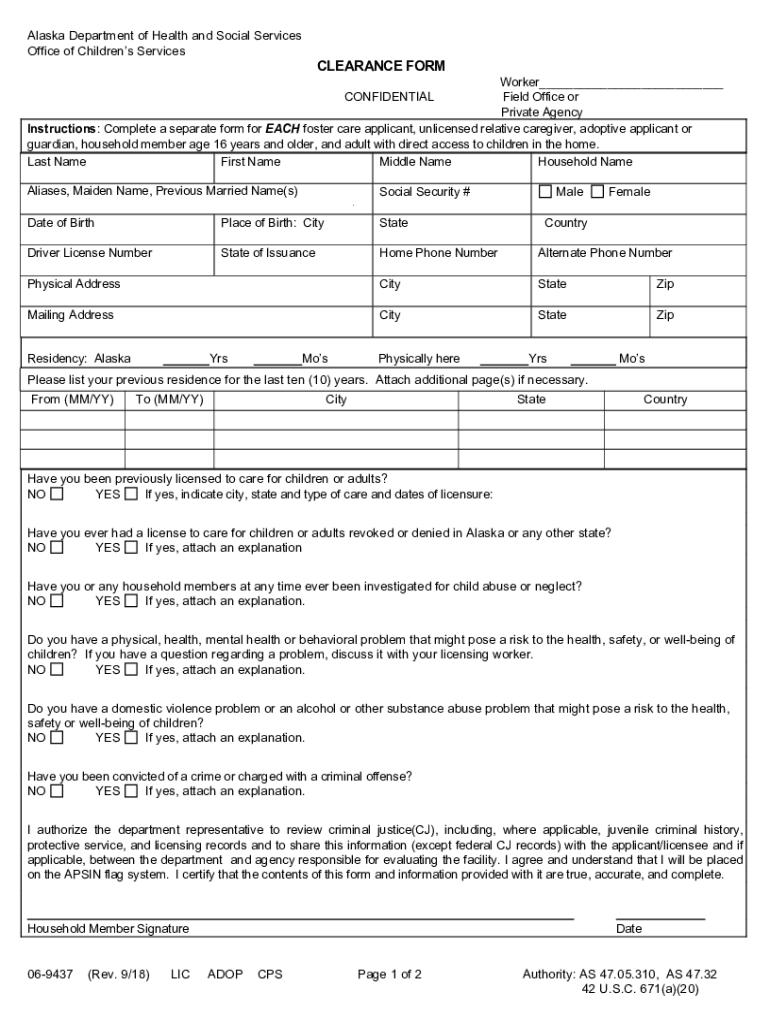
Begin by filling in your personal information, including your last name, first name, and middle name. Ensure accuracy as this information is crucial for identification.
Provide your social security number and date of birth. This section is essential for background checks.
Complete the residency details, indicating how long you have lived in Alaska. This helps establish your local ties.
Answer the questions regarding previous licenses and any investigations related to child abuse or neglect. Attach explanations if necessary.
Review all sections carefully before signing at the bottom of the form to certify that the information provided is true and complete.
Start using our platform today to easily fill out your child care application for free!
We've got more versions of the child care application form. Select the right child care application version from the list and start editing it straight away!
Child care application onlineChild care application pdfChild care application formDSS Child Care Application onlineIllinois child care application online formChild Care application calculatorCCAP child Care applicationChild Care Application Spanish
Security and compliance
At DocHub, your data security is our priority. We follow HIPAA, SOC2, GDPR, and other standards, so you can work on your documents with confidence.
To apply please read the following pages carefully and then submit your completed application to your local Child Care Resource and Referral (CCRR). call 1-
Apply for Childcare and Parent Services (CAPS) Program
The Childcare and Parent Services (CAPS) program assists low-income families with the cost of childcare. Must be 12 years of age or younger, or 17 years of age
Cookie consent notice
This site uses cookies to enhance site navigation and personalize your experience.
By using this site you agree to our use of cookies as described in our Privacy Notice.
You can modify your selections by visiting our Cookie and Advertising Notice.