



Here's how it works



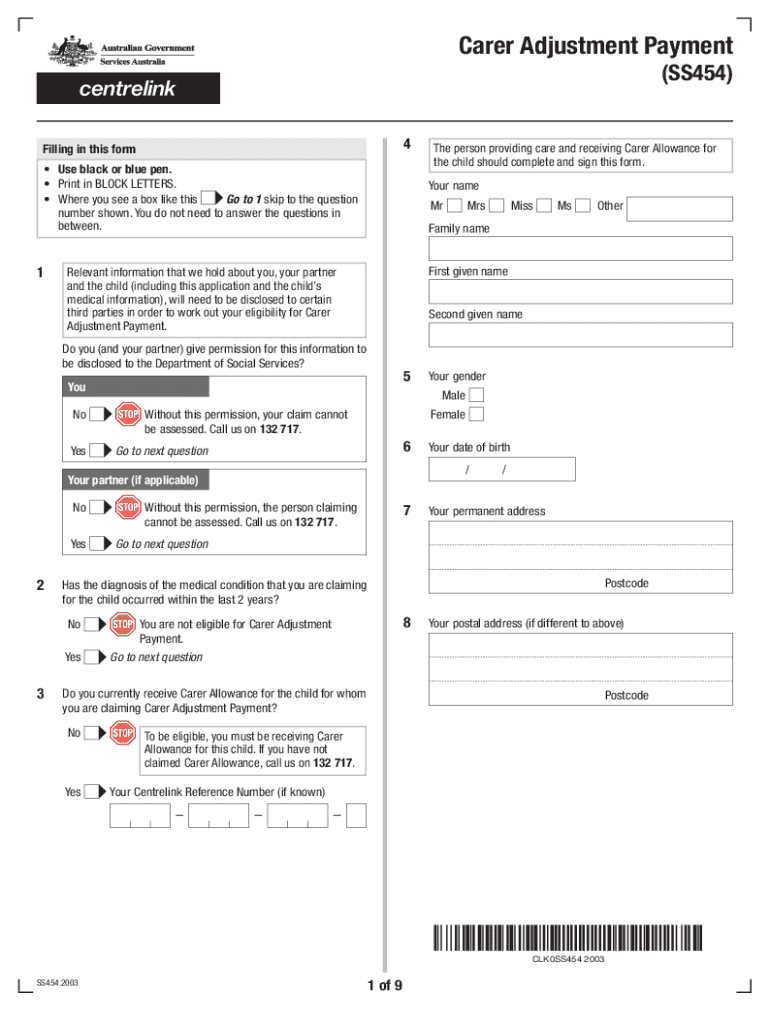
How to use or fill out carer adjustment form download with our platform

- Click ‘Get Form’ to open the carer adjustment form in the editor.
- Begin by entering your personal details in Section 1, including your name, gender, and date of birth. Ensure you print in BLOCK LETTERS for clarity.
- In Section 2, provide your permanent address and contact information. If applicable, include your partner's details as well.
- Proceed to Section 3 where you will confirm if you currently receive Carer Allowance for the child. This is crucial for eligibility.
- Continue through the form, answering questions about your child's diagnosis and any relevant medical conditions. Be thorough to ensure all necessary information is captured.
- In later sections, detail any financial impacts due to caregiving responsibilities, including income changes and anticipated expenses related to your child's care.
- Finally, review all entries for accuracy before submitting the form online or via post as instructed at the end of the document.
Start using our platform today to easily fill out and submit your carer adjustment form for free!
It's free
See more carer adjustment form download versions
Got questions?
Can I fill out and sign my sa010 online?
Yes, and it’s really easy! DocHub is an online PDF editor with advanced document management capabilities that allow you rapidly edit your forms, fill out blank fields and drop new ones for others to fill out, and create electronic signatures in several ways. Upload your sa010, provide information as requested, and select how you want to eSign your document - by typing your name, drawing your signature, uploading its picture, or utilizing a QR code.
How do you complete form sa010 on iOS?
You need only a web connection and a web browser to complete your form sa010 on an iOS phone. Open the DocHub website and authenticate. Then, add your document or choose it from the list in your dashboard. Then use our editing instruments to complete your form and preserve all your changes. You may also send it to a specified recipient right away.
Security and compliance
At DocHub, your data security is our priority. We follow HIPAA, SOC2, GDPR, and other standards, so you can work on your documents with confidence.
Learn more