



Here's how it works



How to use or fill out associated key license application form with our platform

- Click ‘Get Form’ to open the associated key license application form in the editor.
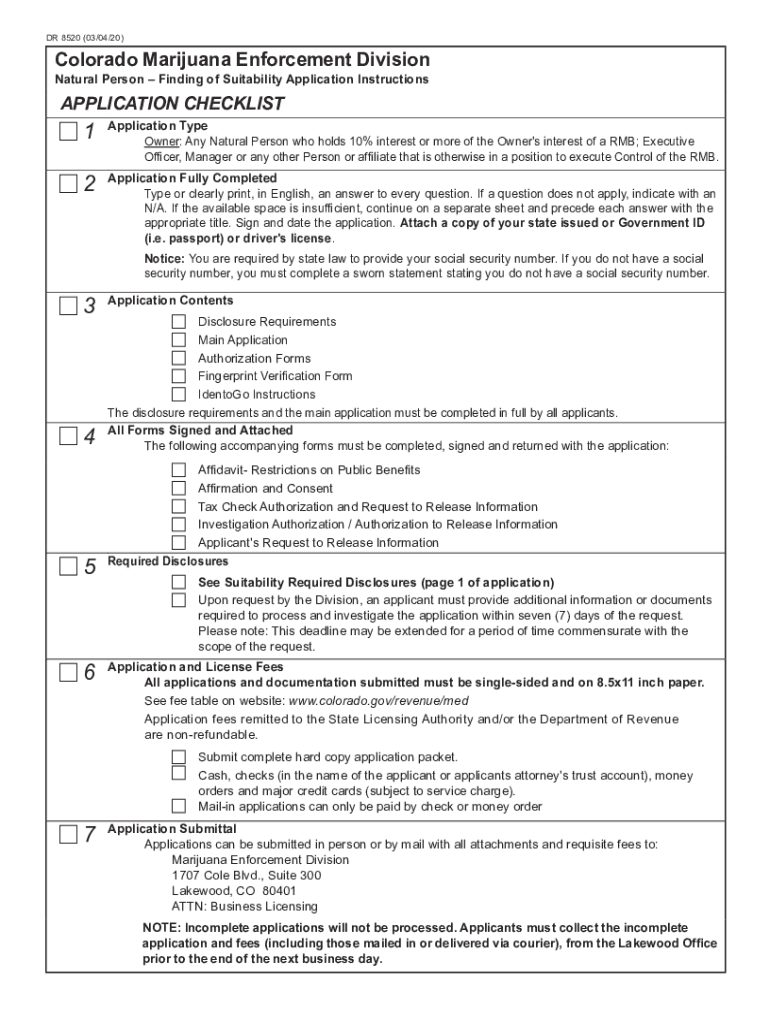
- Begin by filling out the 'Application Type' section. Clearly indicate your role, whether as an Owner, Executive Officer, or Manager.
- Complete all fields in the 'Application Fully Completed' section. Ensure you type or print your answers clearly in English. If a question does not apply, mark it as N/A.
- Attach a copy of your state-issued ID or driver's license as required. This is crucial for verifying your identity.
- Proceed to fill out the 'Disclosure Requirements' and ensure all accompanying forms are signed and attached before submission.
- Review your application thoroughly for completeness. Incomplete applications will not be processed, so double-check each section.
- Once satisfied, submit your application either in person or by mail along with the requisite fees.
Start using our platform today to streamline your application process for free!
It's free
See more associated key license application form versions
Got questions?
How do I sign my associated key license application form on iOS?
With DocHub, you can rapidly sign your associated key license application form or any other paperwork on iOS, even without setting up extra applications. You can access your DocHub account from any internet-connected browser and complete and sign your form in any preferred method with just a few clicks.
Can I print my associated key license application form and finish it by myself?
When you choose analog ways of completing your associated key license application form, you can easily download your file for printing. Search DocHub’s Forms & Templates catalog to locate the exact document template you require and open it for editing or download it on your gadget in the format of your choice. It is possible to complete your form electronically and put your handwritten signature on it after printing or eSign your document with DocHub.
What are the requirements to be a budtender in Colorado?
How do I get my budtender license in Colorado?
How much does a budtender make in Colorado?
Security and compliance
At DocHub, your data security is our priority. We follow HIPAA, SOC2, GDPR, and other standards, so you can work on your documents with confidence.
Learn more