Va form 22 1999-2026

Get Form
va form 22 1999 Preview on Page 1

Here's how it works

01. Edit your va form 22 1999 online
Type text, add images, blackout confidential details, add comments, highlights and more.

02. Sign it in a few clicks
Draw your signature, type it, upload its image, or use your mobile device as a signature pad.

03. Share your form with others
Send va form 22 1999 pdf via email, link, or fax. You can also download it, export it or print it out.

How to use or fill out VA Form 22-1999 with DocHub

Form edit decoration
9.5
Ease of Setup
DocHub User Ratings on G2
9.0
Ease of Use
DocHub User Ratings on G2
  1. Click ‘Get Form’ to open VA Form 22-1999 in our platform.
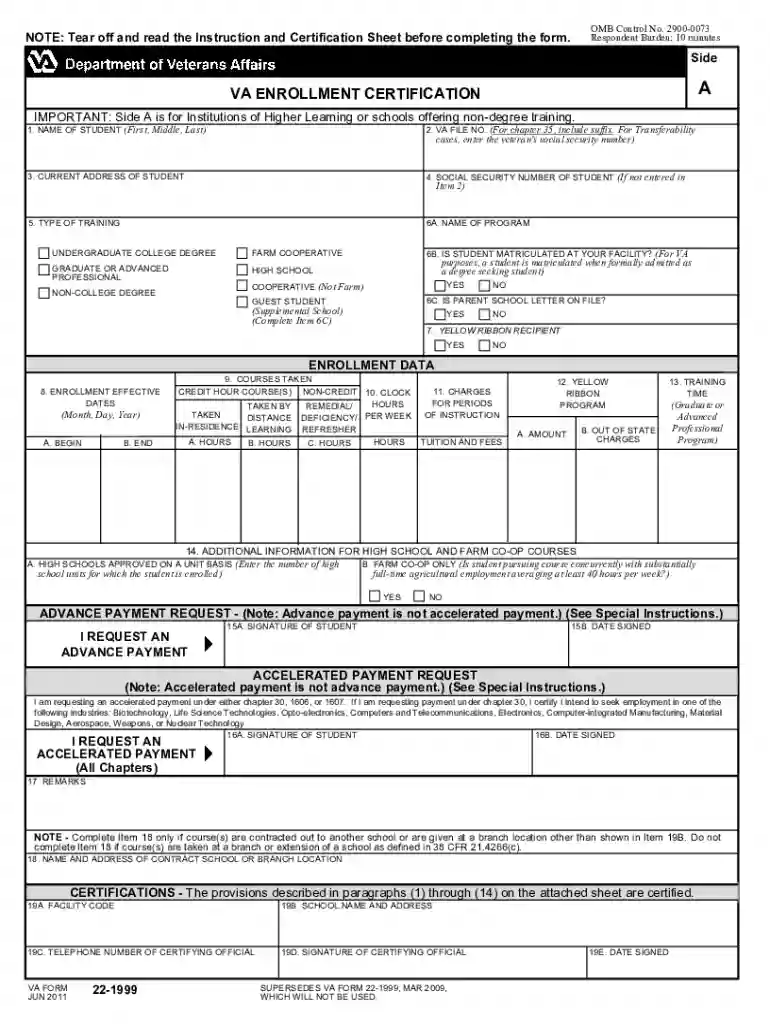
  2. Begin with Side A for Institutions of Higher Learning. Fill in the student's name, VA file number, and current address in the designated fields.
  3. Select the type of training from the options provided, such as Undergraduate College Degree or Non-College Degree.
  4. Complete enrollment data by entering effective dates and courses taken. Ensure to specify credit hours and any Yellow Ribbon Program details if applicable.
  5. For advance payment requests, fill out Items 15A and 15B. Sign and date where indicated.
  6. If using Side B for flight or apprenticeship training, repeat similar steps ensuring all relevant information is accurately filled out.

Start editing your VA Form 22-1999 online for free today!

See more va form 22 1999 versions

We've got more versions of the va form 22 1999 form. Select the right va form 22 1999 version from the list and start editing it straight away!
Versions Form popularity Fillable & printable
2018 4.8 Satisfied (67 Votes)
2011 4.3 Satisfied (235 Votes)
2009 4.4 Satisfied (334 Votes)
2004 4.3 Satisfied (63 Votes)
be ready to get more

Complete this form in 5 minutes or less

Get form

Got questions?

We have answers to the most popular questions from our customers. If you can't find an answer to your question, please contact us.
Contact us
VA Form 22-1999, Enrollment Certification, is designed for schools to make the required certification. Schools may also use the VA Online Certification of Enrollment (VA‑ONCE) system to report enrollments.
VA has multiple safeguards in place to ensure these staff reductions do not impact Veteran care or benefits. All VA mission-critical positions are exempt from the DRP and VERA, and more than 350,000 positions are exempt from the federal hiring freeze.
Step 1: Mail the completed form to the VA Regional Processing Office for the region of that schools physical address. See below for the addresses of the VA Regional Processing Offices. Step 2: The beneficiary will wait for VA to process this enrollment certification.
VA Form 22-1999b is used by service members, veterans, and eligible dependents in reducing, terminating, withdrawing, graduating and making other changes in their current enrollment. This form is used to inform VA that their education status has changed.
be ready to get more

Complete this form in 5 minutes or less

Get form