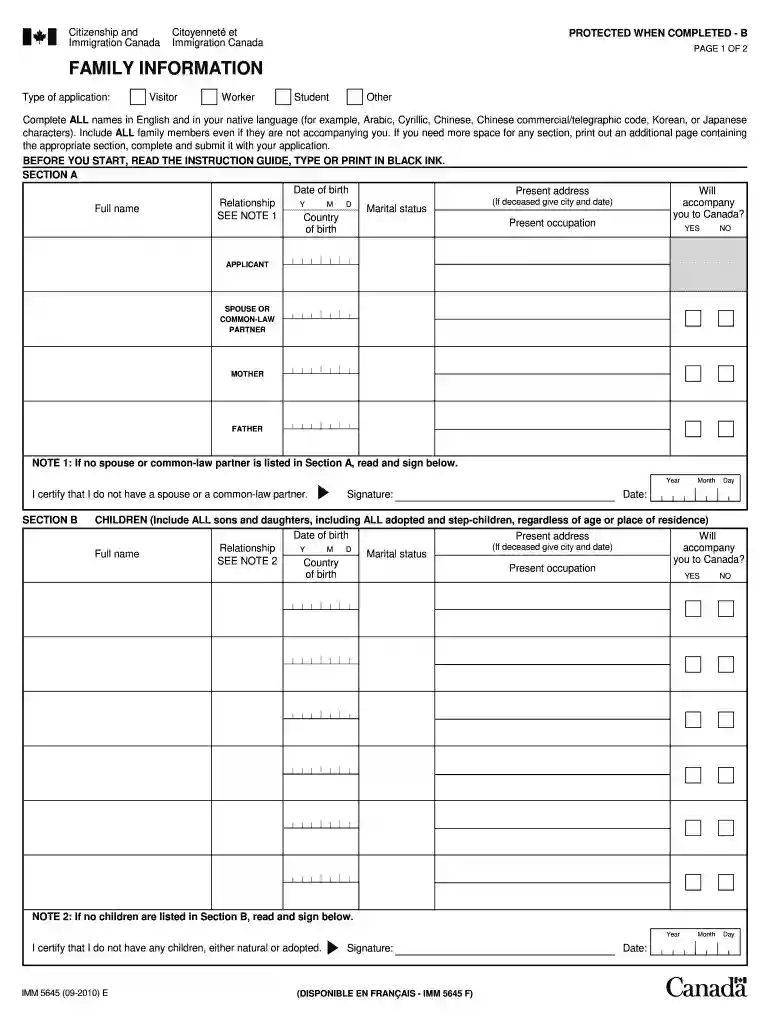
Imm 5645 form-2026

Get Form
imm 4707 et imm 5645 Preview on Page 1

Here's how it works

01. Edit your imm 4707 et imm 5645 online
Type text, add images, blackout confidential details, add comments, highlights and more.

02. Sign it in a few clicks
Draw your signature, type it, upload its image, or use your mobile device as a signature pad.

03. Share your form with others
Send imm 5645 via email, link, or fax. You can also download it, export it or print it out.

Definition and Purpose of the imm 5645 Form

The imm 5645 form is a vital document used in the Canadian immigration process. Specifically, it is known as the Family Information form, which applicants must submit when applying for various immigration permits such as visitor, work, or study visas. This form captures crucial information about an applicant's family members, including spouses, children, and siblings, regardless of their residency status. By ensuring accurate and complete information is provided, applicants contribute to their immigration record, which can affect the outcome of their applications. Collecting this information helps immigration authorities verify relationships and assess the applicant’s background more comprehensively.

Importance of Family Members' Information

  • Establishing family ties can have significant implications for eligibility, particularly for those applying for family sponsorship or permanent residency.
  • Accurate information helps avoid delays in processing applications caused by missing or erroneous details.

How to Complete the imm 5645 Form

Completing the imm 5645 form requires careful attention to detail. Each section must be filled out accurately to avoid issues during the application process.

  1. Personal Details: Begin by providing your full name, date of birth, and contact information. Ensure that the details match those on your primary identification documents.
  2. Family Information: List your family members systematically. For each family member, include:
    • Name
    • Relationship to you (e.g., spouse, child, parent)
    • Date of birth
    • Current address
  3. Supporting Information: The form often requires additional supporting documents to verify the familial relationships listed. Prepare copies of relevant documents, such as marriage certificates or birth certificates, to submit along with the form.
  4. Review and Sign: Once you complete the form, review all entries for accuracy, ensuring no sections are left blank unless specified. Sign and date the form in the designated area.

Tips for Accuracy

  • Double-check spelling and dates to prevent minor errors that could lead to significant delays.
  • Use the official instruction guide specific to the imm 5645 form for additional context on filling out each section.

Who Typically Uses the imm 5645 Form?

The imm 5645 form is primarily used by individuals applying for immigration to Canada who need to provide information regarding their family background. This includes:


  • Visitors: Tourists or individuals planning to stay temporarily in Canada may need this form to apply for a visitor's visa.
  • Students: International students seeking to study in Canada must complete the form as part of their study permit application.
  • Workers: Those applying for work permits, including temporary foreign workers, must also provide this form as part of the immigration process.
decoration image ratings of Dochub

Additional Use Cases

  • Families applying together for permanent residence may need to complete separate forms for each member, ensuring all family ties are documented.
  • Sponsorship applications require detailed familial histories to support the sponsorship requests.

Important Terms Related to the imm 5645 Form

Understanding the terminology associated with the imm 5645 form is crucial for effective completion and compliance. Key terms include:

  • Sponsor: An individual who supports a family member's immigration application by demonstrating financial capability and the intent to support their settlement in Canada.
  • Dependent: Family members, typically children under a specified age or dependent spouses, who rely on the principal applicant for support during the immigration process.
  • Verification: The process by which immigration authorities confirm the accuracy of the information provided, which may involve additional documentation or interviews.

Common Documentation Requirements

  • Birth Certificates: To validate parental or sibling relationships.
  • Marriage Certificates: Needed to establish spousal relationships.

Steps to Obtain the imm 5645 Form

Acquiring the imm 5645 form is a straightforward process. Here are the steps:

  1. Visit the Official Website: Go to the Government of Canada's immigration and citizenship site to locate the form.
  2. Select the Correct Version: Ensure you download the latest version of the imm 5645 form, as older versions may not be accepted.
  3. Download format: Choose between a fillable PDF and a simple PDF version based on your preference for completing the form.
  4. Review Instructions: Always read the accompanying instruction guide to understand the requirements and how to fill out the form correctly.

Availability

  • The imm 5645 form is available in both English and French, catering to a diverse range of applicants.

Essential Elements of the imm 5645 Form

Understanding the essential elements of the imm 5645 form can help ensure thorough and accurate completion. Key components include:

  • Personal Identification Section: Collects basic personal information about the applicant.
  • Family Structure Section: Requires detailed information on each family member, including their residency status.
  • Signature and Declaration: Confirms that all information provided is true and complete, which is critical for legal compliance.

Subsections of Importance

  • Detailed Relationship Information: Providing context in the relationships can enhance the credibility of the information, which may be scrutinized.
  • Mandatory Field Identification: Highlighting which fields are mandatory can help applicants avoid submission errors.

By thoroughly understanding these aspects of the imm 5645 form, applicants can navigate the complexities associated with immigration paperwork more effectively, minimizing delays and enhancing their chances of a successful application.

See more imm 5645 form versions

We've got more versions of the imm 5645 form form. Select the right imm 5645 form version from the list and start editing it straight away!
Versions Form popularity Fillable & printable
2018 4.8 Satisfied (96 Votes)
2010 4.4 Satisfied (558 Votes)
be ready to get more

Complete this form in 5 minutes or less

Get form

Got questions?

We have answers to the most popular questions from our customers. If you can't find an answer to your question, please contact us.
Contact us
How to download and open a PDF form Find the link of the PDF form you wish to download; Right-click the link and select Save as link or Save target as; Choose the location on your computer where you want to save the PDF form; Go to the file location where you saved the PDF form;
Family Information (IMM 5645) This form must be completed by each person, 18 years of age or older, applying for a Temporary Resident Visa, a study or work permit outside Canada.
Downloading and opening PDF files Find the link of the file you want to save (you may need to go back to the previous page to find it). Right-click the link. Select Save target as or Save link as. Choose the location on your computer where you would like to save the file. Select Save.
Authority to Release Personal Information to a Designated Individual (IMM 5475)
Save the form on your computer in a place you can remember. For most Internet browsers, clicking on the link above will automatically download the form. If the form doesnt automatically download, right-click on the link and select Save as.
be ready to get more

Complete this form in 5 minutes or less

Get form

People also ask

To download a form: Click on the form link. When the form opens, save the form on your computer. OR. ress the right button on your mouse on the required link. Select Save Target As from the list. Save the form on your computer.
If you need more space for any section, print out an additional page containing the appropriate section, complete and submit it with your application. Country of birth: Present occupation: Marital status: NOTE 1: If no spouse or common-law partner is listed in Section A, read and sign below.

imm 4707 pdf download