




Here's how it works

01. Edit your form online
Type text, add images, blackout confidential details, add comments, highlights and more.

02. Sign it in a few clicks
Draw your signature, type it, upload its image, or use your mobile device as a signature pad.

03. Share your form with others
Send it via email, link, or fax. You can also download it, export it or print it out.
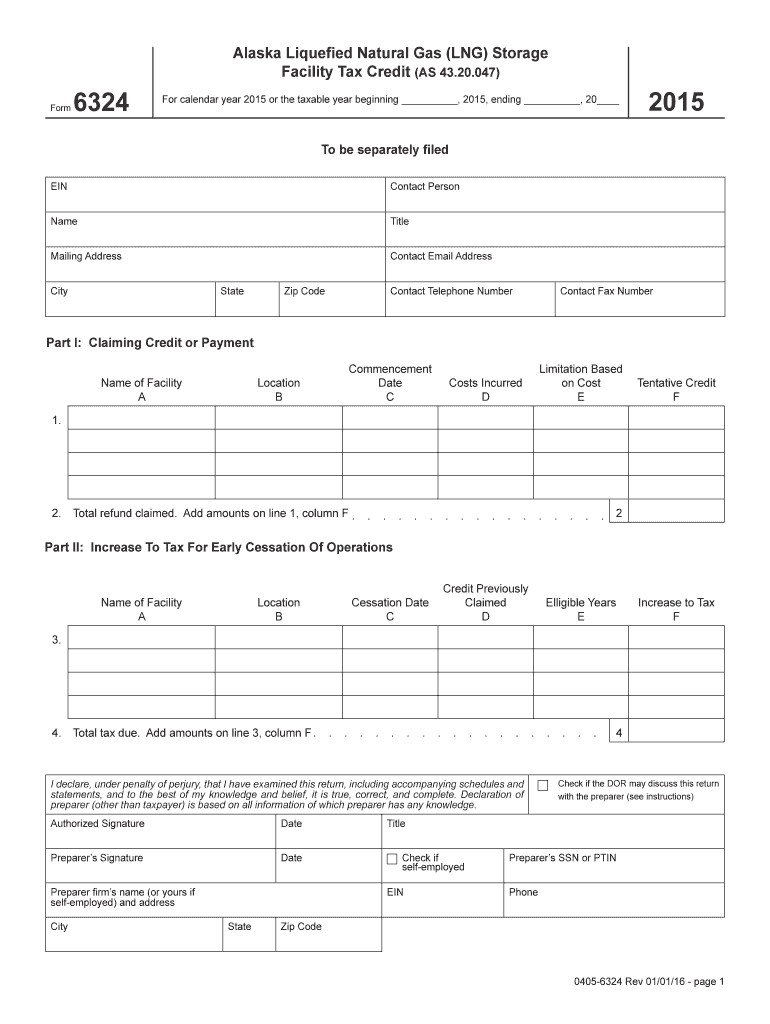
How to use or fill out the Alaska LNG Storage Facility Tax Credit Form

- Click ‘Get Form’ to open it in the editor.
- Begin by entering your EIN and contact information, including the name, title, mailing address, email, city, state, zip code, telephone number, and fax number.
- In Part I, provide details about the facility. Fill in the name of the facility (A), its location (B), commencement date (C), costs incurred (D), and limitation based on cost (E). Calculate the tentative credit (F) for each entry.
- Add up the amounts from line 1 in column F to determine your total refund claimed.
- Proceed to Part II if applicable. Enter similar details for any facilities that ceased operations. Fill in the cessation date (C), eligible years (E), and calculate any increase to tax (F).
- Finally, ensure you sign and date both the taxpayer's declaration and preparer's signature if applicable. Include preparer firm’s name and address.
Start using our platform today to fill out your Alaska LNG Storage Facility Tax Credit form easily and for free!
Fill out - tax alaska online
It's free
It's free
See more - tax alaska versions
We've got more versions of the - tax alaska form. Select the right - tax alaska version from the list and start editing it straight away!
Security and compliance
At DocHub, your data security is our priority. We follow HIPAA, SOC2, GDPR, and other standards, so you can work on your documents with confidence.
Learn more


Related forms

Wilmington College Application for Graduate Admission
The document is an application form for graduate admission to Wilmington College, detailing the college's accreditation, ...

Officer candidate regulations
The document OTCNINST 1530.6B outlines the regulations and procedures for Officer Candidates in the Navy, including the ...

OCULAR MOTILITY WORKSHEET - med navy
The document is an Ocular Motility Worksheet used for recording various aspects of a patient's eye examination, includin ...

DEFENSE SERVICE OFFICE WEST
The document outlines the privacy practices and procedures of the Defense Service Office (DSO) West, detailing the colle ...

COMMUNITY PHARMACY INCIDENT REPORT FORM
The document is a Community Pharmacy Medication Safety Incident Report Form designed to record details of medication saf ...

R0277X - State of Michigan - michigan
The document is a Direct Deposit Application for pension recipients from the Michigan Office of Retirement Services (ORS ...

Michigan raffle license lookup
The document is a Raffle Financial Statement required by the Charitable Gaming Division in Michigan. It outlines the nec ...

CUSTODIANSHIP CERTIFICATE TO SUPPORT CLAIM ON BEHALF OF MINOR CHILDREN OF DECEASED MEMBERS OF THE AR
CUSTODIANSHIP CERTIFICATE TO SUPPORT CLAIM ON BEHALF OF MINOR CHILDREN OF DECEASED MEMBERS OF THE AR
The document is a Custodianship Certificate required to support claims for benefits on behalf of minor children of decea ...