- courts ca 2026

Get Form
- courts ca Preview on Page 1

Here's how it works

01. Edit your form online
Type text, add images, blackout confidential details, add comments, highlights and more.

02. Sign it in a few clicks
Draw your signature, type it, upload its image, or use your mobile device as a signature pad.

03. Share your form with others
Send it via email, link, or fax. You can also download it, export it or print it out.

How to use or fill out GV-800-INFO with our platform

Form edit decoration
9.5
Ease of Setup
DocHub User Ratings on G2
9.0
Ease of Use
DocHub User Ratings on G2
  1. Click ‘Get Form’ to open it in the editor.
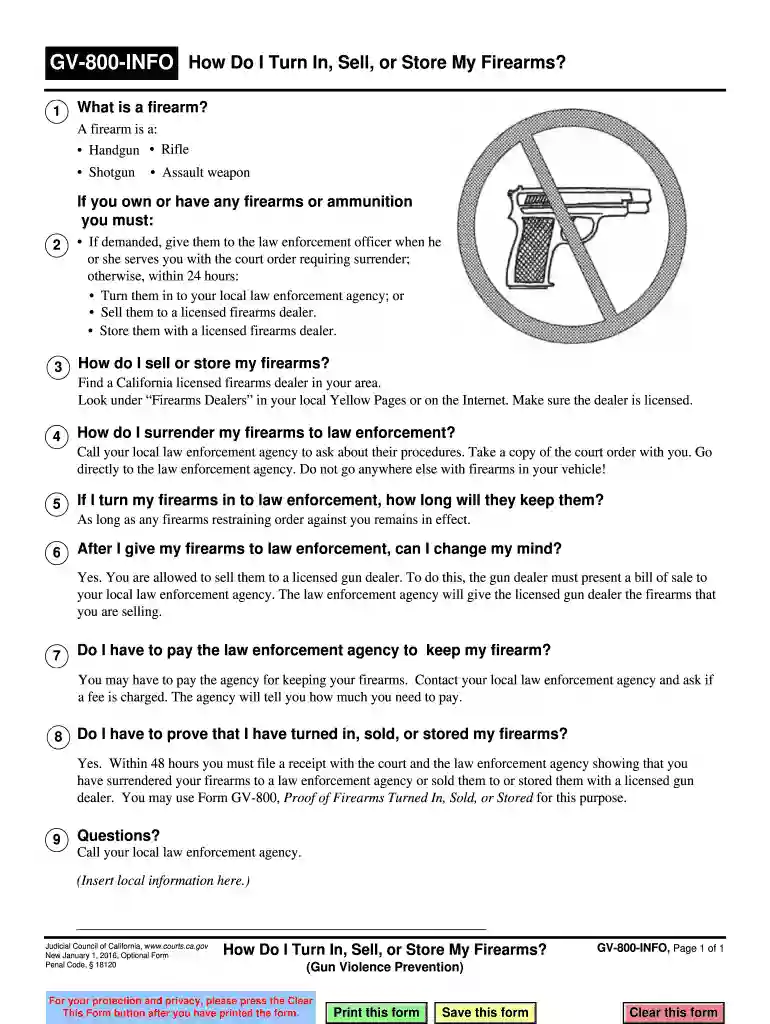
  2. Begin by reviewing the definition of a firearm provided in the document. Ensure you understand what qualifies as a firearm before proceeding.
  3. Fill out your personal information at the top of the form, including your name and contact details, to ensure proper identification.
  4. In the section regarding surrendering firearms, clearly indicate whether you are turning them in, selling them, or storing them. Follow the instructions for each option carefully.
  5. If applicable, attach any receipts or documentation that proves you have surrendered or sold your firearms. This is crucial for compliance with court orders.
  6. Review all entered information for accuracy before finalizing. Use our platform’s tools to make any necessary edits easily.
  7. Once completed, save your form and print it directly from our editor for submission to the appropriate authorities.

Start using our platform today to streamline your document editing and ensure compliance with ease!

See more - courts ca versions

We've got more versions of the - courts ca form. Select the right - courts ca version from the list and start editing it straight away!
Versions Form popularity Fillable & printable
2019 4.8 Satisfied (72 Votes)
2019 4.4 Satisfied (170 Votes)
2016 4.4 Satisfied (283 Votes)
be ready to get more

Complete this form in 5 minutes or less

Get form

Got questions?

We have answers to the most popular questions from our customers. If you can't find an answer to your question, please contact us.
Contact us

Electronic signatures are a perfect replacement for traditional signing, as they save time, effort, and money people spend on printing, scanning, and paper delivery. You can eSign your - courts ca utilizing a reliable and powerful online document processing services like DocHub. It complies with major eSignature policies (ESIGN and UETA), so all documents approved there are legally binding and have the same validity as manually signed ones.

If you use Chrome, there are two straightforward methods to modify your - courts ca online. First, visit the DocHub site, add your document, and modify it using our toolbar. You can also install our Chrome extension and modify any document by dragging and dropping it in your web browser tab.

Courts Overview Supreme Court. The Supreme Court is the states highest court. Its decisions are binding on all other California state court. Courts of Appeal. The appeals court is the intermediate court of review for the state. Superior Courts. Also known as trial courts, there are 58, one for each county in the state.
Go to the courts website where the case is filed. Most courts have a section on their website called online services or something similar. There you will find information about whether you can look up a court case online and what type of records you can see. Not all types of records are available online.
Requests for record searches may be made in person in the Criminal Operations Department at any Justice Center. Additionally, Online Case and Calendar access will now allow you to conduct record searches online by case number, person name or business name.

Security and compliance

At DocHub, your data security is our priority. We follow HIPAA, SOC2, GDPR, and other standards, so you can work on your documents with confidence.

Learn more
ccpa2
pci-dss
gdpr-compliance
hipaa
soc-compliance

People also ask

The public may request copies of court case records if the records are not confidential by law or sealed by a court order. The public may request copies of a courts judicial administrative records if the records are not exempt under rule 10.500(f) of the California Rules of Court.
California Superior Court Records Searches by case/docket number are free; searches by party name require an account and fee payment.
Average base salary The average salary for a judge is $158,596 per year in California. 38 salaries taken from job postings on Indeed in the past 36 months (updated September 10, 2025).
Public records in California are available online through official government agency websites. Otherwise, you may have to contact the agency directly via mail or phone or visit them in person to obtain public records that are not available online.

Related links