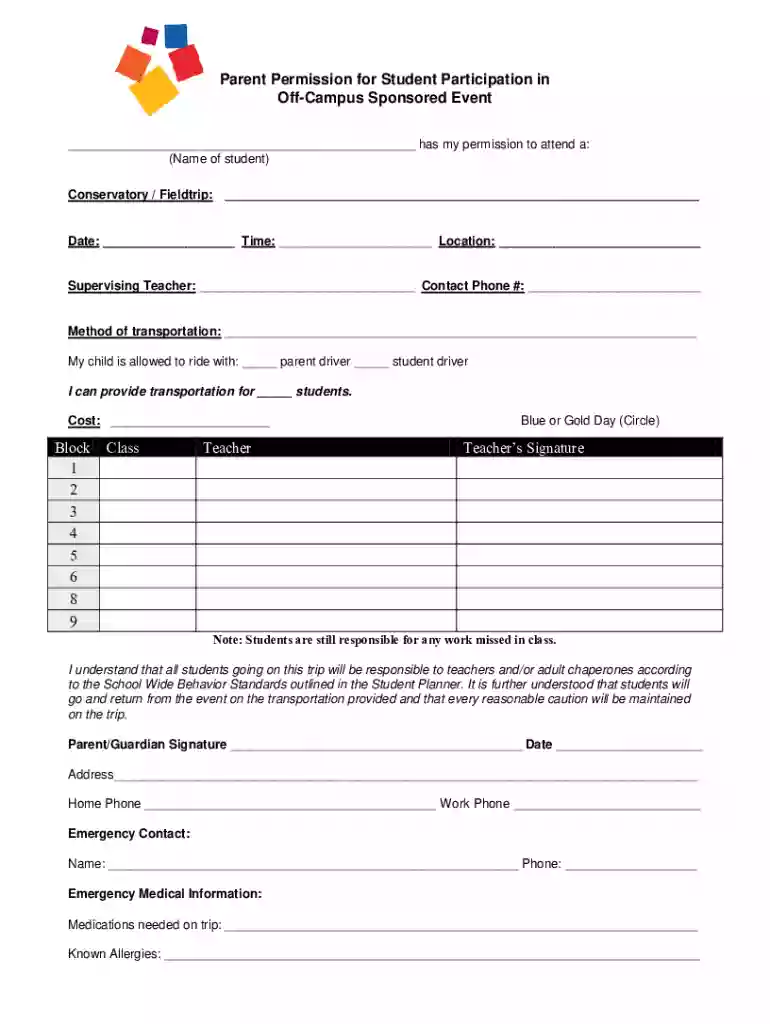
Appendix R PARENT PERMISSION FORM FOR SCHOOL-SPONSORED TRIP PARTICIPATION 2026

Get Form
Appendix R PARENT PERMISSION FORM FOR SCHOOL-SPONSORED TRIP PARTICIPATION Preview on Page 1

Here's how it works

01. Edit your form online
Type text, add images, blackout confidential details, add comments, highlights and more.

02. Sign it in a few clicks
Draw your signature, type it, upload its image, or use your mobile device as a signature pad.

03. Share your form with others
Send it via email, link, or fax. You can also download it, export it or print it out.

How to use or fill out Appendix R PARENT PERMISSION FORM FOR SCHOOL-SPONSORED TRIP PARTICIPATION with DocHub

Form edit decoration
9.5
Ease of Setup
DocHub User Ratings on G2
9.0
Ease of Use
DocHub User Ratings on G2
  1. Click ‘Get Form’ to open it in the editor.
  2. Begin by entering the student's name in the designated field at the top of the form.
  3. Fill in the details of the conservatory or field trip, including the date, time, and location.
  4. Provide information about the supervising teacher and their contact phone number.
  5. Indicate the method of transportation and specify if your child is allowed to ride with a parent or student driver. You can also note how many students you can transport.
  6. Complete any cost information related to the trip.
  7. Fill out block numbers for class and teacher, circle Blue or Gold Day as applicable, and ensure that a teacher’s signature is included.
  8. Sign and date at the bottom as a parent/guardian, providing your address and contact numbers.
  9. Lastly, fill out emergency contact information along with any necessary medical details such as medications needed on the trip and known allergies.

Start using our platform today to easily complete your Appendix R Parent Permission Form for free!

See more Appendix R PARENT PERMISSION FORM FOR SCHOOL-SPONSORED TRIP PARTICIPATION versions

We've got more versions of the Appendix R PARENT PERMISSION FORM FOR SCHOOL-SPONSORED TRIP PARTICIPATION form. Select the right Appendix R PARENT PERMISSION FORM FOR SCHOOL-SPONSORED TRIP PARTICIPATION version from the list and start editing it straight away!
Versions Form popularity Fillable & printable
2015 4.5 Satisfied (48 Votes)
be ready to get more

Complete this form in 5 minutes or less

Get form

Got questions?

We have answers to the most popular questions from our customers. If you can't find an answer to your question, please contact us.
Contact us

Sure, and it’s really easy! DocHub is an online PDF editor with advanced document processing functions that allow you rapidly modify your documents, fill out empty fields and add new ones for other people to fill out, and create eSignatures in several ways. Add your Appendix R PARENT PERMISSION FORM FOR SCHOOL-SPONSORED TRIP PARTICIPATION, provide information as requested, and choose how you want to eSign your document - by typing your name, drawing your signature, uploading its image, or using a QR code.

Document editing with DocHub is equally convenient on desktop and mobile devices. You only need an internet browser to edit your Appendix R PARENT PERMISSION FORM FOR SCHOOL-SPONSORED TRIP PARTICIPATION on Android. Open our website and sign in to access the instruments you require. Add your document and introduce your intended changes. Next, you can keep your form in your document storage or send it out instantly.

How do you write a Child Travel Consent Form? Describe the travel plans. Outline where your child is travelling and their trip itinerary. Provide your childs details. Provide the supervision details. Provide details for non-travelling parent(s) Sign the form.
Parental Consent to Go on a School Trip This is to inform you that I have given my consent for my son to participate in the school trip. I am also sending the money (Rs. 5000/-) for the trip with him. Kindly provide the itinerary and the safety precautions that would be followed throughout the journey.
4-Step Guide: How to Make a Consent Form Choose a sample consent form to customize. To begin, choose from a selection of sample consent forms and customize them easily to suit your specific needs. Adjust the forms design. Publish your form online. Get consent and print the documents if needed.

Security and compliance

At DocHub, your data security is our priority. We follow HIPAA, SOC2, GDPR, and other standards, so you can work on your documents with confidence.

Learn more
ccpa2
pci-dss
gdpr-compliance
hipaa
soc-compliance
be ready to get more

Complete this form in 5 minutes or less

Get form

People also ask

On the permission slip, make sure you mention the cost, any location specific clothing needed (like sunscreen, a raincoat or closed toe shoes), lunch details and how you and your class will be getting to and from the location.
Start the slip with ``Dear (parent or guardian). Use a friendly tone, include all relevant details in sentence format, and close the letter with a comment that invites further communication. For example, you can write, ``If you have any questions or would like further information, dont hesitate to docHub out.
An electronic signature is an efficient way to provide consent and declare the information given on forms exchanged between third parties is correct and complete.
Childs information Childs full name. Single line text. Childs gender. Single choice. Childs age. Single line text. Parents / guardians full name. Parents / guardians phone number. Parents / guardians email address. 7.Do you consent for your child to participate in the school trip? Preferred date of school trip.

Related links