Social security number 2026

Get Form
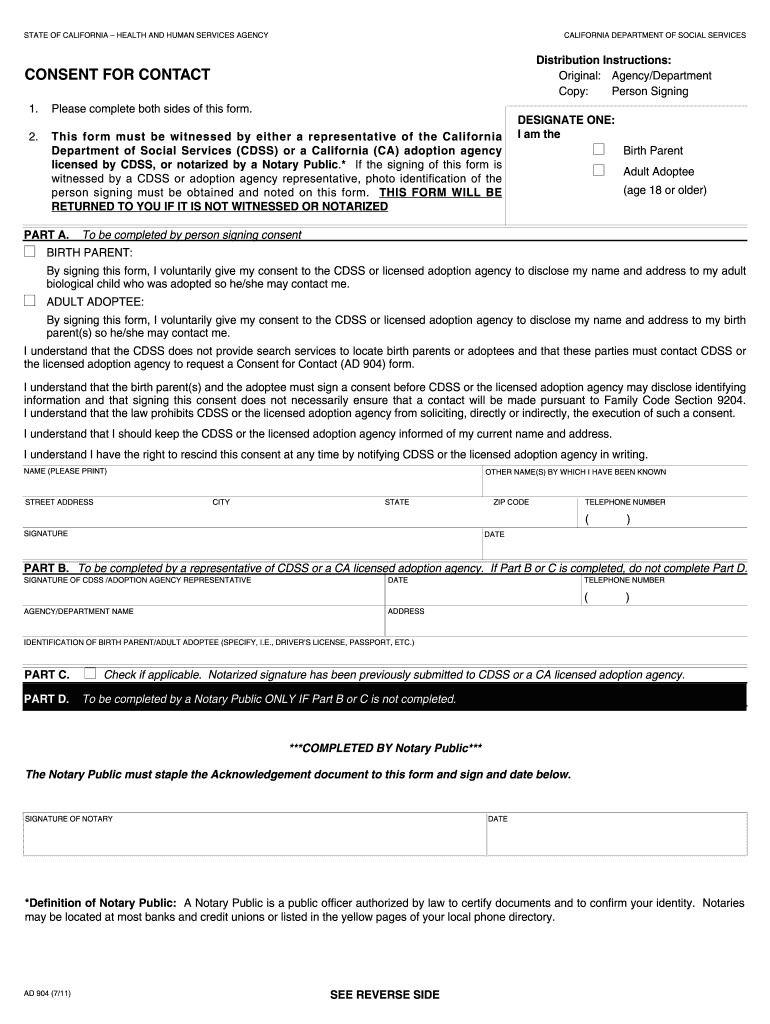
california consent form Preview on Page 1

Here's how it works

01. Edit your california consent form online
Type text, add images, blackout confidential details, add comments, highlights and more.
02. Sign it in a few clicks
Draw your signature, type it, upload its image, or use your mobile device as a signature pad.
03. Share your form with others
Send ad904 via email, link, or fax. You can also download it, export it or print it out.

How to use or fill out social security number with our platform

Form edit decoration
9.5
Ease of Setup
DocHub User Ratings on G2
9.0
Ease of Use
DocHub User Ratings on G2
  1. Click ‘Get Form’ to open the social security number document in the editor.
  2. Begin by filling out your name in the designated field. Ensure that you print your name clearly for accurate identification.
  3. Next, provide your street address, city, state, and zip code. This information is crucial for any correspondence related to your consent.
  4. In the telephone number section, enter a valid phone number where you can be reached. This will facilitate communication if needed.
  5. Sign and date the form at the bottom. Your signature confirms your consent and understanding of the terms outlined in the document.
  6. If applicable, ensure that Part B or C is completed by a representative or Notary Public as required before submission.

Start using our platform today to fill out your social security number form easily and for free!

See more social security number versions

We've got more versions of the social security number form. Select the right social security number version from the list and start editing it straight away!
Versions Form popularity Fillable & printable
2011 4.8 Satisfied (140 Votes)
be ready to get more

Complete this form in 5 minutes or less

Get form

Got questions?

We have answers to the most popular questions from our customers. If you can't find an answer to your question, please contact us.
Contact us

Yes, you can use DocHub for signing any business and private paperwork, including your ad 904. All eSignatures you create with our tool are legally binding and court-admissible, as DocHub complies with criteria required by ESIGN and UETA. Save your completed form with a detailed Audit Trail if needed.

If you are searching for a state-specific social security number sample, you can find it in our DocHub Forms & Templates catalog. Use the search field, enter your form’s name, and search through the results for your state. You may also filter out irrelevant results while browsing our catalog by groups.

SSN is given a serial number from the series 2001-2999 and 7001-7999. The last three serial numbers issued are 9998, 9999, and 7999. Serial number 0000 is never used. Each State goes through all of its area numbers with group number 01 and serial numbers 0001-9999 and 7999 before using group number 03.
A Social Security number (SSN) is a nine-digit number that the U.S. government issues to all U.S. citizens and eligible U.S. residents who apply for one. The government uses this number to keep track of your lifetime earnings and the number of years worked.
The first three (3) digits of a persons social security number are determined by the ZIP Code of the mailing address shown on the application for a social security number. Prior to 1973, social security numbers were assigned by our field offices.

Security and compliance

At DocHub, your data security is our priority. We follow HIPAA, SOC2, GDPR, and other standards, so you can work on your documents with confidence.

Learn more
ccpa2
pci-dss
gdpr-compliance
hipaa
soc-compliance
be ready to get more

Complete this form in 5 minutes or less

Get form

People also ask

Australia is one of many countries that set up a Social Security system long before the U.S. did. They passed a law establishing old age and disability pensions in 1908.
Your Social Security Statement (Statement) is available to view online by opening a my Social Security account. It is useful for people of all ages who want to learn about their future Social Security benefits and current earnings history.
1. On Your Card. If you have one, though, you must have a Social Security card. So, to find out your number, you should check your card, which features the number along with your name.
To locate your phones serial number, go to the Settings app, tap General, then tap About to view various details about your phone. Scroll down and look for the Serial Number entry, and make a note of the alphanumeric string that follows.
The Serial Number, itself, doesnt say anything about your location or age that the Group Number and Area Number dont already say, although since they are assigned consecutively, they could potentially reveal your relative age within a Group and an Area.

Related links