Form void request 2026

Get Form
masshealth void request form Preview on Page 1

Here's how it works

01. Edit your masshealth void request form online
Type text, add images, blackout confidential details, add comments, highlights and more.

02. Sign it in a few clicks
Draw your signature, type it, upload its image, or use your mobile device as a signature pad.

03. Share your form with others
Send request void masshealth via email, link, or fax. You can also download it, export it or print it out.

How to use or fill out form void request with our platform

Form edit decoration
9.5
Ease of Setup
DocHub User Ratings on G2
9.0
Ease of Use
DocHub User Ratings on G2
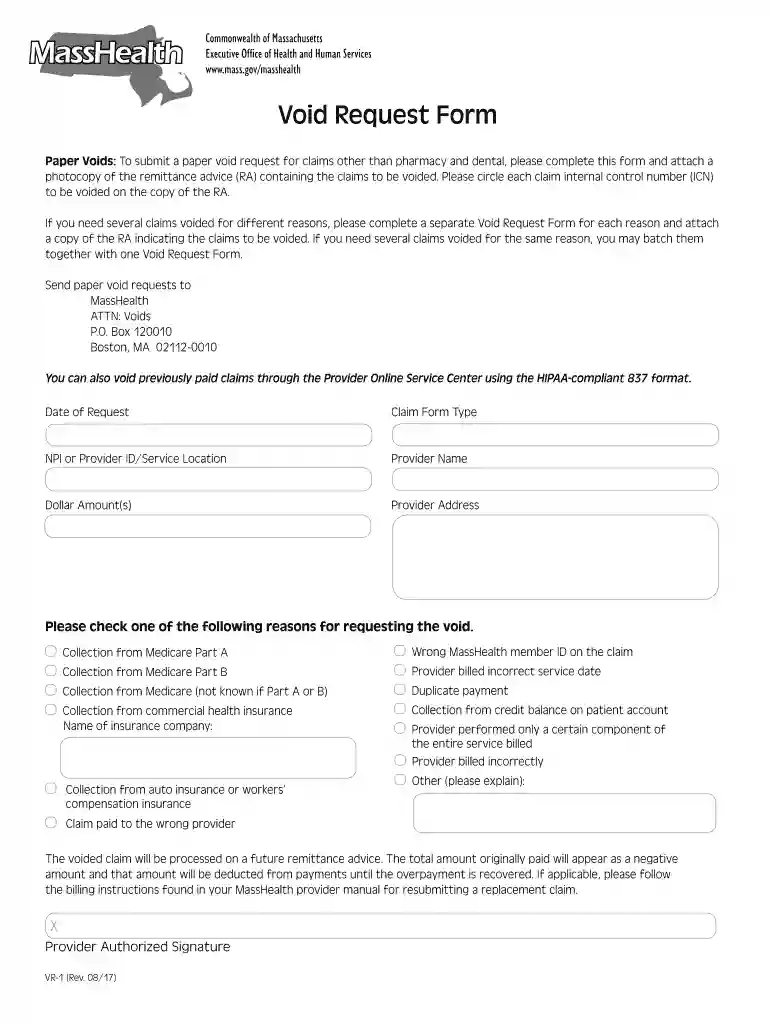
  1. Click ‘Get Form’ to open the Void Request Form in the editor.
  2. Begin by entering the 'Date of Request' at the top of the form. This helps track when your void request was submitted.
  3. Fill in the 'Claim Form Type' and provide your NPI or Provider ID along with the Service Location. This information is crucial for identifying your claims.
  4. Next, enter your 'Provider Name' and 'Provider Address'. Ensure these details are accurate to avoid processing delays.
  5. List the 'Dollar Amount(s)' associated with each claim you wish to void. Be precise to ensure correct adjustments.
  6. Select one reason for requesting the void from the provided options. If necessary, specify additional details in the 'Other' section.
  7. Finally, sign in the designated area as 'Provider Authorized Signature' to validate your request before submission.

Start using our platform today for free to streamline your document editing and submission process!

See more form void request versions

We've got more versions of the form void request form. Select the right form void request version from the list and start editing it straight away!
Versions Form popularity Fillable & printable
2017 4.8 Satisfied (82 Votes)
2009 4 Satisfied (30 Votes)
be ready to get more

Complete this form in 5 minutes or less

Get form

Got questions?

We have answers to the most popular questions from our customers. If you can't find an answer to your question, please contact us.
Contact us

Microsoft Word doesn’t have signing tools to generate valid eSignatures and enforceable documents. Luckily, DocHub is an online eSignature-compliant editor that supports different document formats, such as .doc files. Sign in to your account and import the Word edition of your mass health void request form from your device and cloud, or URL - our editor will automatically convert it into an editable PDF. Make all essential adjustments in your form and click Sign to generate your own legally-binding electronic signature. There are four signing methods from which to choose.

Using a swift editing platform like DocHub, you do not need anything but a browser and internet connection to edit your masshealth void request form online quickly. Add your file or get the appropriate form in DocHub’s catalog, open our editor with a single click, and finish it electronically. To edit your forms at any time, register a free account with DocHub.

Form Submission Using POST Instead of using GET and query parameters to submit form data, we can use POST. To submit a form using a POST request, set the forms method attribute to POST . Form data submitted via POST will be submitted in the body of the HTTP request.
Request forms enable a formal, coordinated process that can be followed for each request that comes through. Forms also ensure that tasks are properly scheduled and prioritized. They help simplify the intake workflow and add structure to the entire work request process.
A refund request form is used to request a refund for a previous transaction or purchase. Individuals usually use this type of form when they arent satisfied with the item or service they received, made a payment in error, or returned a purchase for other reasons.

People also ask

A request form is a document used to request something from an organization or individual. It typically includes information about the requester and what they are asking for, and it is used to provide a consistent and organized way for the request to be processed.
How to Create a Request Form Define Your Use Case and Requirements. Start Building Your Form. Add and Customize Form Fields. Personalize the Form Design. Set Up Notifications and Approvals. Publish and Share Your Form. Test and Manage Submissions.
A sample request form is a document used by your customers to order samples from your core. It is created and maintained by core administrators and can be configured to include any fields you require.

form void request