Registration worksheet 2026

Get Form
registration worksheet form Preview on Page 1

Here's how it works

01. Edit your registration worksheet form online
Type text, add images, blackout confidential details, add comments, highlights and more.

02. Sign it in a few clicks
Draw your signature, type it, upload its image, or use your mobile device as a signature pad.

03. Share your form with others
Send it via email, link, or fax. You can also download it, export it or print it out.

How to use or fill out the registration worksheet with our platform

Form edit decoration
9.5
Ease of Setup
DocHub User Ratings on G2
9.0
Ease of Use
DocHub User Ratings on G2
  1. Click ‘Get Form’ to open the registration worksheet in the editor.
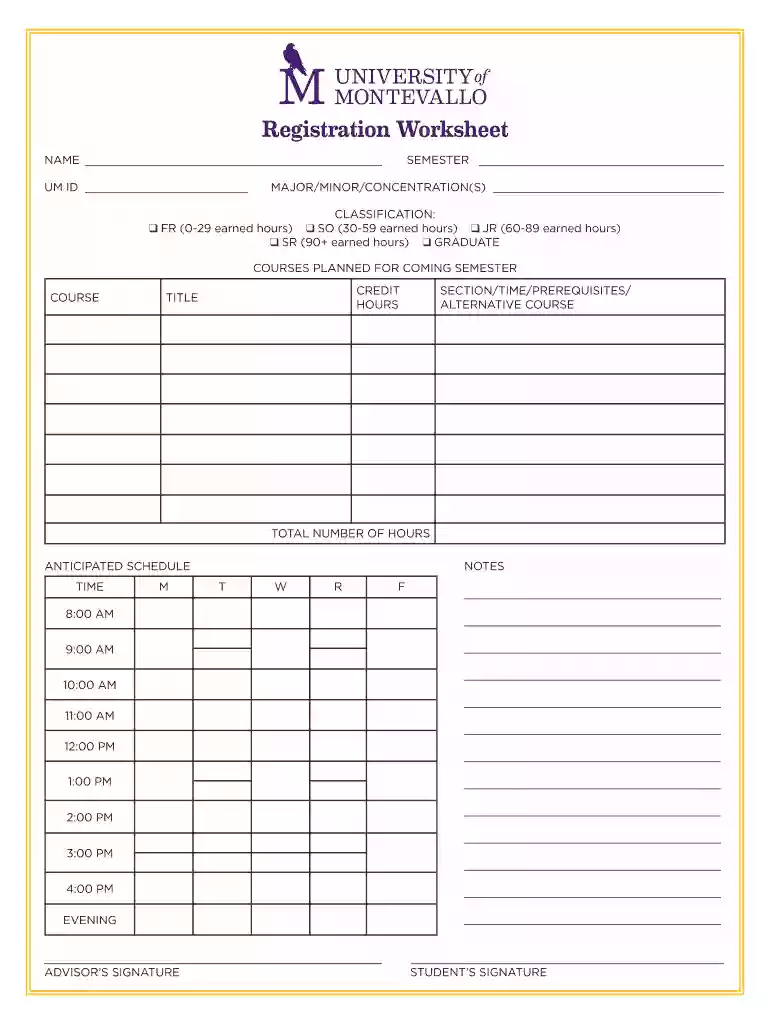
  2. Begin by entering your NAME and UM ID at the top of the form. This information is essential for identification purposes.
  3. Next, specify the SEMESTER for which you are registering. This helps in organizing your academic schedule.
  4. Indicate your MAJOR/MINOR/CONCENTRATION(S) to ensure that your course selections align with your academic goals.
  5. Select your CLASSIFICATION by checking the appropriate box (FR, SO, JR, SR, or GRADUATE) based on your earned hours.
  6. Fill out the COURSES PLANNED FOR COMING SEMESTER section by listing each COURSE along with its CREDIT HOURS and TITLE. Include any SECTION/TIME/PREREQUISITES/ALTERNATIVE COURSE as needed.
  7. Complete the ANTICIPATED SCHEDULE section by filling in time slots for each day of the week according to your planned courses.
  8. Lastly, ensure that all required signatures (ADVISOR’S SIGNATURE and STUDENT’S SIGNATURE) are obtained before submission.

Start using our platform today to easily fill out and manage your registration worksheet online for free!

See more registration worksheet versions

We've got more versions of the registration worksheet form. Select the right registration worksheet version from the list and start editing it straight away!
Versions Form popularity Fillable & printable
2019 4.8 Satisfied (124 Votes)
2011 4.5 Satisfied (54 Votes)
be ready to get more

Complete this form in 5 minutes or less

Get form

Got questions?

We have answers to the most popular questions from our customers. If you can't find an answer to your question, please contact us.
Contact us
Event registration forms for general attendees should capture general information about them like their name, email address, payment details, and other details that will help you improve their experience at your event, be it dietary restrictions or activity preferences.
What information is typically collected in a registration form? Common fields include name, email, phone number, address, and any eventor service-specific details such as session choices, dietary restrictions, or payment information.
How to create a registration form in 7 steps Determine form length. Set clear fields. Set up a confirmation message. Add a payment option (if applicable) Check for accessibility. Embed the form for easy completion. Create your own registration form with SurveyMonkey.
A registration form is the first point of contact between event organisers and potential attendees. It not only serves to collect information but also sets expectations for the event.
A registration form is a document that has a series of fields that a person fills out and delivers to a company or individual in order to register for an event, program, membership, list, and so on. You may collect contact information and encourage people to communicate with you by using the online registration form.

Security and compliance

At DocHub, your data security is our priority. We follow HIPAA, SOC2, GDPR, and other standards, so you can work on your documents with confidence.

Learn more
ccpa2
pci-dss
gdpr-compliance
hipaa
soc-compliance

People also ask

A registration form is a structured digital document that lets you collect data from users for a specific purpose, such as attending an event, signing up for a program, or enrolling in a membership.
A template is a form, mold or pattern used as a guide to create something consistently and efficiently. Templates can be physical objects, such as a paper template for cutting fabric, or digital files used in design software like Photoshop.

Related links