



Here's how it works



How to use or fill out Oklahoma Construction Industries Board with our platform

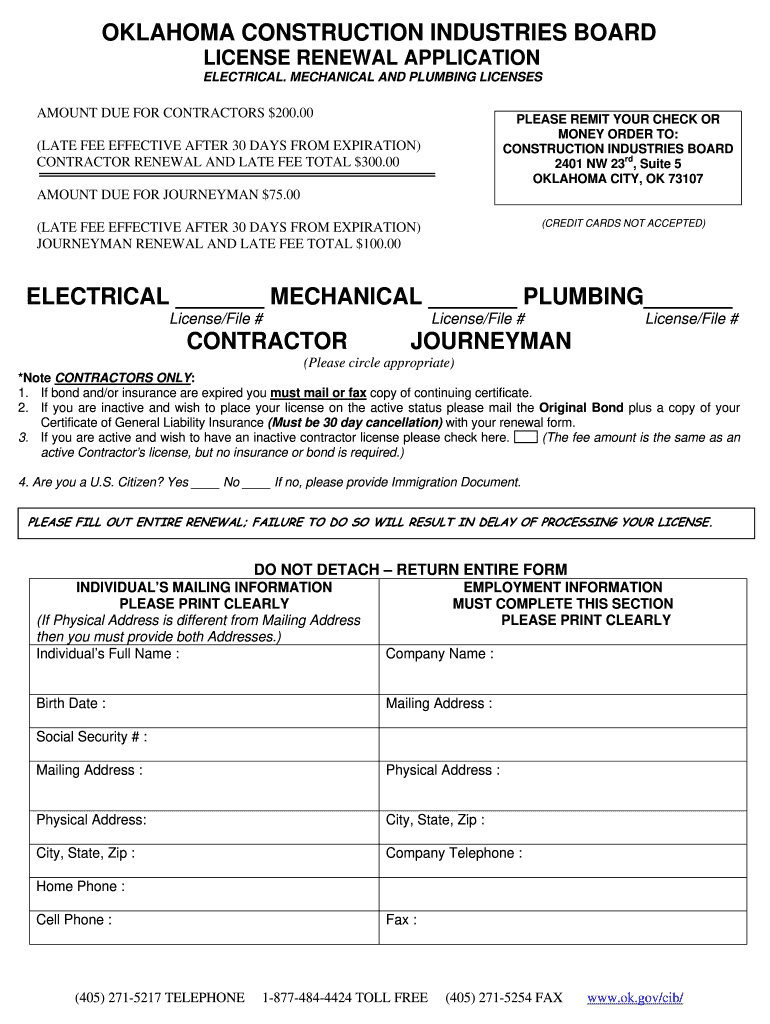
- Click ‘Get Form’ to open the Oklahoma Construction Industries Board License Renewal Application in the editor.
- Begin by filling out your individual’s full name and ensure it is printed clearly. This is crucial for identification purposes.
- Complete the Employment Information section by entering your company name, birth date, and both mailing and physical addresses. If they differ, provide both.
- Input your Social Security number, company telephone, home phone, and cell phone numbers accurately to avoid processing delays.
- Select the appropriate license type (Electrical, Mechanical, Plumbing) by circling the correct option. Ensure you include your License/File number for each category.
- If applicable, indicate whether you are a U.S. Citizen and provide any necessary immigration documents if not.
- Review all sections thoroughly before submitting to ensure no fields are left incomplete, as this could delay your license processing.
Start using our platform today for free to streamline your form completion process!
It's free
See more oklahoma construction industries board versions
| Versions | Form popularity | Fillable & printable |
|---|---|---|
| 2010 | 4.5 Satisfied (59 Votes) |
Got questions?
What do I need to sign my oklahoma construction industries board electronically?
Electronic document approval demands a software solution that complies with data security and eSignature laws. DocHub is a great tool for that, because it meets all the above mentioned requirements. Whatever method you prefer to sign your oklahoma construction industries board in DocHub, your electronic signature will be legally binding and court-admissible.
How do you edit construction industries board of oklahoma on Android?
Document editing with DocHub is equally convenient on desktop and mobile devices. You just need an internet browser to modify your construction industries board of oklahoma on Android. Open our website and sign in to access the instruments you need. Add your document and introduce your intended modifications. After that, you can keep your form in your document storage or send it out right away.
Do you need an HVAC license in Oklahoma?
Do you need a handyman license in Oklahoma?
How do I renew my roofing license in Oklahoma?
Security and compliance
At DocHub, your data security is our priority. We follow HIPAA, SOC2, GDPR, and other standards, so you can work on your documents with confidence.
Learn more


Related forms