




Here's how it works

01. Edit your dochub com fillable form online
Type text, add images, blackout confidential details, add comments, highlights and more.

02. Sign it in a few clicks
Draw your signature, type it, upload its image, or use your mobile device as a signature pad.

03. Share your form with others
Send oklahoma duplicate title same day via email, link, or fax. You can also download it, export it or print it out.
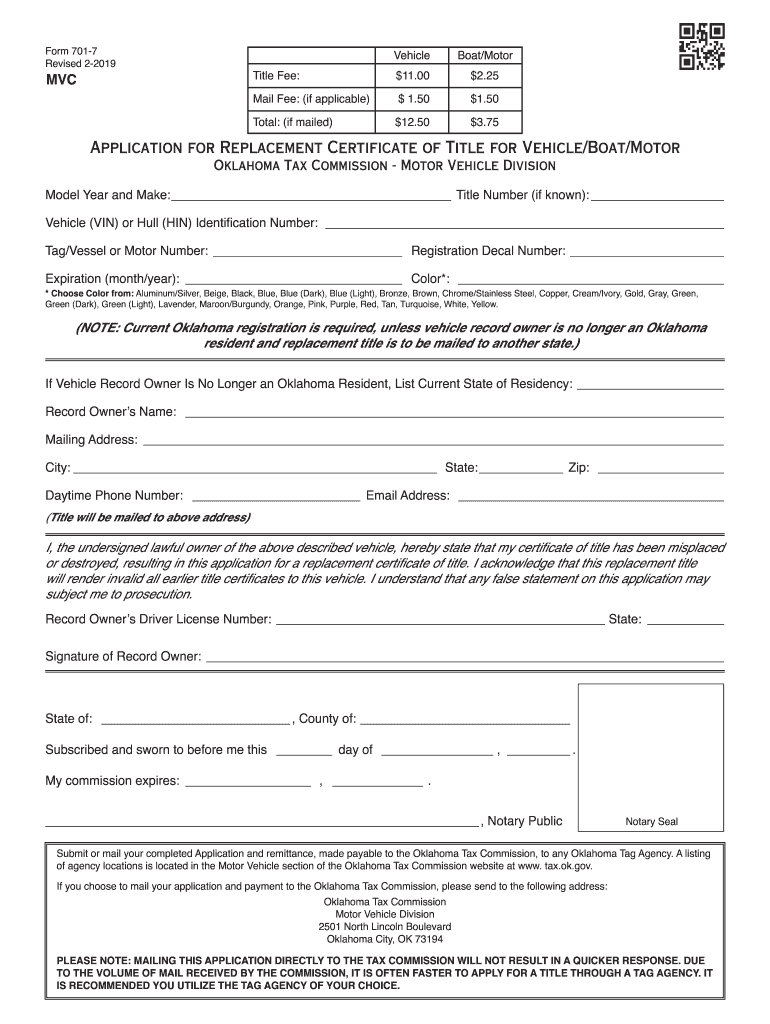
How to use or fill out Oklahoma Replacement Title with our platform

- Click ‘Get Form’ to open the Oklahoma Replacement Title application in the editor.
- Begin by entering the Model Year and Make of your vehicle, along with the Title Number if known. This information is crucial for identifying your vehicle.
- Next, input the Vehicle Identification Number (VIN) or Hull Identification Number (HIN). This unique identifier ensures that your application is processed accurately.
- Fill in the Tag/Vessel or Motor Number and Registration Decal Number. These details help verify your ownership and registration status.
- Select the Expiration date (month/year) and choose the Color of your vehicle from the provided options. This helps in correctly identifying your vehicle's appearance.
- If applicable, indicate if you are no longer an Oklahoma resident and provide your current state of residency.
- Complete the Record Owner’s Name, Mailing Address, City, State, Zip Code, Daytime Phone Number, and Email Address. Ensure accuracy as this is where your title will be mailed.
- Sign and date the application to confirm that you are the lawful owner and acknowledge any false statements may lead to prosecution.
- Finally, submit or mail your completed application along with payment to an Oklahoma Tag Agency or directly to the Oklahoma Tax Commission as instructed.
Start using our platform today for free to streamline your document editing and form completion!
Fill out oklahoma replacement title online
It's free
It's free
See more oklahoma replacement title versions
We've got more versions of the oklahoma replacement title form. Select the right oklahoma replacement title version from the list and start editing it straight away!
Security and compliance
At DocHub, your data security is our priority. We follow HIPAA, SOC2, GDPR, and other standards, so you can work on your documents with confidence.
Learn more


Related forms
Taguig business permit application form 2023
The document is an application form for business permits and licensing in Taguig City, Philippines. It includes sections ...

Standard Form 1405 - Pre-Award Survey of Prospective Contractor (Production)
The document is a Pre-Award Survey form for prospective contractors involved in production, governed by the OMB Control ...

GSA Form 2010 "Small Purchase Tabulation Source List Abstract"
The document is a procurement tabulation form used for small purchases, detailing supplier responses, pricing, and compl ...

Gs3196a xpw - Accessible FormN - GSA
The document pertains to the General Services Administration (GSA) and outlines details related to the sale of governmen ...

EUROPEAN COMMISSION Call for Candidatures Core Team
The document is a health declaration form from the European Commission for individuals applying to work in international ...
In the court of special appeals of maryland - University of Maryland - law umaryland
The document is a legal brief submitted by the appellees, MobilePro Corp and CloseCall America, Inc., in response to an ...

Job Satisfaction in Nursing Assistants
The document explores factors influencing job satisfaction among nursing assistants in nursing homes, highlighting the h ...