




Here's how it works

01. Edit your montana replacement title online
Type text, add images, blackout confidential details, add comments, highlights and more.

02. Sign it in a few clicks
Draw your signature, type it, upload its image, or use your mobile device as a signature pad.

03. Share your form with others
Send mv7 form montana via email, link, or fax. You can also download it, export it or print it out.
How to use or fill out montana replacement title with our platform

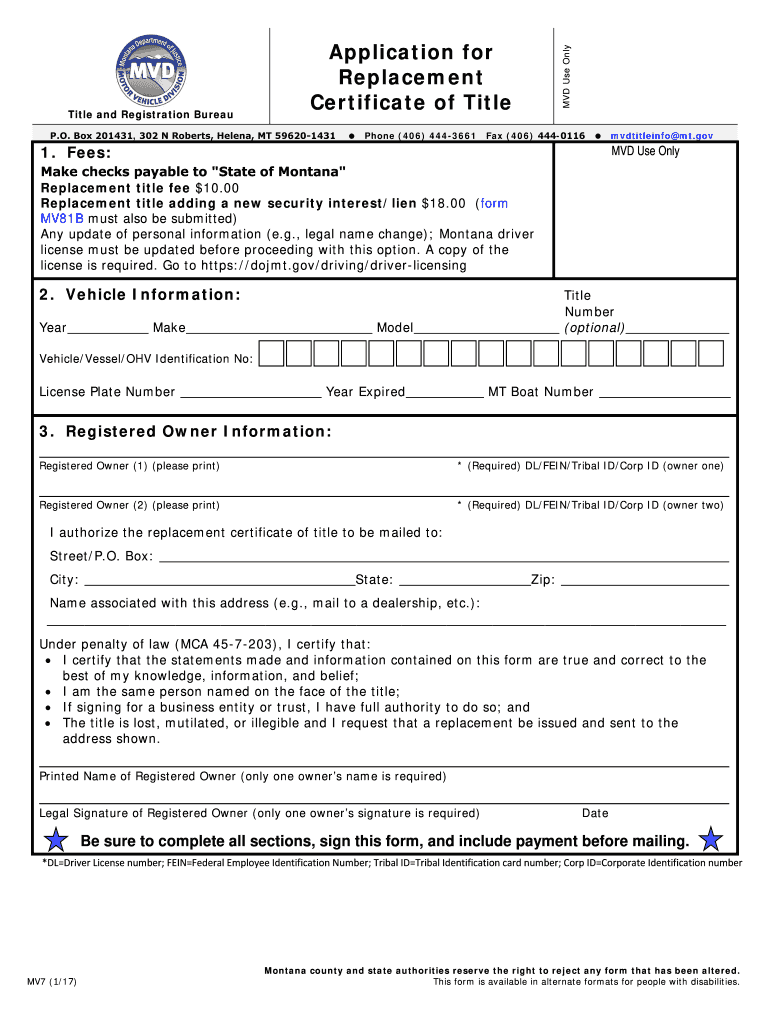
- Click ‘Get Form’ to open the Montana Replacement Title in the editor.
- Begin by entering the vehicle information. Fill in the year, make, model, and identification number of your vehicle. If available, include the title number and license plate number.
- Next, provide registered owner information. Print the names of both owners if applicable, along with their respective DL/FEIN/Tribal ID/Corp ID numbers.
- Indicate where you want the replacement title mailed by filling out the address section completely. Ensure that you include a name associated with this address if necessary.
- Finally, certify your statements by printing your name and signing the form. Make sure to date it as well. Remember to include payment for processing before mailing.
Start using our platform today for free to streamline your Montana Replacement Title process!
Fill out montana replacement title online
It's free
It's free
See more montana replacement title versions
We've got more versions of the montana replacement title form. Select the right montana replacement title version from the list and start editing it straight away!
Security and compliance
At DocHub, your data security is our priority. We follow HIPAA, SOC2, GDPR, and other standards, so you can work on your documents with confidence.
Learn more


Related forms

470-3624 Child Care Assistance Application - Postville Childcare
The document is an application form for Child Care Assistance from the Iowa Department of Human Services. It collects in ...

Form 1099-NEC (Rev April 2025)
The document provides information regarding the IRS Form 1099-NEC, which is used to report nonemployee compensation. It ...
Treasury challan form
The document is an interim receipt form (T.R. 12) used for remittances made in Treasuries by the Government of Kerala. I ...
Namv form
The document is a Form N.A.M.V. used to notify the Registering Authority of proposed alterations to a motor vehicle. It ...

THE GREENWICH ASSOCIATION OF REALTORS, INC
The document is a residential lease agreement between a landlord and tenant, outlining the terms of rental for a dwellin ...