What is the difference between DocHub vs PaperSave vs. DocMoto?
When it comes to managing documents, you have a few great options to choose from: DocHub, PaperSave, and DocMoto. Each of these tools offers unique features and benefits that can help you streamline your document management process.
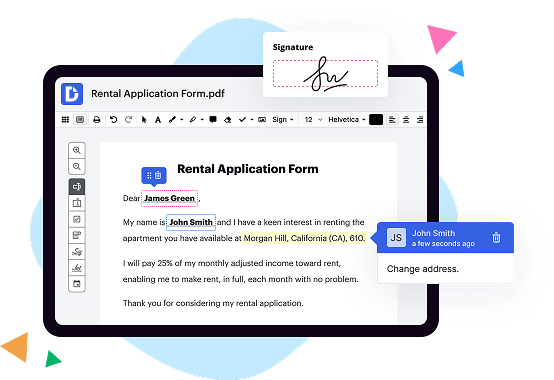
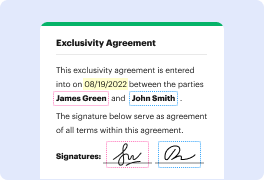
Let's start by talking about DocHub. This versatile tool allows you to easily edit, sign, and share PDF documents online. With DocHub, you can annotate and mark up your documents, fill out forms, and even add your electronic signature. Its user-friendly interface and seamless integration with popular cloud storage services make it a top choice for individuals and businesses alike.
PaperSave, on the other hand, focuses on automating document management processes. This powerful tool allows you to capture, store, and retrieve documents effortlessly. PaperSave integrates with popular ERP and CRM systems, making it a fantastic option for organizations looking to streamline their workflow and improve productivity. With its robust search capabilities and seamless integration, PaperSave takes document management to the next level.
Lastly, we have DocMoto, a comprehensive document management system that offers a wide range of features. DocMoto enables you to organize and control your documents with ease. It provides version control, document tracking, and secure sharing options, making it an excellent choice for businesses that deal with sensitive information. With DocMoto, you can collaborate seamlessly, ensuring that everyone is working with the most up-to-date documents.
In summary, each of these tools offers unique features and benefits. Whether you need a simple solution for editing and signing documents with DocHub, an automation-driven system with PaperSave, or a comprehensive document management solution with DocMoto, you can't go wrong. Evaluate your specific needs and preferences, and choose the tool that aligns best with your requirements. Rest assured, whichever option you choose, you'll be well-equipped to manage your documents efficiently and effectively.
DocHub vs PaperSave vs DocMoto: which is better for Enterprises?
While PaperSave and DocMoto are good solutions to work with PDFs online, DocHub offers greater capabilities to help individuals and businesses digitize their documents and make them run smoothly across different devices and your favorite apps.
DocHub vs PaperSave vs DocMoto: which is better for small businesses?
PaperSave and DocMoto are good options for editing, signing, and sharing PDFs. However, DocHub offers a more comprehensive featureset that includes organizations, reusable templates, advanced eSignatures, seamless Google integrations, and more that are perfect for small businesses, helping them simplify and streamline document editing, sharing, signing, and form completition.
What is DocHub?
DocHub is a Google-integrated PDF editor and eSignature solution that helps you get your PDFs done online, using any device. DocHub comes with an online PDF editor, advanced eSignatures, PDF forms, reusable templates, and straightforward Google integrations so you can maximize your productivity when working within your favorite Google apps.
What is PaperSave and how does it work?
PaperSave is an innovative solution that streamlines document management and workflow processes. So, how does it work? Well, it's quite simple! When you upload your documents to PaperSave, it uses cutting-edge technology to automatically extract information, organize files, and eliminate the need for tedious manual entry.
With PaperSave, you'll be able to effortlessly search for and retrieve any document within seconds, thanks to its powerful search capabilities. Gone are the days of frantically sifting through piles of paper or endless folders on your computer. PaperSave makes it easy to find exactly what you're looking for, right when you need it.
But that's not all – PaperSave also offers seamless integration with popular accounting and enterprise resource planning (ERP) systems. This means that you can access and manage your documents directly from the familiar software you already use. It's like having your own personal assistant, always at your disposal!
What sets PaperSave apart from other document management systems is its user-friendly interface. You don't need to be an IT expert to navigate and utilize its features effectively. Even the most technologically-challenged individuals will find it a breeze to use.
In addition to its convenience, PaperSave also prioritizes security. Rest assured that your documents are protected with top-of-the-line encryption and access controls. With PaperSave, you can have peace of mind knowing that your sensitive information is safe and secure.
To sum it all up, PaperSave is a game-changer in the world of document management. It simplifies and automates processes, making your life easier and more efficient. So why waste time and energy on manual tasks when you can let PaperSave handle it all? Give it a try and experience the difference for yourself!
What is DocMoto and how does it work?
DocMoto is a fantastic tool that allows you to effortlessly manage your documents. Perfect for individuals or teams, it simplifies the way you organize, collaborate, and store your files.
So, how does DocMoto work? Well, it starts by creating a centralized repository for all your documents. Instead of searching through numerous folders or requesting files from colleagues, you can easily access everything you need in one place.
What makes DocMoto truly special is its user-friendly interface, designed with simplicity in mind. You don't need to be a tech wizard to navigate through the system smoothly. It's intuitive and easy to use, allowing you to focus on what really matters: your work.
Collaboration becomes a breeze with DocMoto. You can effortlessly share documents with your team members, even if they are located in different offices or countries. Real-time collaboration and version control ensure that everyone is on the same page, allowing for seamless teamwork.
Security is also a top priority with DocMoto. Your documents are safely stored, with access controls and permissions in place. You can designate who has access to certain files and track any changes made. Say goodbye to worrying about the confidentiality of your documents.
With DocMoto, you'll find it easier than ever to manage your workflow. It offers efficient search functionalities, allowing you to quickly locate the documents you need. You can also create tags and metadata to make organization a breeze. No more wasting precious time searching for that one important file!
DocMoto is compatible with various file formats, making it flexible and adaptable to your needs. Whether you work with Microsoft Office files, PDFs, or images, you can trust DocMoto to handle it all seamlessly.
In summary, DocMoto is a powerful document management system that simplifies your work life. It provides a centralized repository, intuitive interface, seamless collaboration, robust security, efficient search capabilities, and compatibility with different file formats. Say hello to an organized and productive work environment with DocMoto!
Is DocHub free?
Yes. DocHub's free plan is a perfect fit for one-offs or occasional projects. You can start using DocHub’s Free Plan straight away after completing the quick account registration. No learning is needed. The DocHub Pro Plan has a 30-day free trial so you have enough time to test the product.
Is PaperSave free to use?
Yes, PaperSave is absolutely free to use! You won't have to pay a single penny to experience the amazing features and benefits it offers. All you need to do is sign up, and you can start enjoying the convenience and efficiency that PaperSave brings to your document management tasks. With PaperSave, you'll be able to organize, store, and retrieve your important files effortlessly. Plus, it's user-friendly and intuitive, making it a breeze to navigate and utilize. So go ahead and give PaperSave a try today - you won't be disappointed!
What is DocHub’s cost and pricing?
DocHub has straightforward pricing that includes one free plan and one paid plan. If you need to get documents done once in a while, the Free Plan is just the thing for you. It includes all the PDF tools to help you edit, sign, share, and organize your documents. For a growing document workflow, we recommend the DocHub Pro plan at $14 per user per month. It includes unlimited PDF capabilities and priority tech support. You can even test it free for 30 days before buying.
What are the plans and prices for DocMoto?
As of November 2021, the pricing for DocMoto has not been publicly disclosed on their official website. The best way to obtain accurate and up-to-date information about their plans and prices is by contacting DocMoto directly via their website or customer support channels.
Is PaperSave safe?
Yes, PaperSave is absolutely safe. Our top priority is ensuring the security of your data. From the moment you entrust us with your information, we take every necessary measure to protect it. With advanced encryption methods and strict access controls in place, rest assured that your data is safeguarded from any unauthorized access or potential threats. Furthermore, our team of dedicated professionals continuously monitors and updates our systems to stay ahead of any security vulnerabilities. So, you can confidently use PaperSave knowing that your data is in safe hands.
Is DocMoto safe?
Yes, DocMoto is a secure and reliable platform that prioritizes the safety of your documents. With robust security measures in place, your files are protected from unauthorized access and potential breaches. Our team constantly updates and maintains the system to ensure its safety and efficiency.
When it comes to data storage and transfer, we employ advanced encryption protocols, allowing for a seamless and secure experience. This means that your documents remain confidential and only accessible to you and authorized users.
Moreover, DocMoto's user-friendly interface and intuitive features guarantee a smooth navigation experience, making it effortless to organize, locate, and share your files securely with your colleagues or clients. Our priority is to provide you with a reliable and consistent solution for your document management needs.
So, be confident in using DocMoto knowing that your documents are in safe hands.
What are the main DocHub alternatives?
The main DocHub alternatives are Lumin PDF, Small PDF, PDF escape, and others. However, DocHub’s ease of use, flexibility, affordability, and deep Google integrations are the reasons why DocHub is ahead of the competition.
What are the 10 best PaperSave alternatives?
If you're in search of the perfect PaperSave alternative, look no further! We understand that finding the right solution is crucial for your business, which is why we've curated a list of the top 10 alternatives that will exceed your expectations.
1. DocHub: This fantastic tool offers a wide range of features to streamline your document management process. With its user-friendly interface and powerful collaboration capabilities, DocHub is a popular choice among businesses of all sizes.
2. Adobe Acrobat: Known for its reliability and comprehensive set of features, Adobe Acrobat stands as a strong competitor in the paperless document management arena. From editing to signing and sharing, it has you covered.
3. PandaDoc: If you're seeking an all-in-one document solution, PandaDoc is an excellent choice. Its intuitive interface, document automation, and robust analytics will revolutionize the way you handle your paperwork.
4. SignNow: Looking for a reliable e-signature tool? SignNow has got you covered. With its secure and legally binding signatures, you can eliminate the hassle of printing, signing, and scanning documents.
5. Nitro Pro: Nitro Pro offers a complete PDF solution, empowering you to create, edit, and sign documents seamlessly. With its focus on productivity, this alternative is an excellent choice for teams looking to maximize efficiency.
6. HelloSign: For quick and secure e-signatures, HelloSign is a top contender. Its user-friendly interface and seamless integration with other popular apps make it a breeze to manage your documents.
7. Smallpdf: Need to compress, convert, or merge documents effortlessly? Smallpdf has all the essential tools to simplify your document management tasks. It also offers robust security features for peace of mind.
8. Foxit PhantomPDF: Foxit PhantomPDF is a reliable alternative that boasts powerful editing and collaboration features. Whether you're working individually or in a team, this solution has the versatility to meet your needs.
9. PDFelement: PDFelement is a comprehensive PDF editor with a wide range of features. Its intuitive design, coupled with advanced tools, allows you to create and manage professional-looking documents easily.
10. Soda PDF: Last but certainly not least, Soda PDF offers an impressive set of features for document management. From editing and converting to secure sharing, this alternative is trusted by many professionals.
Remember, each of these alternatives has its own unique strengths, so it's important to assess your specific requirements to find the perfect fit. Evaluate your needs, weigh the options, and you'll surely discover a fantastic PaperSave alternative that will revolutionize your document management processes.
What are the 10 best DocMoto alternatives?
When it comes to finding the perfect alternative to DocMoto, you're in luck! There are a wealth of options available that offer superb document management capabilities. Let's dive into the top 10 alternatives, with DocHub leading the charge:
1. DocHub: This fantastic platform offers a seamless document management experience, allowing you to create, edit, and sign documents with ease. It boasts a user-friendly interface and powerful collaboration features.
2. Google Drive: A popular choice for many, Google Drive provides ample storage space, excellent document editing tools, and seamless integration with other Google services. It's an all-in-one solution for managing your documents.
3. Dropbox: A widely recognized name in cloud storage, Dropbox offers easy file sharing, automatic syncing, and robust security features. It's perfect for individuals and businesses alike.
4. Box: If you're seeking a secure and reliable alternative, Box has you covered. This platform offers seamless collaboration and file sharing capabilities, with advanced security features to give you peace of mind.
5. OneDrive: Microsoft's entry into the cloud storage realm, OneDrive, offers seamless integration with the Microsoft Office suite. It's an ideal choice for those heavily invested in the Microsoft ecosystem.
6. Zoho Docs: Zoho Docs provides a comprehensive suite of document management features, including powerful collaboration tools, version control, and document sharing capabilities. It's a reliable choice for businesses of all sizes.
7. Evernote: While primarily known as a note-taking app, Evernote offers robust document management capabilities. It allows you to organize, edit, and share files effortlessly, making it a versatile alternative to DocMoto.
8. Adobe Acrobat: For those in need of extensive document editing and manipulation features, Adobe Acrobat is a go-to option. It offers advanced editing tools, PDF conversion capabilities, and secure sharing options.
9. Quip: This collaborative productivity suite combines the power of documents, spreadsheets, and chat in one platform. Quip is perfect for teams looking to streamline document management and enhance collaboration.
10. Bitrix24: As an all-in-one digital workplace, Bitrix24 offers document management, communication, collaboration, and project management tools. It's an excellent choice for businesses seeking a comprehensive solution.
With these top-notch alternatives at your fingertips, you can confidently explore the options available and find the perfect fit for your document management needs. Happy exploring!