What is the difference between DocHub vs eSignly vs. Thales Digital Signing?
When it comes to digital signing solutions, there are a few options available, including DocHub, eSignly, and Thales Digital Signing. While they all serve the same purpose, it's important to understand the differences between them to choose the one that best suits your needs.
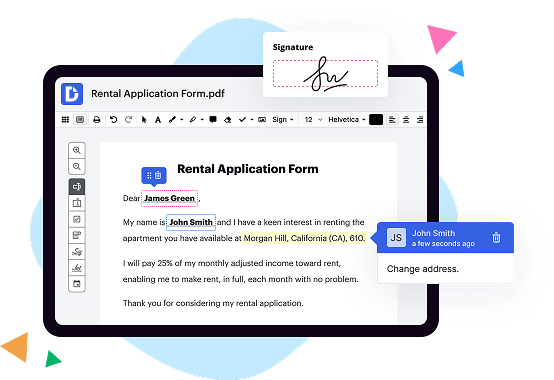
Let's start by looking at DocHub. This platform offers a range of features that make it a standout option. It provides a user-friendly interface, allowing you to effortlessly edit, sign, and send documents online. With its advanced editing tools, you can easily add text, images, and annotations to your documents. DocHub also supports integration with popular cloud storage platforms like Google Drive, Dropbox, and OneDrive, making it convenient to access and manage your files. Furthermore, it offers robust security measures to ensure the confidentiality and integrity of your documents.
Moving on to eSignly, this solution brings simplicity and efficiency to the digital signing process. Its intuitive interface makes it easy for users to upload their documents, prepare them for signing, and send them off to recipients. With features like reusable templates and bulk sending, you can save time and streamline your signing workflow. eSignly also provides options for custom branding, allowing you to maintain a professional image with your clients and partners. Plus, it offers strong authentication and encryption measures to ensure the security of your signed documents.
Now let's take a look at Thales Digital Signing. This platform offers a comprehensive digital signature solution with a focus on compliance and legality. It provides advanced security features, including cryptographic technology, to ensure the authenticity and integrity of your signed documents. Thales Digital Signing also offers compliance with various local and industry regulations, making it a reliable choice for businesses in highly regulated sectors. Additionally, it provides a user-friendly interface, enabling easy document preparation and signing.
In summary, DocHub, eSignly, and Thales Digital Signing all offer digital signing solutions with their own unique features. DocHub stands out for its user-friendly interface and integration capabilities, while eSignly emphasizes simplicity and efficiency. Thales Digital Signing focuses on compliance and security. Consider your specific needs and priorities to choose the solution that best fits your requirements.
DocHub vs eSignly vs Thales Digital Signing: which is better for Enterprises?
While eSignly and Thales Digital Signing are good solutions to work with PDFs online, DocHub offers greater capabilities to help individuals and businesses digitize their documents and make them run smoothly across different devices and your favorite apps.
DocHub vs eSignly vs Thales Digital Signing: which is better for small businesses?
eSignly and Thales Digital Signing are good options for editing, signing, and sharing PDFs. However, DocHub offers a more comprehensive featureset that includes organizations, reusable templates, advanced eSignatures, seamless Google integrations, and more that are perfect for small businesses, helping them simplify and streamline document editing, sharing, signing, and form completition.
What is DocHub?
DocHub is a Google-integrated PDF editor and eSignature solution that helps you get your PDFs done online, using any device. DocHub comes with an online PDF editor, advanced eSignatures, PDF forms, reusable templates, and straightforward Google integrations so you can maximize your productivity when working within your favorite Google apps.
What is eSignly and how does it work?
eSignly is an incredible solution that simplifies the process of signing documents electronically. It is designed to make your life easier, saving you time and effort. With eSignly, you can say goodbye to the hassles of printing, scanning, and mailing documents.
So, how does eSignly work? Well, it's straightforward! First, you need to upload your document onto the eSignly platform. This can be done in a variety of formats, such as PDF, Word, or even image files. Don't worry about the file size; eSignly can handle large documents with ease.
Once your document is uploaded, you can start adding signers and defining their roles. Whether it's a client, colleague, or business partner, you can specify who needs to sign and where.
Next, it's time to add signature fields to the document. You can easily drag and drop these fields onto the document, positioning them wherever you like. This ensures that signers know exactly where they need to put their signatures.
Now, you're ready to send the document for signing. All you need is the email address of your signer, and eSignly will take care of the rest. The recipient will receive a notification email with a secure link to access the document. They can then review it, sign it, and add any other required information, all within the eSignly interface.
What sets eSignly apart is its user-friendly interface, making the signing process intuitive for signers of all levels of technical expertise. Plus, eSignly adheres to industry-leading security measures, ensuring the confidentiality and integrity of your documents.
Once all the signatures are collected, you will receive a notification email, and you can download the fully executed document. No more scanning or mailing required!
Using eSignly not only streamlines the signing process but also reduces your ecological footprint. By going paperless, you contribute to a greener environment.
So, if you're looking for a reliable, efficient, and environmentally-friendly way to sign documents, eSignly is the perfect solution for you. Try it out today and experience the convenience of electronic signatures firsthand.
What is Thales Digital Signing and how does it work?
Thales Digital Signing is an incredible solution that allows users to securely sign digital documents and transactions with utmost ease. Let me explain to you how it works in a simple and straightforward manner.
When you use Thales Digital Signing, you can rest assured that your digital signature is strong, verifiable, and tamper-proof. It utilizes advanced cryptographic algorithms to create a unique digital signature for each document or transaction you sign.
Here's the process: Firstly, you upload the document or transaction that needs to be signed onto the Thales platform. Then, using a cryptographic key, Thales Digital Signing creates a mathematical hash of the document. This hash is a unique representation of the document's content.
Next, the platform uses your private key to encrypt the hash, thereby creating your digital signature. This signature is securely attached to the document, ensuring its integrity and authenticity.
To verify the signature, the recipient can use the corresponding public key, which serves as an electronic fingerprint of your private key. By comparing the decrypted hash with the original one, the recipient can confirm if the document has been altered or tampered with in any way.
Thales Digital Signing also offers additional security features such as timestamping, which provides an irrefutable record of when the document was signed. This adds an extra layer of trust and accountability to the process.
By utilizing Thales Digital Signing, you can easily sign and authenticate important documents, contracts, or any digital transactions with confidence. Its seamless integration and user-friendly interface make it an invaluable tool for individuals and organizations alike.
So, whether you're an individual or a business looking to streamline your digital signing process, Thales Digital Signing offers a secure and reliable solution that ensures the utmost integrity of your digital documents.
Is DocHub free?
Yes. DocHub's free plan is a perfect fit for one-offs or occasional projects. You can start using DocHub’s Free Plan straight away after completing the quick account registration. No learning is needed. The DocHub Pro Plan has a 30-day free trial so you have enough time to test the product.
Is eSignly free to use?
Yes, eSignly is completely free to use! With our user-friendly platform, you can easily sign, send, and manage your documents online. We prioritize your convenience and provide a seamless experience. So go ahead and experience the benefits of eSignly, without having to worry about any costs. Sign up today and streamline your document signing process effortlessly.
Is Thales Digital Signing free to use?
Yes, Thales Digital Signing is absolutely free for you to use! We believe in making digital signing accessible to everyone, without any hidden costs or fees. By offering our service for free, we aim to empower individuals and businesses to securely sign their digital documents with ease. So, whether you're a student, a freelancer, or a small business owner, you can utilize Thales Digital Signing without any financial burden. With our user-friendly interface and advanced security features, you can confidently sign your documents online, knowing that your information is protected. So, why wait? Start using Thales Digital Signing today and experience the convenience and peace of mind it provides for free!
What is DocHub’s cost and pricing?
DocHub has straightforward pricing that includes one free plan and one paid plan. If you need to get documents done once in a while, the Free Plan is just the thing for you. It includes all the PDF tools to help you edit, sign, share, and organize your documents. For a growing document workflow, we recommend the DocHub Pro plan at $14 per user per month. It includes unlimited PDF capabilities and priority tech support. You can even test it free for 30 days before buying.
Is eSignly safe?
Yes, eSignly is absolutely safe and secure for all your digital signing needs. Our platform utilizes state-of-the-art security measures to protect your sensitive information. With eSignly, you can confidently sign documents online without worrying about the safety of your data.
eSignly takes your privacy seriously, ensuring that all your documents are transmitted and stored securely. We adhere to strict data protection protocols, using encryption technology to safeguard your personal and business information throughout the entire signing process.
Rest assured, eSignly's robust security measures have been designed to meet industry standards and comply with regulatory requirements. Our platform undergoes regular security audits and assessments to guarantee the utmost safety for our users.
Not only does eSignly prioritize security, but it also offers a user-friendly experience. With intuitive features and a seamless interface, signing documents digitally has never been easier. You can confidently navigate our platform, knowing that your information is protected every step of the way.
So, if you're looking for a safe and reliable solution for digital signatures, eSignly is the answer. Experience the peace of mind that comes with using a trustworthy platform that prioritizes your security. Start signing documents with eSignly today and enjoy the convenience and confidentiality it offers.
Is Thales Digital Signing safe?
Yes, Thales Digital Signing is indeed safe. Our top priority is to ensure the utmost security and protection for our users. We have implemented robust measures and cutting-edge technology to safeguard your digital signatures and confidential information. By utilizing the power of encryption and advanced authentication protocols, we guarantee that your data remains secure throughout the signing process.
With Thales Digital Signing, you can confidently trust that your signatures are authentic, tamper-proof, and legally binding. Our intuitive and user-friendly interface ensures a seamless experience, allowing you to easily sign documents with just a few clicks. Additionally, we adhere to best practices and stringent security standards to maintain the highest level of data privacy and compliance.
Rest assured, you are in safe hands when you choose Thales Digital Signing. We are committed to providing a secure and reliable digital signing solution, empowering you to streamline your workflow and enhance productivity without compromising on safety. Experience the peace of mind that comes with our trusted and secure digital signing platform.
What are the main DocHub alternatives?
The main DocHub alternatives are Lumin PDF, Small PDF, PDF escape, and others. However, DocHub’s ease of use, flexibility, affordability, and deep Google integrations are the reasons why DocHub is ahead of the competition.
What are the 10 best eSignly alternatives?
When it comes to finding the perfect eSignly alternative, you're in luck! There are some fantastic options out there that can meet all of your electronic signing needs. Let's dive into the top 10 alternatives, starting with the highly recommended DocHub.
1. DocHub: DocHub takes the spotlight with its user-friendly interface and numerous features that make signing documents a breeze. With its seamless integration options and robust editing tools, it's no wonder why DocHub is a crowd favorite.
2. PandaDoc: Known for its powerful document automation capabilities, PandaDoc streamlines the entire signing process, making it quick and efficient. From generating proposals to collecting electronic signatures, PandaDoc has got you covered.
3. HelloSign: As one of the most popular e-signature solutions out there, HelloSign boasts simplicity and ease of use. Its secure and legally binding signatures make it a reliable choice for individuals and businesses alike.
4. Adobe Sign: A prominent name in the digital world, Adobe Sign offers a comprehensive suite of e-signature tools. From creating and managing documents to tracking signatures, Adobe Sign is a reliable choice for those who require a trusted solution.
5. SignNow: With a focus on efficiency, SignNow offers a user-friendly interface and a range of powerful features. Its intuitive document management system makes it an excellent alternative to eSignly.
6. Docusign: Docusign is widely recognized for its reliability and versatility. With its extensive integration options, users can seamlessly incorporate Docusign into their existing workflows, making it a top choice for businesses of all sizes.
7. SignRequest: SignRequest offers a straightforward and affordable e-signature solution. Its simplicity does not compromise on functionality, making it an excellent alternative to consider.
8. Formstack Sign: Formstack Sign is designed to simplify the signing process. With its advanced features and intuitive interface, Formstack Sign helps users get their documents signed quickly and efficiently.
9. SignEasy: SignEasy is a mobile-friendly e-signature solution that allows users to sign documents on the go. With its user-friendly interface and integration options, SignEasy is an ideal choice for those who need flexibility and convenience.
10. Eversign: Eversign offers a comprehensive set of features to streamline the signing process. Its user-friendly interface, robust security measures, and affordability make Eversign a strong contender in the e-signature market.
With these incredible alternatives, you now have a variety of options to choose from. Each solution brings its unique strengths and features to the table, so consider your specific requirements and find the eSignly alternative that best suits your needs. Happy signing!
What are the 10 best Thales Digital Signing alternatives?
When it comes to digital signing solutions, there are a variety of excellent alternatives to Thales. One standout option that deserves mention is DocHub. Offering a user-friendly and reliable platform, DocHub empowers you to easily and securely sign documents online.
In addition to DocHub, here are nine other exceptional alternatives to consider:
1. Adobe Sign: Known for its extensive features and integration capabilities, Adobe Sign provides a seamless signing experience, ensuring your documents are legally binding.
2. PandaDoc: With a focus on streamlining the document signing process, PandaDoc allows you to effortlessly send, track, and sign contracts online.
3. HelloSign: Simplifying the signing process with its intuitive interface, HelloSign enables you to sign and send documents in just a few clicks.
4. Docusign: A widely popular choice, Docusign offers a comprehensive digital signing solution that includes advanced authentication options and robust security measures.
5. SignNow: Combining simplicity and power, SignNow allows you to send, sign, and manage documents from anywhere, making it an ideal choice for remote teams.
6. SignEasy: Designed with convenience in mind, SignEasy offers a seamless mobile signing experience, making it easy to sign contracts on the go.
7. SignRequest: With a focus on efficiency, SignRequest enables you to request signatures, track progress, and store signed documents securely in the cloud.
8. CudaSign: Formerly known as SignNow, CudaSign boasts a range of features, including document templates, audit trails, and Salesforce integration.
9. eSign Genie: Offering both electronic signatures and document management capabilities, eSign Genie helps you streamline your document workflows while ensuring compliance.
Each of these alternatives provides a reliable and user-friendly digital signing solution, allowing you to save time and effort while ensuring the security and integrity of your documents. So, whether you choose DocHub or explore the other options on this list, you can be confident in finding the perfect alternative for your digital signing needs.