




Here's how it works



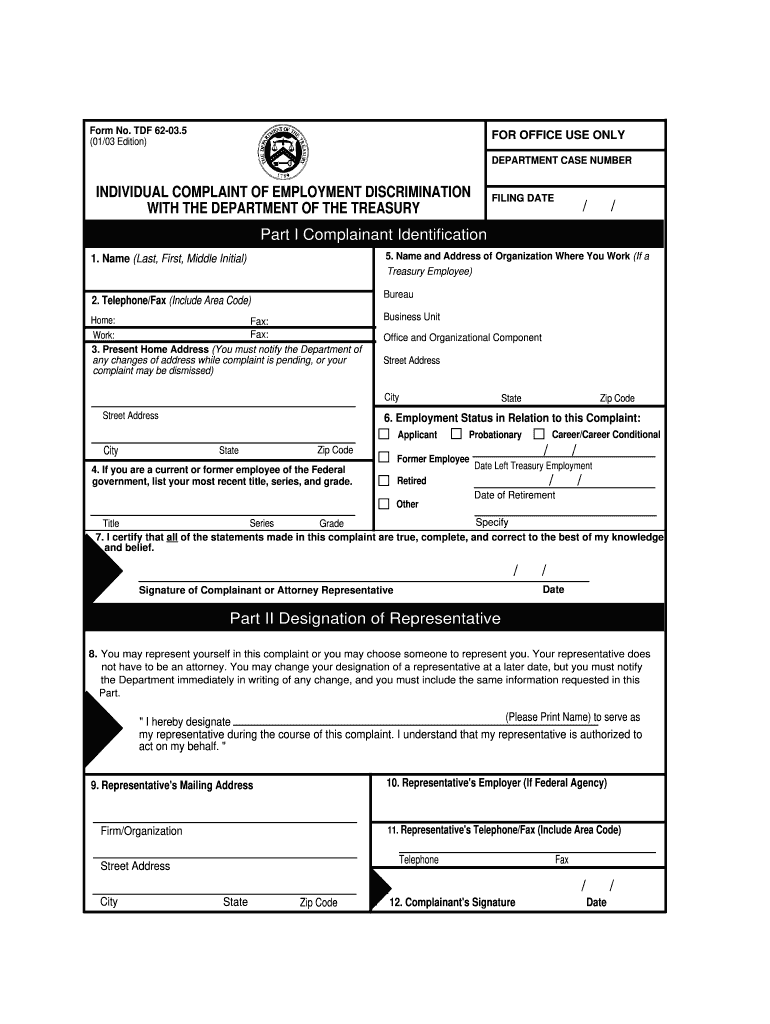
How to use or fill out editable form tdf 62 035 2003

- Click ‘Get Form’ to open it in the editor.
- Begin with Part I, where you will provide your personal information. Fill in your name, address, and contact details accurately.
- In Part II, designate a representative if you choose to have one. Provide their name and contact information.
- Move to Part III to describe the alleged discriminatory actions. Clearly outline the events, including dates and responsible individuals.
- Indicate the basis for your complaint by marking the relevant boxes in Part III. Be thorough in your descriptions for clarity.
- Finally, review all sections for completeness and accuracy before signing and dating the form at the end.
Start filling out your editable form tdf 62 035 2003 today on our platform for free!
It's free
See more editable form tdf 62 035 2003 versions
Got questions?
Can I complete and sign my editable form tdf 62 035 2003 online?
Sure, and it’s really easy! DocHub is a web-based PDF editor with advanced document management functions that allow you rapidly modify your paperwork, complete blank fields and insert new ones for other people to fill out, and create eSignatures in several ways. Import your editable form tdf 62 035 2003, give information as required, and select how you want to eSign your template - by typing your name, drawing your signature, uploading its picture, or using a QR code.
How to complete editable form tdf 62 035 2003 on the internet free of charge in 2024?
With a swift editing system like DocHub, you do not need anything but a web browser and internet connection to edit your editable form tdf 62 035 2003 online quickly. Add your document or get the appropriate form in DocHub’s catalog, open our editor with one click, and finish it digitally. To edit your forms anytime, register a free profile with DocHub.
Security and compliance
At DocHub, your data security is our priority. We follow HIPAA, SOC2, GDPR, and other standards, so you can work on your documents with confidence.
Learn more


