Type text, add images, blackout confidential details, add comments, highlights and more.

02. Sign it in a few clicks
Draw your signature, type it, upload its image, or use your mobile device as a signature pad.

03. Share your form with others
Send it via email, link, or fax. You can also download it, export it or print it out.

How to use or fill out puamass with our platform
Ease of Setup
DocHub User Ratings on G2
Ease of Use
DocHub User Ratings on G2
Click ‘Get Form’ to open the puamass document in the editor.
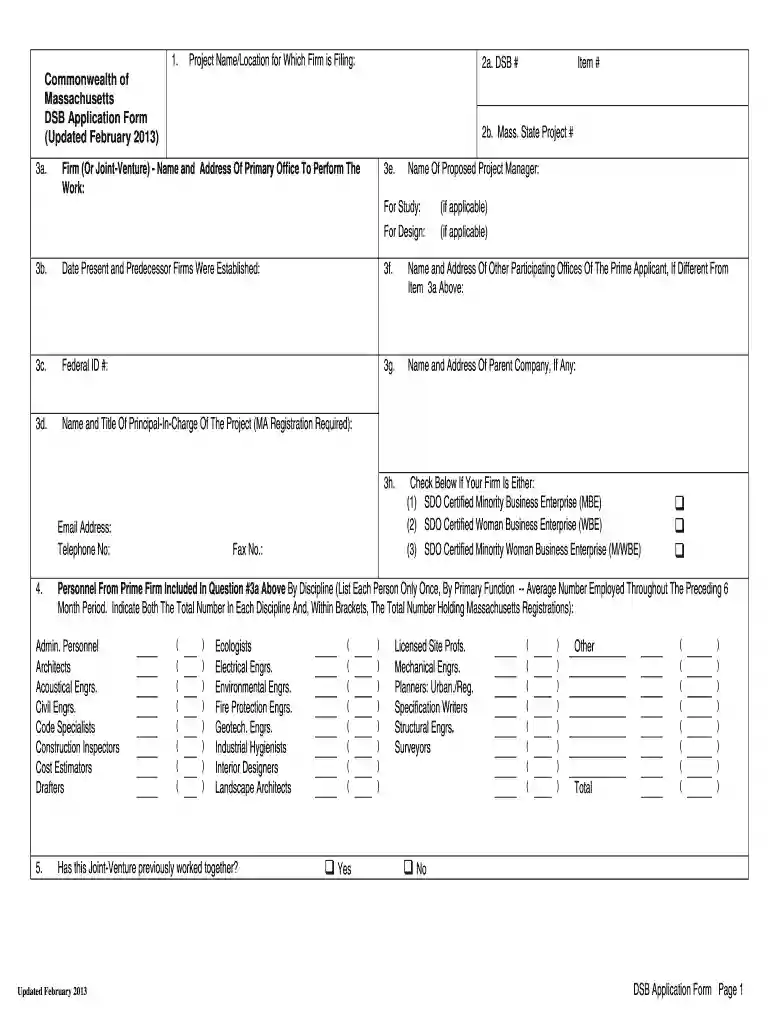
Begin by entering the Project Name and Location in the designated fields at the top of the form. Ensure accuracy as this information is crucial for identification.
Fill in your firm's details, including name, address, and Federal ID #. This section also requires you to provide contact information such as email and telephone number.
Complete Section 3 by providing details about your firm’s registration status and personnel involved. Be sure to check any applicable certifications like MBE or WBE.
In Section 6, create an organizational chart listing all prime and sub-consultant personnel as requested in the advertisement. Include their roles and Massachusetts registration numbers.
For Sections 7 through 10, provide resumes and project experience for key personnel. Limit responses to one person per discipline as specified.
Finally, review all entries for accuracy before submitting your completed form through our platform.
Start filling out your puamass today using our platform for free!
The Department of Unemployment Assistance supports Massachusetts workers through challenging times and helps employers navigate the unemployment insurance
Cookie consent notice
This site uses cookies to enhance site navigation and personalize your experience.
By using this site you agree to our use of cookies as described in our Privacy Notice.
You can modify your selections by visiting our Cookie and Advertising Notice.