Ma dsb application form 2026

Get Form
dsb application form Preview on Page 1

Here's how it works

01. Edit your dsb application form online
Type text, add images, blackout confidential details, add comments, highlights and more.

02. Sign it in a few clicks
Draw your signature, type it, upload its image, or use your mobile device as a signature pad.

03. Share your form with others
Send dsb form via email, link, or fax. You can also download it, export it or print it out.

How to use or fill out ma dsb application form with our platform

Form edit decoration
9.5
Ease of Setup
DocHub User Ratings on G2
9.0
Ease of Use
DocHub User Ratings on G2
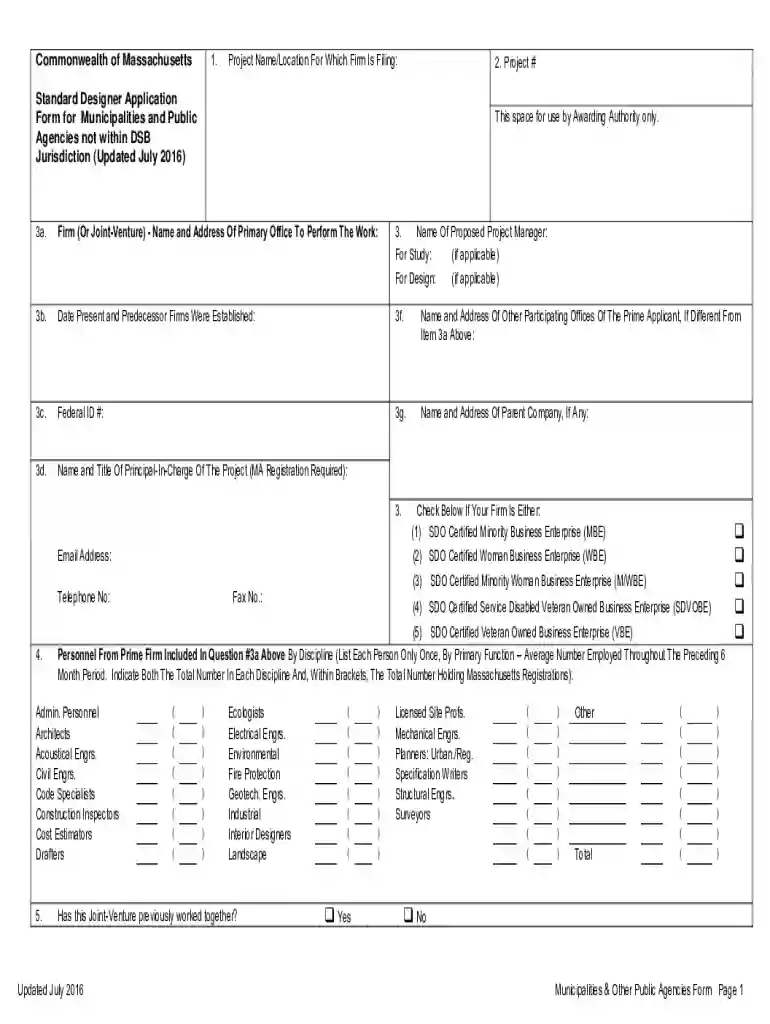
  1. Click ‘Get Form’ to open the ma dsb application form in the editor.
  2. Begin by filling in the 'Project Name/Location' and 'Project #' at the top of the form. This information is crucial for identifying your submission.
  3. In section 3, provide details about your firm, including the name and address of your primary office, as well as the proposed project manager's name for both study and design phases.
  4. Complete sections 3c to 3g with your firm's Federal ID number, names of other participating offices, and parent company details if applicable.
  5. For section 4, indicate if your firm qualifies as a certified service-disabled veteran-owned business enterprise or any other relevant certifications.
  6. Continue through the form by listing personnel from your firm by discipline in section 5. Ensure accuracy in numbers and registrations.
  7. Use section 6 to create an organizational chart for prime and sub-consultant personnel requested in the advertisement. Include all necessary details.
  8. Finally, review all sections for completeness before submitting. Utilize our platform’s features to save or share your completed application easily.

Start using our platform today to fill out your ma dsb application form online for free!

See more ma dsb application form versions

We've got more versions of the ma dsb application form form. Select the right ma dsb application form version from the list and start editing it straight away!
Versions Form popularity Fillable & printable
2016 4.8 Satisfied (135 Votes)
2013 4.3 Satisfied (122 Votes)
be ready to get more

Complete this form in 5 minutes or less

Get form

Got questions?

We have answers to the most popular questions from our customers. If you can't find an answer to your question, please contact us.
Contact us
Mailing Addresses ReturnsExtension PaymentPayment Voucher Form 2: Mass. DOR, PO Box 7018, Boston, MA 02204 Form 2G: Mass. DOR, PO Box 7017, Boston, MA 02204 Form M-8736: Mass. DOR, PO Box 419544, Boston, MA 02241-9544 Form 2-PV: Mass. DOR, PO Box 419544, Boston, MA 02241-9544 Jan 17, 2025
The Designer Selection Board is an autonomous eleven member board that selects designers for state building projects and Commonwealth charter school projects. The DSB serves the design community, assist municipalities with guidelines for their designer selection process and other state entities.
Personal Income Refund: Mass. DOR, PO Box 7000, Boston, MA 02204. Payment: Mass. DOR, PO Box 7003, Boston, MA 02204.
Every executor, administrator, trustee, guardian, conservator, trustee in a noncorporate bankruptcy or receiver of a trust or estate that received income in excess of $100 that is taxable under MGL ch 62 at the entity level or to a beneficiary(ies) and that is subject to Massachusetts jurisdiction must file a Form 2.
Form ITR-2 is specifically for individuals and HUFs who do not have business or professional income. Individuals and HUFs with income from salary, multiple house property, all kind of capital gains, foreign income, taxpayers holiding unlisted shares, and agricultural income exceeding Rs. 5,000 can file ITR-2.

Security and compliance

At DocHub, your data security is our priority. We follow HIPAA, SOC2, GDPR, and other standards, so you can work on your documents with confidence.

Learn more
ccpa2
pci-dss
gdpr-compliance
hipaa
soc-compliance