




Here's how it works



How to use or fill out Liquid Fuel Carrier Petroleum Products Report MF-206 - Kansas with our platform

- Click ‘Get Form’ to open the Liquid Fuel Carrier Petroleum Products Report MF-206 in the editor.
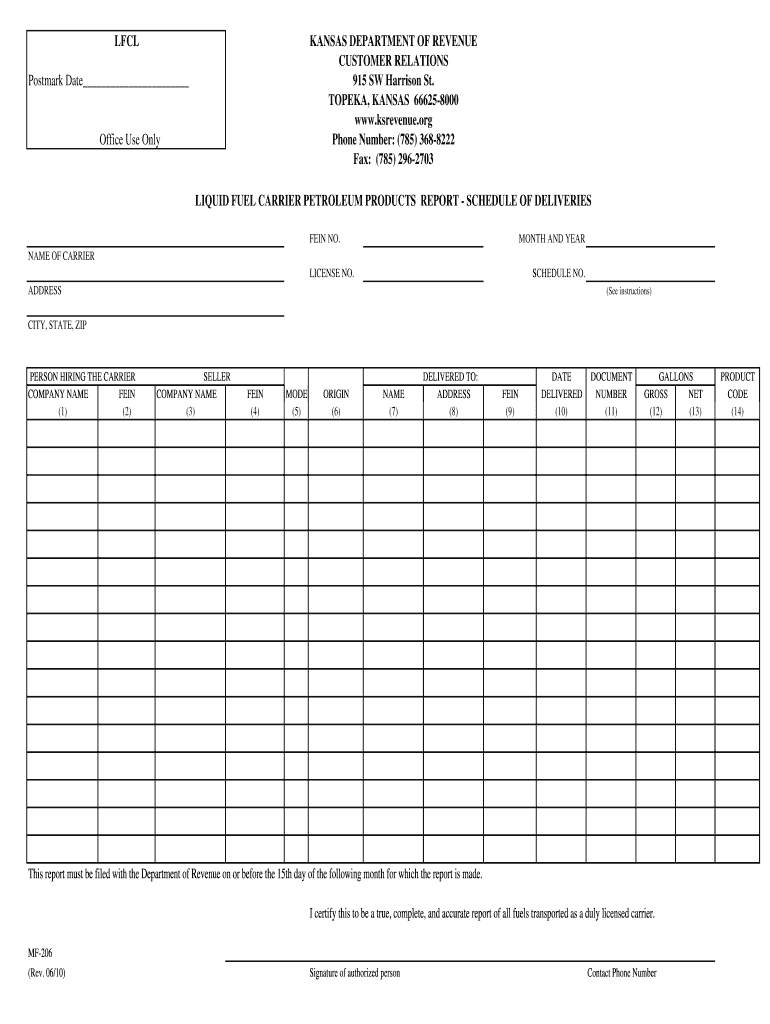
- Begin by entering the Postmark Date at the top of the form. This is essential for timely submission.
- Fill in your FEIN number, month and year, name of carrier, license number, and schedule number in the designated fields.
- For each delivery, provide details such as the person hiring the carrier (columns 1 & 2), seller information (columns 3 & 4), and mode of transport (column 5).
- Document the origin of each delivery (column 6) and enter the final delivery point's name, address, and FEIN (columns 7, 8 & 9).
- Record the date delivered (column 10) and document number (column 11) accurately.
- Finally, input gross and net gallons along with product codes for each delivery in columns 12, 13, and 14.
Start using our platform today to streamline your form completion process for free!
It's free
See more Liquid Fuel Carrier Petroleum Products Report MF-206 - Kansas ... - ksrevenue versions
Got questions?
Can I sign my Liquid Fuel Carrier Petroleum Products Report MF-206 - Kansas ... - ksrevenue on a mobile?
Of course, you’ll find numerous apps for this on the web. However, if you need to eSign your Liquid Fuel Carrier Petroleum Products Report MF-206 - Kansas ... - ksrevenue without installing additional software, DocHub is the best choice you can make. This powerful editor works on mobile devices just as on desktops. Open our editor in any internet browser, register or sign in to your account, and start processing your documents.
How do you complete Liquid Fuel Carrier Petroleum Products Report MF-206 - Kansas ... - ksrevenue online?
You can complete and eSign your Liquid Fuel Carrier Petroleum Products Report MF-206 - Kansas ... - ksrevenue online, even on a tight deadline. All you need to access high quality editing tools on any device is a DocHub account, that you can sign up within a couple of moments. Once you register, upload your file or find what you are looking for in our catalog, complete it utilizing the editing tools you need, and put your electronic signature on it at the end.
Security and compliance
At DocHub, your data security is our priority. We follow HIPAA, SOC2, GDPR, and other standards, so you can work on your documents with confidence.
Learn more


