
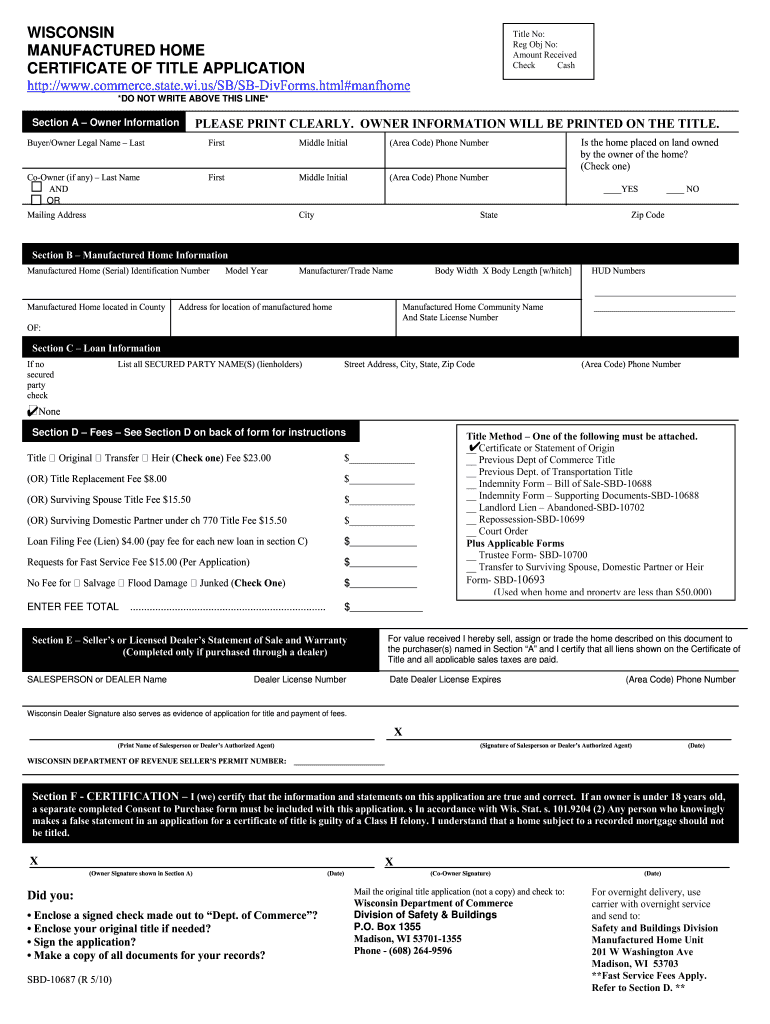





Wisconsin sbd 10687 form 2026

Get Form
wisconsin sbd 10687 form Preview on Page 1

Here's how it works

01. Edit your form online
Type text, add images, blackout confidential details, add comments, highlights and more.
02. Sign it in a few clicks
Draw your signature, type it, upload its image, or use your mobile device as a signature pad.
03. Share your form with others
Send it via email, link, or fax. You can also download it, export it or print it out.

How to use or fill out Wisconsin SBD 10687 form with our platform

Form edit decoration
9.5
Ease of Setup
DocHub User Ratings on G2
9.0
Ease of Use
DocHub User Ratings on G2
  1. Click ‘Get Form’ to open the Wisconsin SBD 10687 form in the editor.
  2. Begin with Section A – Owner Information. Clearly print the legal names of the buyer and co-owner, if applicable. Ensure that phone numbers and mailing addresses are accurate.
  3. Move to Section B – Manufactured Home Information. Enter the serial identification number, model year, manufacturer name, and dimensions of your manufactured home.
  4. In Section C – Loan Information, list any secured parties (lienholders) if applicable. If there are none, check the corresponding box.
  5. Proceed to Section D – Fees. Select the appropriate title type and calculate total fees based on your selections.
  6. Complete Section E if purchased through a dealer by providing their information and ensuring all necessary documents are attached.
  7. Finally, sign in Section F to certify that all information is correct. Remember to include any required additional forms for owners under 18.

Start using our platform today for free to streamline your document editing and submission process!

See more wisconsin sbd 10687 form versions

We've got more versions of the wisconsin sbd 10687 form form. Select the right wisconsin sbd 10687 form version from the list and start editing it straight away!
Versions Form popularity Fillable & printable
2014 4.8 Satisfied (163 Votes)
2011 4.2 Satisfied (57 Votes)
2010 4.3 Satisfied (64 Votes)
be ready to get more

Complete this form in 5 minutes or less

Get form

Got questions?

We have answers to the most popular questions from our customers. If you can't find an answer to your question, please contact us.
Contact us

Electronic document signing demands a software solution that works in compliance with data protection and eSignature laws. DocHub is a perfect tool for that, since it meets all the previously mentioned requirements. Whatever method you prefer to sign your wisconsin sbd 10687 form in DocHub, your electronic signature will be legally binding and court-admissible.

You may quickly complete, modify, and even eSign your wisconsin sbd 10687 form using DocHub. Create a new account and begin your free trial. After that, you can upload the document with the form and simply make all the required edits. No need to print on paper or use a third-party application to sign it, as you can place your electronic signature on your document faster through DocHub.

The cars title number identifies its certificate of title. This information is essential when getting a new title or locating a missing one. The title number is usually in the cars title or any one of its registration or renewal documents.
Regardless of the revision date, the MV11 forms includes dealer assignment, odometer statement and is printed by a secure printing process. The MV11 form is frequently revised by Wisconsins Division of Motor Vehicles which authorizes WATDASI Forms to distribute the MV11 and other DMV forms.
A title deed is a legal document used when a home is transferred from a seller to a buyer, while the certificate of title serves as an impression of the status of a property and does not serve as a guarantee of legal ownership.

Security and compliance

At DocHub, your data security is our priority. We follow HIPAA, SOC2, GDPR, and other standards, so you can work on your documents with confidence.

Learn more
ccpa2
pci-dss
gdpr-compliance
hipaa
soc-compliance
be ready to get more

Complete this form in 5 minutes or less

Get form

People also ask

The Wisconsin Certificate of Title is an important document that indicates ownership of the vehicle. When you sell the vehicle, fill out all of the information requested on the title (e.g., odometer statement, brand disclosure, etc.) and sign the title as the seller, and have the buyer sign as well.
Title, never. Do not keep your title in your car. That is the legal document that proves your ownership of the vehicle. Keep that in a safe place not in your car. You only need to present the title when you are transferring ownership of the vehicle.
This document typically includes detailed information about the mobile home, such as the make, model, year, identification number, and its current condition. It also captures the full names, addresses, and contact information of both the seller and the buyer, as well as the sale price and payment terms.
When you purchase a vehicle, receive it as a gift, or you are a new Wisconsin resident, you must immediately apply for a new Certificate of Title in your name. This document proves that you own the vehicle. Never buy a vehicle without receiving a title signed by the previous owner.
The Wisconsin Department of Transportation (WisDOT) allows vehicle owners to apply for a duplicate title online, by mail, or in person at a DMV office.

Related links