




Here's how it works



How to use or fill out laciv 239 with our platform

- Click ‘Get Form’ to open the laciv 239 document in the editor.
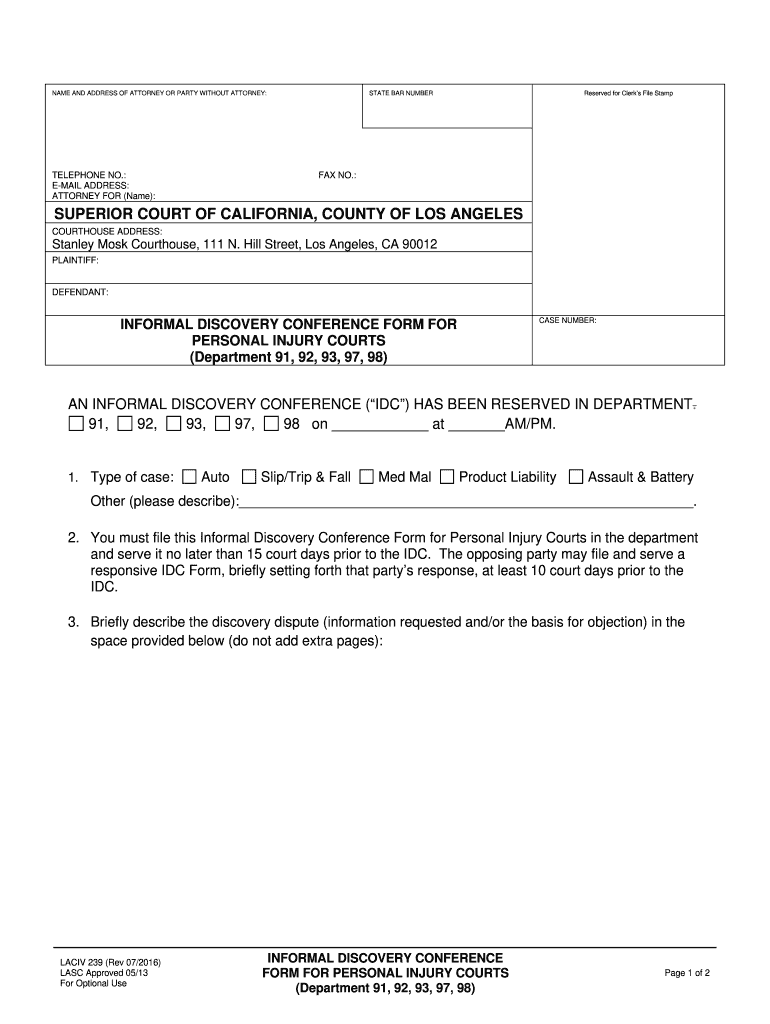
- Begin by entering your name and address in the designated fields for the attorney or party without an attorney. Include your telephone number, email address, and state bar number if applicable.
- Fill in the courthouse address as 'Stanley Mosk Courthouse, 111 N. Hill Street, Los Angeles, CA 90012'.
- Indicate the plaintiff and defendant names along with the case number in their respective sections.
- Select the type of case from the options provided (e.g., Auto, Slip/Trip & Fall). If your case falls under 'Other', please describe it briefly.
- In the space provided, describe any discovery disputes clearly and concisely without adding extra pages.
- Review all entered information for accuracy before saving or submitting your form.
Start using our platform today to fill out laciv 239 online for free!
It's free
See more laciv 239 versions
Got questions?
What is the best way to send my laciv 239 for eSignature?
Upload your laciv 239 to DocHub (once you’ve set up an account for this). If you need to complete fields in it, use proper tools from the top pane. For instance, add Signature Fields, assign each to a particular person, and click on Sign → Request signatures from others. Personalize your message for your recipients and click Send Request. You can also send your paperwork by fax or as a Signing link instead of using email (you’ll find these options by navigating to the Menu → Send)
How do you edit laciv 239 on Android?
Document editing with DocHub is equally convenient on desktop and mobile devices. You just need an internet browser to revise your laciv 239 on Android. Open our website and sign in to access the tools you need. Add your document and introduce your intended modifications. After that, you can keep your form in your document storage or send it out immediately.
How to speak to a judge on the phone?
How to respectfully talk to a judge?
What forms do I need to file a civil lawsuit in California?
Security and compliance
At DocHub, your data security is our priority. We follow HIPAA, SOC2, GDPR, and other standards, so you can work on your documents with confidence.
Learn more


