




Here's how it works

01. Edit your inz 1209 online
Type text, add images, blackout confidential details, add comments, highlights and more.

02. Sign it in a few clicks
Draw your signature, type it, upload its image, or use your mobile device as a signature pad.

03. Share your form with others
Send inz1209 national security check via email, link, or fax. You can also download it, export it or print it out.
How to use or fill out inz1209 with our platform

- Click ‘Get Form’ to open the inz1209 in the editor.
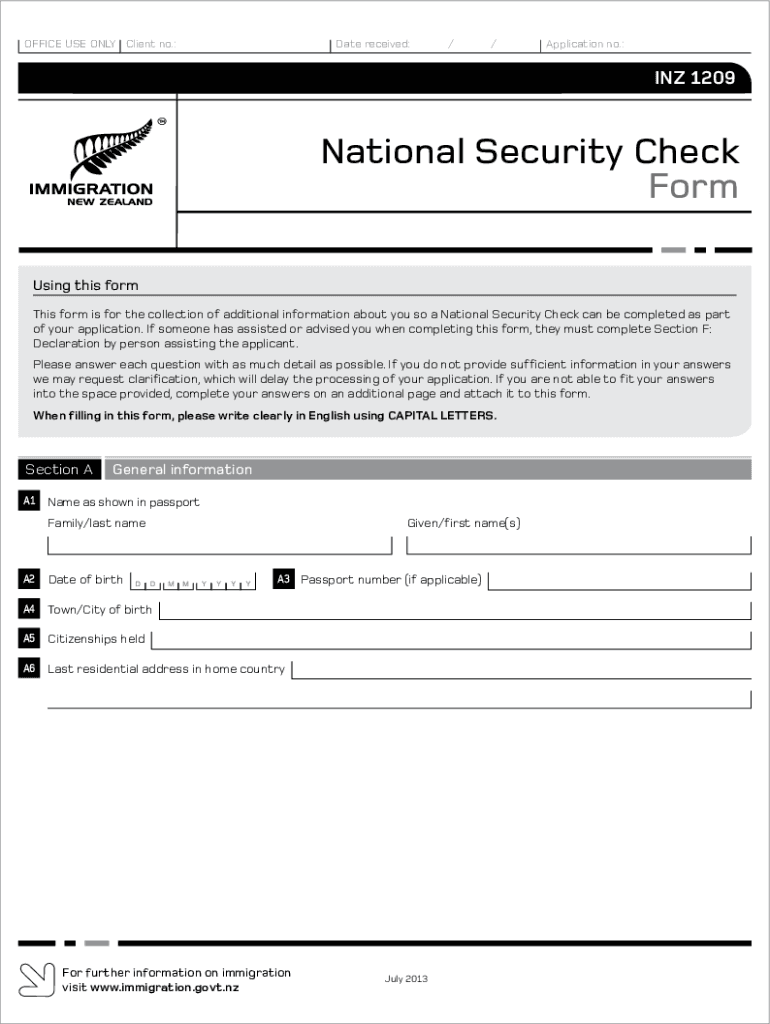
- Begin with Section A, where you will provide your general information. Fill in your name as shown in your passport, date of birth, and passport number if applicable. Ensure clarity by using CAPITAL LETTERS.
- Proceed to Section B to disclose any previous visa refusals. Answer 'Yes' or 'No' and provide details if applicable.
- In Section C, outline your education history starting from secondary school. Include dates, institutions attended, and qualifications earned.
- Continue to Section D for military history. Answer questions regarding military service and any associations with intelligence agencies.
- Complete Section E by signing the declaration confirming that all provided information is true and correct.
- If assistance was provided while filling out the form, ensure Section F is completed by the assisting individual.
Start using our platform today for free to streamline your form completion process!
Fill out inz1209 online
It's free
It's free
See more inz1209 versions
We've got more versions of the inz1209 form. Select the right inz1209 version from the list and start editing it straight away!
| Versions | Form popularity | Fillable & printable |
|---|---|---|
| 2013 | 4.8 Satisfied (145 Votes) |
Security and compliance
At DocHub, your data security is our priority. We follow HIPAA, SOC2, GDPR, and other standards, so you can work on your documents with confidence.
Learn more


Related forms

FF-206-FY-21-118 NFIP Flood Insurance Cancellation Nullification Request Form, May 2021
The document is a Flood Insurance Cancellation/Nullification Request Form from the U.S. Department of Homeland Security' ...

Form I-881, Instructions for Application for Suspension of Deportation or Special Rule Cancellation
Form I-881, Instructions for Application for Suspension of Deportation or Special Rule Cancellation
The document provides detailed instructions for Form I-881, which is used by eligible aliens to apply for suspension of ...

Blue Shield of California Subscriber's Statement of Claim
The document is a Subscriber's statement of claim form for Blue Shield of California, intended for members to submit cla ...

Construction Plan Submittal Form for Health Care Facilities Construction Plan Submittal Form for Hea
Construction Plan Submittal Form for Health Care Facilities Construction Plan Submittal Form for Hea
The document is a Construction Plan Submittal Form for health care facilities, detailing the requirements for submitting ...

Massachusetts UNIFORM APPLICATION 2009 STATE - Mass - mass
The Massachusetts Uniform Application 2009 State Implementation Report outlines the state's efforts in providing communi ...

11 13 12 and 11 14 12 Registration - michigan
The document is a registration form for the Michigan Weights and Measures Serviceperson testing sessions, requiring part ...

4698 MBT Additional Tax Credit for Qualified Utilities Making Certain Capital Investments Worksheet
4698 MBT Additional Tax Credit for Qualified Utilities Making Certain Capital Investments Worksheet
The document outlines the process for Michigan gas and electric utilities to claim an additional Investment Tax Credit ( ...

Bank credit reference form
The document is a Bank Credit Reference Form that authorizes a bank to release a customer's account and credit informati ...