




Here's how it works



How to use or fill out 4698 MBT Additional Tax Credit for Qualified Utilities Making Certain Capital Investments Worksheet

- Click ‘Get Form’ to open it in the editor.
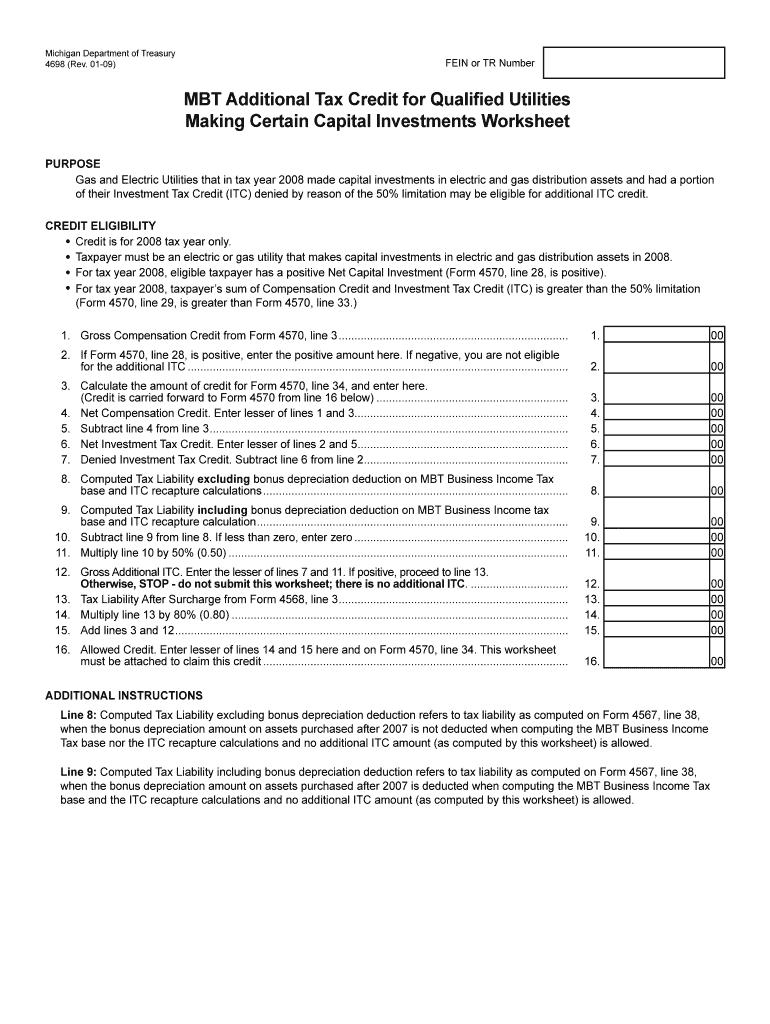
- Begin by entering your FEIN or TR Number at the top of the form. This is essential for identification purposes.
- Proceed to Section 1, where you will input the Gross Compensation Credit from Form 4570, line 3. Ensure accuracy as this affects your credit eligibility.
- In Section 2, if Form 4570, line 28 is positive, enter that amount. If negative, you are not eligible for additional ITC.
- Continue calculating in Section 3 by determining the credit amount from Form 4570, line 34 and entering it accordingly.
- Follow through Sections 4 to 16, ensuring each calculation is based on previous lines accurately to determine your Allowed Credit.
Start using our platform today to fill out your form online for free and streamline your tax credit process!
It's free
Got questions?
How do I sign my 4698 MBT Additional Tax Credit for Qualified Utilities Making Certain Capital Investments Worksheet on iOS?
With DocHub, you can rapidly sign your 4698 MBT Additional Tax Credit for Qualified Utilities Making Certain Capital Investments Worksheet or any other paperwork on iOS, even without installing extra programs. You can access your DocHub account from any web-connected browser and fill out and sign your document in any way you like with just a few clicks.
Can I sign my 4698 MBT Additional Tax Credit for Qualified Utilities Making Certain Capital Investments Worksheet while I edit it?
If you edit your 4698 MBT Additional Tax Credit for Qualified Utilities Making Certain Capital Investments Worksheet with DocHub, you simply will not need to look for other applications or solutions to sign it. An electronic signature is a component of DocHub’s substantial editing toolset, which enables you to apply changes in your form without switching between websites. Just complete your form, double-check the correctness of your data and put your electronic signature at the end to make it submission-ready within a few minutes.
Security and compliance
At DocHub, your data security is our priority. We follow HIPAA, SOC2, GDPR, and other standards, so you can work on your documents with confidence.
Learn more




