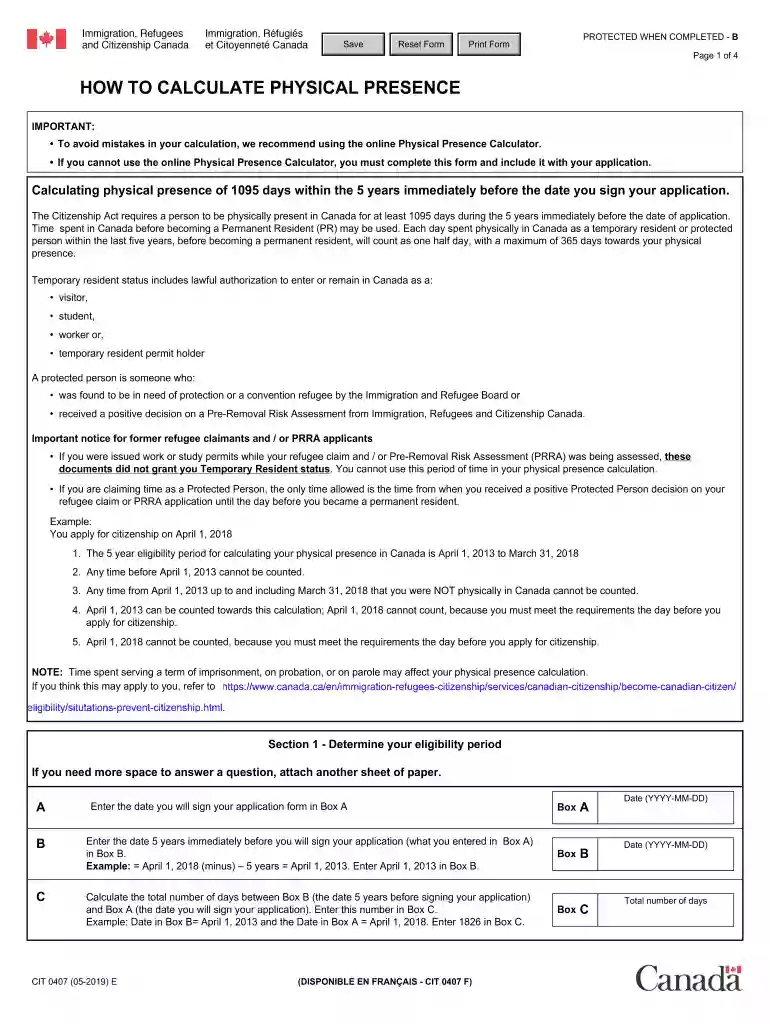
cit 0407 Preview on Page 1

Cit 0407-2026

Here's how it works

  • 01. Edit your cit 0407 online

    Type text, add images, blackout confidential details, add comments, highlights and more.

  • 02. Sign it in a few clicks

    Draw your signature, type it, upload its image, or use your mobile device as a signature pad.

  • 03. Share your form with others

    Send cit0407 via email, link, or fax. You can also download it, export it or print it out.

How to use or fill out cit 0407 with our platform

Form edit decoration
9.5
Ease of Setup
DocHub User Ratings on G2
9.0
Ease of Use
DocHub User Ratings on G2
  1. Click ‘Get Form’ to open the CIT 0407 in the editor.
  2. In Section 1, enter the date you will sign your application in Box A. Then, calculate and enter the date five years prior in Box B.
  3. Calculate the total number of days between Box B and Box A and enter this number in Box C. Remember, do not count the day you sign your application.
  4. In Section 2, enter the date you became a permanent resident in Box D. Calculate the total days from that date to Box A and input it in Box E.
  5. If applicable, list all absences from Canada in the provided chart and calculate the total days absent to enter in Box F.
  6. Complete Section 3 if you had Temporary Resident or Protected Person status before becoming a permanent resident, entering relevant dates and calculating accordingly.

Start filling out your CIT 0407 form online for free today!

See more cit 0407 versions

We've got more versions of the cit 0407 form. Select the right cit 0407 version from the list and start editing it straight away!

VersionsForm popularityFillable & printable
20194.8 Satisfied (61 Votes)
20154.5 Satisfied (56 Votes)
20124.4 Satisfied (549 Votes)

be ready to get more

Complete this form in 5 minutes or less

Security and compliance

At DocHub, your data security is our priority. We follow HIPAA, SOC2, GDPR, and other standards, so you can work on your documents with confidence.

how to calculate physical presence form cit 0407

Reference Manual

CIT tests the Inter-record indicator in the selected channel. If the Inter 0402 0403 0404 0405 0406 0407. 0410 0411 0412 0413 0414 0415. 0418 0419Read more

Learn more
Crisis Intervention Team | Loudoun County, VA

The Loudoun Crisis Intervention Team (CIT) is designed to protect the safety, dignity, and rights of persons suffering from mental health issues.Read more

Learn more
Instructional Technology Standard: Classroom Support

Jul 15, 2025 The primary support contact is the person or group responsible for installing the software image and maintaining the instructor computer.Read more

Learn more
If you believe that this page should be taken down, please follow our DMCA take down process here