
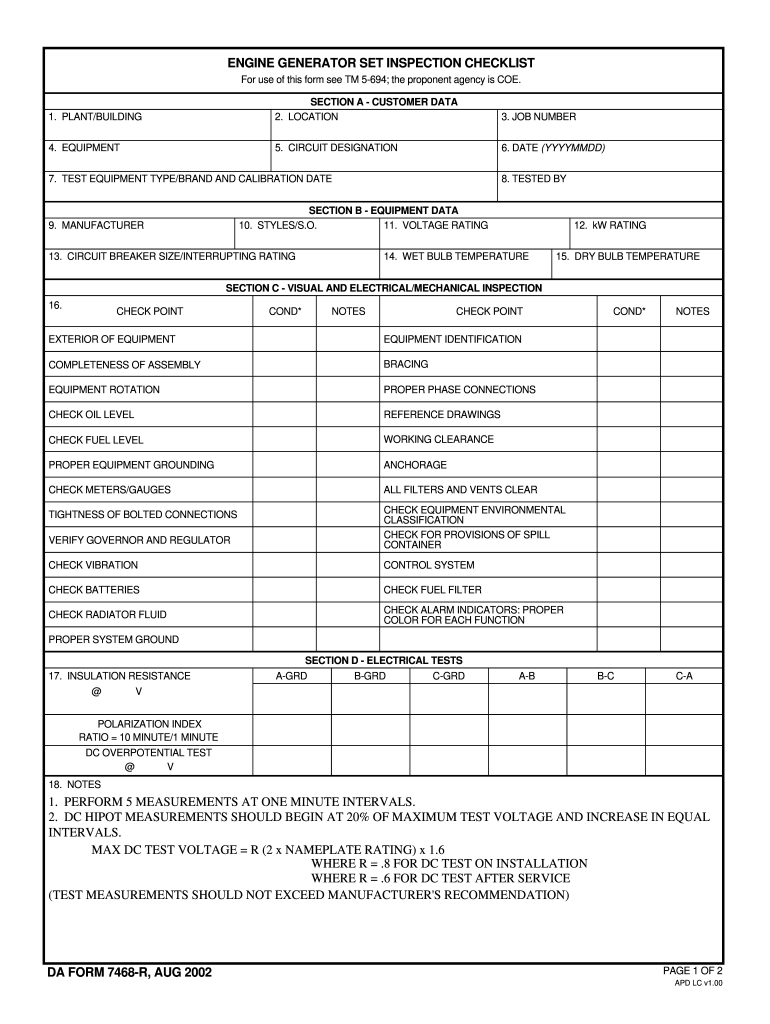







Definition and Meaning of the Generator Log Sheet Excel
A generator log sheet excel is a structured document utilized for tracking the operational data of generator sets. This log sheet serves multiple functions, including recording usage hours, maintenance schedules, fuel consumption, and performance metrics. It is essential for both compliance and operational efficiency, allowing operators to maintain a clear history of generator performance and service requirements. This sheet can be pivotal for organizations relying on generators for their critical operations, such as construction sites, data centers, and hospitals, where continuous power supply is crucial.
Importance of Accurate Logging
- Compliance: Regular logging helps ensure adherence to safety and operational regulations.
- Maintenance Records: Documenting service and maintenance can help detect issues before they escalate, extending the lifespan of the generator.
- Financial Tracking: Keeping track of fuel and operational costs aids in budget management, allowing businesses to allocate resources efficiently.
How to Use the Generator Log Sheet Excel Effectively
Utilizing a generator log sheet excel involves several steps that cater to the specific needs of the user while ensuring accuracy and comprehensiveness in data entry.
Basic Structure
A typical generator log sheet consists of various sections that users must populate:
- Date and Time: The starting point of any log entry.
- Usage Duration: Total hours the generator was in operation.
- Fuel Consumption: Amount of fuel used during operation, typically measured in gallons.
- Maintenance Activities: Notes on any servicing, repairs, or inspections conducted on the generator.
- Performance Metrics: Any observed issues, such as noise levels or overheating.
Steps to Enter Data
- Open the Excel Template: Start with a pre-designed template or a blank sheet designed to capture all necessary details.
- Input Basic Information: Enter the date, time, and operator’s name for every activity.
- Log Operational Time: Record the runtime for every generator operation, which informs maintenance scheduling.
- Document Maintenance Activities: Note any checks or repairs, including dates and descriptions of work performed.
- Review Weekly/Monthly: At regular intervals, review the logs for patterns that could indicate deeper issues or opportunities for maintenance improvements.
Steps to Complete the Generator Log Sheet Excel
Completing the generator log sheet excel requires attention to detail and systematic organization. Each step involves specific actions that ensure all relevant data is recorded accurately.
Step-by-Step Process
-
Preparation of the Log Sheet:
- Select a standardized template that suits your organization's needs. Customize columns to match operational requirements.
-
Filling in Data:
- For each usage cycle, enter data systematically. Include the generator ID if managing multiple units.
- Utilize dropdown menus for repetitive data entries (like type of fuel or routine checks) to minimize errors.
-
Monitoring Performance:
- Analyze the logged data regularly. Use Excel's analytical tools to chart fuel usage and run hours against performance thresholds.
-
Updating Maintenance Records:
- Whenever maintenance is performed, immediately log the details. This ensures the service history is accurate and comprehensive.
-
Syncing with Other Systems:
- Integrate your excel sheet with other management software if applicable, ensuring all information is readily accessible for stakeholder evaluations.
Examples of Using the Generator Log Sheet Excel
Practical examples illustrate how the generator log sheet excel is beneficial across different scenarios.
Scenario: Construction Site Operations
On a construction site, where generator reliance is high, a log sheet can:
- Track the hours worked during construction shifts.
- Monitor fuel levels, helping procurement teams plan fuel deliveries ahead of time.
- Record maintenance actions, ensuring compliance with safety protocols.
Scenario: Hospital Emergency Power
For hospitals, maintaining detailed generator logs can be critical:
- Logging daily checks and fuel consumption can contribute to compliance with healthcare regulations.
- Tracking any anomalies in performance can trigger immediate inspections, helping to avoid power outages that could compromise patient care.
Important Terms Related to the Generator Log Sheet Excel
Understanding key terminology enhances effective usage of the generator log sheet excel.
- Operation Hours: The total hours a generator has been active, critical for maintenance scheduling.
- Fuel Type: Kind of fuel used (diesel, natural gas), affecting performance and cost calculations.
- Load Testing: An assessment performed to ensure the generator can handle its specified output load.
- Preventive Maintenance: Scheduled servicing aimed at preventing unexpected failures.
Key Elements of the Generator Log Sheet Excel
Several critical components make up an effective generator log sheet excel, and understanding these elements is vital for accurate record-keeping.
Essential Components
- Header Section: Basic information such as generator ID, location, and operator details should be clearly indicated at the top of the sheet for quick reference.
- Operational Data Fields: Include necessary columns for date, usage duration, fuel consumed, maintenance notes, and performance observations.
- Summary Section: A compiled overview of totals and averages for fuel consumption and hours logged, providing immediate insights into generator performance.
- Compliance Notes: A section dedicated to any compliance-related entries, serving as a vital reference for audits and inspections.
By integrating these components, users can ensure comprehensive tracking and management of generator operations, ultimately leading to improved performance and compliance.




