01. Edit your windstream lifeline application form online
Type text, add images, blackout confidential details, add comments, highlights and more.

02. Sign it in a few clicks
Draw your signature, type it, upload its image, or use your mobile device as a signature pad.

03. Share your form with others
Send lifeline windstream via email, link, or fax. You can also download it, export it or print it out.

How to use or fill out windstream internet with our platform
Ease of Setup
DocHub User Ratings on G2
Ease of Use
DocHub User Ratings on G2
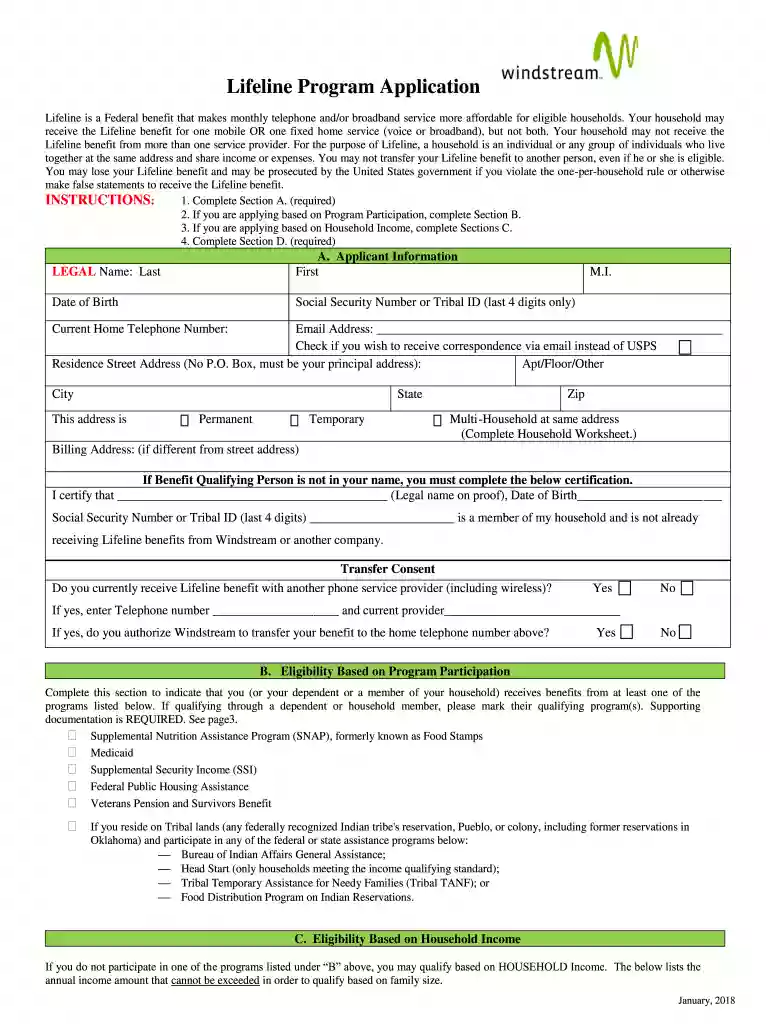
Click ‘Get Form’ to open the windstream internet application in the editor.
Begin with Section A, where you will enter your legal name, date of birth, and Social Security Number (last 4 digits only). Ensure that your current home telephone number and email address are accurate.
If applying based on program participation, complete Section B by checking the relevant benefits you or a household member receives. Remember to gather supporting documentation as required.
For those applying based on household income, proceed to Section C. Fill in your household size and annual income details. Make sure to provide necessary proof of income.
Complete Section D by reading the program rules carefully. Initial each statement to certify your understanding and compliance before signing and dating the application.
Start filling out your windstream internet application today for free using our platform!
We've got more versions of the windstream internet form. Select the right windstream internet version from the list and start editing it straight away!
Windstream internet customer serviceWindstream customer serviceWindstream internet outageWindstream loginWindstream internet phone numberWindstream internet not workingWindstream internet reviewsWindstream internet outage map
Security and compliance
At DocHub, your data security is our priority. We follow HIPAA, SOC2, GDPR, and other standards, so you can work on your documents with confidence.
However, when there are several routers in the network, you may want to set up static routing. Static routing determines the path of the data in your network.Read more
Cookie consent notice
This site uses cookies to enhance site navigation and personalize your experience.
By using this site you agree to our use of cookies as described in our Privacy Notice.
You can modify your selections by visiting our Cookie and Advertising Notice.