Type text, add images, blackout confidential details, add comments, highlights and more.
02. Sign it in a few clicks
Draw your signature, type it, upload its image, or use your mobile device as a signature pad.
03. Share your form with others
Send fl 685 form instructions via email, link, or fax. You can also download it, export it or print it out.
How to use or fill out FL-685 with our platform
Ease of Setup
DocHub User Ratings on G2
Ease of Use
DocHub User Ratings on G2
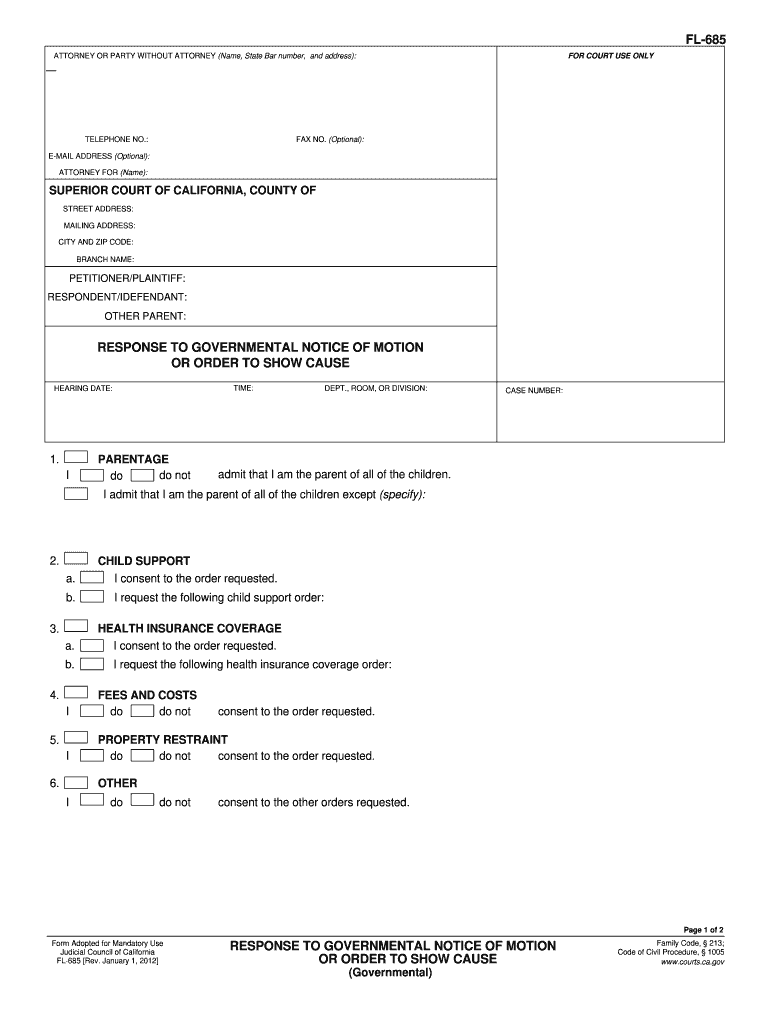
Click ‘Get Form’ to open FL-685 in the editor.
Begin by entering your name, State Bar number, and address in the 'Attorney or Party Without Attorney' section. Include your telephone number and optional fax and email addresses.
Fill in the court details including the Superior Court of California, County, street address, mailing address, city, zip code, and branch name.
Identify the parties involved by entering the names of the Petitioner/Plaintiff, Respondent/Defendant, and Other Parent.
In the 'Parentage' section, indicate whether you admit to being a parent of all children listed. Specify any exceptions if applicable.
Complete sections regarding child support and health insurance coverage by consenting or requesting orders as needed.
Provide facts supporting your response in the designated area. Attach any necessary declarations.
Sign and date the form at the bottom to validate your response.
If required, complete the 'Proof of Service by Mail' section to confirm that you have served copies of this response appropriately.
Start using our platform today for free to streamline your FL-685 form completion!
FL-685 Response To Governmental Notice Of Motion Or Order
I served this Response, which included an address verification declaration (Declaration Regarding Address Verification. Postjudgment Request to Modify a ChildRead more
Correlation among the changes in hepatic microsomal components after intoxication with alkyl halides and other hepatotoxins. Mol Pharmacol 20(3):685-693. *NAS/Read more
IN THE SUPREME COURT OF FLORIDA. CASE NO. SC 03-685. IN RE: AMENDMENTS TO FLORIDA RULES OF CRIMINAL PROCEDURE. AND THE FLORIDA RULES OF APPELLATE PROCEDURE. /.Read more
Cookie consent notice
This site uses cookies to enhance site navigation and personalize your experience.
By using this site you agree to our use of cookies as described in our Privacy Notice.
You can modify your selections by visiting our Cookie and Advertising Notice.