Dhmh 4345 1997 form-2026

Get Form
dhmh 4345 1997 form Preview on Page 1

Here's how it works

01. Edit your form online
Type text, add images, blackout confidential details, add comments, highlights and more.

02. Sign it in a few clicks
Draw your signature, type it, upload its image, or use your mobile device as a signature pad.

03. Share your form with others
Send it via email, link, or fax. You can also download it, export it or print it out.

How to use or fill out dhmh 4345 1997 form with our platform

Form edit decoration
9.5
Ease of Setup
DocHub User Ratings on G2
9.0
Ease of Use
DocHub User Ratings on G2
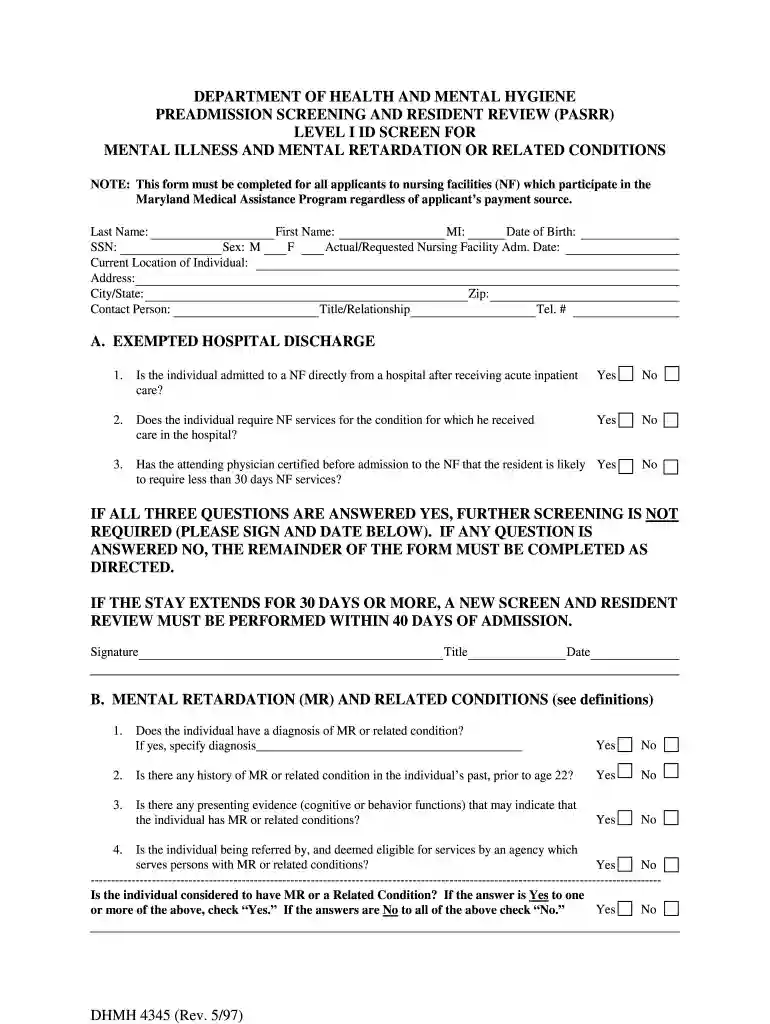
  1. Click ‘Get Form’ to open the dhmh 4345 1997 form in the editor.
  2. Begin by filling in the personal information section, including Last Name, First Name, MI, SSN, Date of Birth, and Current Location. Ensure all details are accurate for proper processing.
  3. Proceed to Section A regarding Exempted Hospital Discharge. Answer the three questions by selecting 'Yes' or 'No'. If all are answered 'Yes', you can sign and date at the bottom of this section.
  4. If any question in Section A is answered 'No', continue to Section B on Mental Retardation. Answer each question carefully and specify any diagnosis if applicable.
  5. Next, move to Section C for Serious Mental Illness. Again, respond to each question truthfully and provide necessary details about diagnoses and treatment history.
  6. Finally, complete Section D if applicable. Review your answers thoroughly before signing at the end of the form to certify accuracy.

Start using our platform today for free to streamline your form completion process!

See more dhmh 4345 1997 form versions

We've got more versions of the dhmh 4345 1997 form form. Select the right dhmh 4345 1997 form version from the list and start editing it straight away!
Versions Form popularity Fillable & printable
2014 4.8 Satisfied (182 Votes)
1997 4 Satisfied (42 Votes)
be ready to get more

Complete this form in 5 minutes or less

Get form

Got questions?

We have answers to the most popular questions from our customers. If you can't find an answer to your question, please contact us.
Contact us

Microsoft Word doesn’t have signing tools to generate legitimate electronic signatures and enforceable documents. Luckily, DocHub is an online eSignature-compliant editor that works with different file formats, including .doc files. Sign in to your account and upload the Word edition of your dhmh 4345 1997 form from your device and cloud, or URL - our editor will automatically transform it into an editable PDF. Make all necessary modifications in your document and click Sign to generate your own legally-binding eSignature. There are four signing options from which to choose.

If you use Chrome, there are two easy ways to edit your dhmh 4345 1997 form online. First, go to the DocHub site, add your file, and edit it utilizing our toolbar. You may also set up our Chrome extension and edit any document by dragging and dropping it in your browser tab.

A Level 2 Evaluation is a person-centered evaluation that is completed for anyone identified by the Level 1 Screening as having, or suspected of having, a PASRR condition, i.e., serious mental illness (SMI), intellectual disability (ID), developmental disability (DD), or related condition (RC).
How to write employee performance reviews Step 1: Review the employees current job description. Step 2: Review past employee performance reviews. Step 3: Highlight areas of improvement. Step 4: Identify strengths and weaknesses (and chart progress) Step 5: Provide actionable goals. Step 6: Include 360-degree feedback.
To fill out the PASRR Level I Screen, start by providing the demographic information of the individual. Next, answer the mental illness screening questions based on the individuals history. Finally, ensure that all sections are completed accurately before submission.

People also ask

The components of the MSE are as follows: Appearance: How does the patient look? Level of alertness: Is the patient conscious? Speech: Is it normal in tone, volume and quantity? Behavior: Pleasant? Awareness of environment, also referred to as orientation: Do they know where they are and what they are doing here?
When you fill the form: Be honest and critical. Analyze your failures and mention the reasons for it. Keep the words minimal. Identify weaknesses. Mention your achievements. Link achievements to the job description and the organizations goals. Set the goals for the next review period. Resolve conflicts and grievances.
Essential elements What was the nature or type of dispatch? What was the initial scene assessment upon arrival? How did you transfer the patient to the ambulance? Which medications were administered, and at what dosages? What supplies were utilized during the call? Were there any safety concerns?

Related links