Get a copy of my ged 2026

Get Form
get a copy of my ged Preview on Page 1

Here's how it works

01. Edit your get a copy of my ged online
Type text, add images, blackout confidential details, add comments, highlights and more.

02. Sign it in a few clicks
Draw your signature, type it, upload its image, or use your mobile device as a signature pad.

03. Share your form with others
Send hse request lctcs edu via email, link, or fax. You can also download it, export it or print it out.

How to use or fill out get a copy of my ged

Form edit decoration
9.5
Ease of Setup
DocHub User Ratings on G2
9.0
Ease of Use
DocHub User Ratings on G2
  1. Click ‘Get Form’ to open it in the editor.
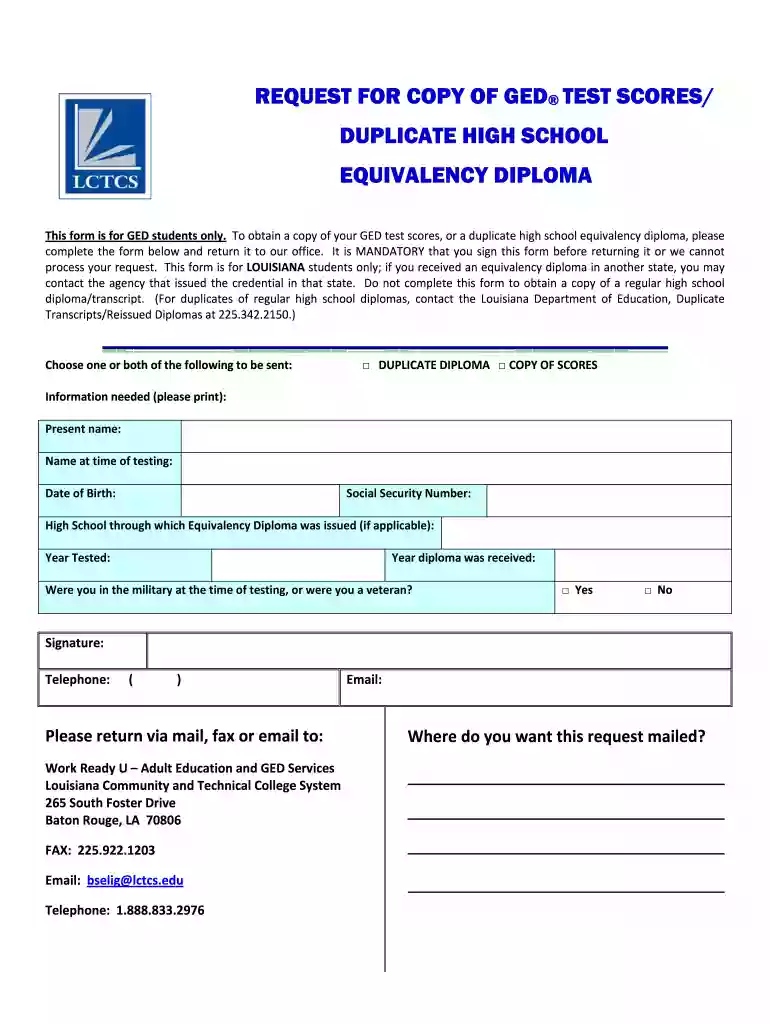
  2. Select whether you want a duplicate diploma, a copy of your scores, or both by checking the appropriate boxes.
  3. Fill in your present name and the name you used at the time of testing. Ensure accuracy for processing.
  4. Enter your date of birth and Social Security Number. This information is crucial for identity verification.
  5. If applicable, provide the name of the high school through which your equivalency diploma was issued.
  6. Indicate the year you were tested and the year you received your diploma.
  7. Answer whether you were in the military at the time of testing or if you are a veteran by checking 'Yes' or 'No'.
  8. Sign the form to authorize processing and include your telephone number for any follow-up communication.

Start using our platform today to easily fill out and submit your GED request form online for free!

See more get a copy of my ged versions

We've got more versions of the get a copy of my ged form. Select the right get a copy of my ged version from the list and start editing it straight away!
Versions Form popularity Fillable & printable
2011 4 Satisfied (20 Votes)
2010 4.8 Satisfied (57 Votes)
be ready to get more

Complete this form in 5 minutes or less

Get form

Got questions?

We have answers to the most popular questions from our customers. If you can't find an answer to your question, please contact us.
Contact us
Request your transcripts at GED.com or through your GED account. Scroll down to the Request your Transcript section, click on GED Grads, and then use the Select Area drop-down to select Washington.
In most cases, GED transcripts are sent out within 24 hours of the checkout process. However, sometimes, these records must be manually located due to age or other technical difficulties. This may result in a minor delay.
Your diploma is the certificate issued by your state upon completion of the GED indicating that you have earned your high school equivalency. Your transcript is the official record of the GED test subjects that you took and your scores.
GED Records Click here to order a copy of your GED from the South Carolina Department of Education. There is a $10.00 fee. Important Information: All requests for student records/information will be submitted and paid for online using a credit or debit card.
(1) Go to the GED Request your Transcript page, (2) Select the Region and Area where you took the test and click Request Transcripts, (3) On the next screen, sign in. Need help creating an account?

Security and compliance

At DocHub, your data security is our priority. We follow HIPAA, SOC2, GDPR, and other standards, so you can work on your documents with confidence.

Learn more
ccpa2
pci-dss
gdpr-compliance
hipaa
soc-compliance

People also ask

All states hold records of GED diplomas and everyone who earned a GED there. These records are accessible for GED holders themselves but also for other individuals and organizations who have their consent. For instance, when you apply for a job, you will most likely need to submit your secondary education details.
If you earned your diploma in Florida after January 1, 2014, you can order duplicate credentials in your GED account at GED.com. After logging in, go to My Scores and select Order Duplicates. Carefully follow the instructions presented during the order process.

Related links