01. Edit your register dot medical card online michigan online
Type text, add images, blackout confidential details, add comments, highlights and more.
02. Sign it in a few clicks
Draw your signature, type it, upload its image, or use your mobile device as a signature pad.
03. Share your form with others
Send michigan dot medical card requirements via email, link, or fax. You can also download it, export it or print it out.
How to use or fill out dot medical card online with our platform
Ease of Setup
DocHub User Ratings on G2
Ease of Use
DocHub User Ratings on G2
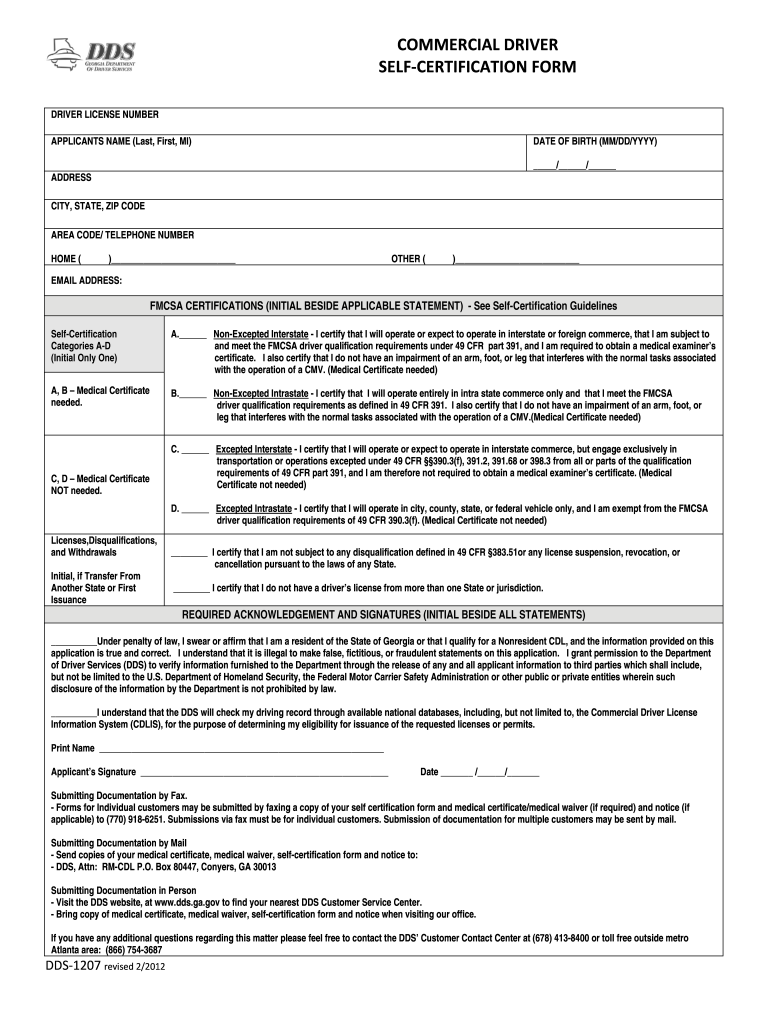
Click ‘Get Form’ to open the dot medical card online in the editor.
Begin by entering your Driver License Number, followed by your full name (Last, First, MI) and Date of Birth in the specified format (MM/DD/YYYY).
Fill in your address details including City, State, and ZIP Code. Don’t forget to provide your area code and telephone number for both home and other contacts.
In the FMCSA Certifications section, carefully read each category (A-D) and initial beside the statement that applies to you. Ensure you understand whether a medical certificate is needed based on your selection.
Complete the Licenses, Disqualifications, and Withdrawals section by initialing if applicable. This confirms you are not subject to disqualifications or holding multiple licenses.
Finally, acknowledge all statements in the Required Acknowledgement and Signatures section by initialing beside each statement. Print your name, sign, and date the form before submission.
Start filling out your dot medical card online for free today using our platform!
We've got more versions of the dot medical card online form. Select the right dot medical card online version from the list and start editing it straight away!
dot medical card online near coloradodot medical card online near denver, coHow to check DOT medical card status onlineFMCSA Medical cardTexas CDL medical card status checkHow do I update my DOT medical card onlineRegister DOT medical card online georgiaRegister DOT medical card online Texas
Security and compliance
At DocHub, your data security is our priority. We follow HIPAA, SOC2, GDPR, and other standards, so you can work on your documents with confidence.
**Driver ID Verified By: Record what type of photo ID was used to verify the identity of the driver, e.g., CDL, drivers license, passport. (Attach additionalRead more
A Department of Transportation physical exam can be performed only by a medical professional who has passed training authorized by the Federal Motor CarrierRead more
Cookie consent notice
This site uses cookies to enhance site navigation and personalize your experience.
By using this site you agree to our use of cookies as described in our Privacy Notice.
You can modify your selections by visiting our Cookie and Advertising Notice.