




Here's how it works

01. Edit your georgia index special conditions search online
Type text, add images, blackout confidential details, add comments, highlights and more.

02. Sign it in a few clicks
Draw your signature, type it, upload its image, or use your mobile device as a signature pad.

03. Share your form with others
Send index conditions probation via email, link, or fax. You can also download it, export it or print it out.
How to use or fill out Georgia Index Conditions Probation with Our Platform

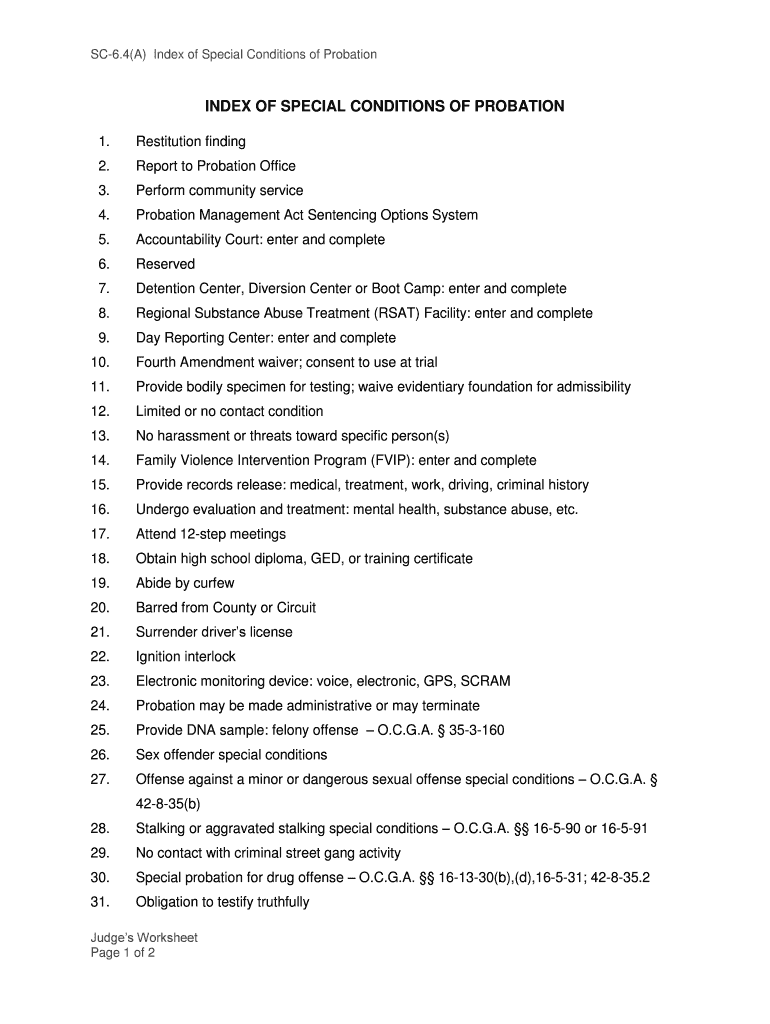
- Click ‘Get Form’ to open the Georgia Index Conditions of Probation document in the editor.
- Begin by reviewing the first section, which outlines restitution findings. Ensure you understand any financial obligations that may apply.
- Proceed to the 'Report to Probation Office' section. Enter your scheduled reporting dates and any required details as specified.
- For community service, indicate the number of hours required and any specific organizations where you will serve.
- Continue through each condition listed, such as attending treatment programs or submitting to evaluations. Fill in all necessary fields accurately.
- If applicable, complete sections regarding electronic monitoring or special conditions related to substance abuse or violence.
- Finally, review all entries for accuracy before saving your completed form. Utilize our platform’s features for easy editing and signing.
Start using our platform today for free to streamline your document completion process!
Fill out georgia index conditions probation online
It's free
It's free
Security and compliance
At DocHub, your data security is our priority. We follow HIPAA, SOC2, GDPR, and other standards, so you can work on your documents with confidence.
Learn more


