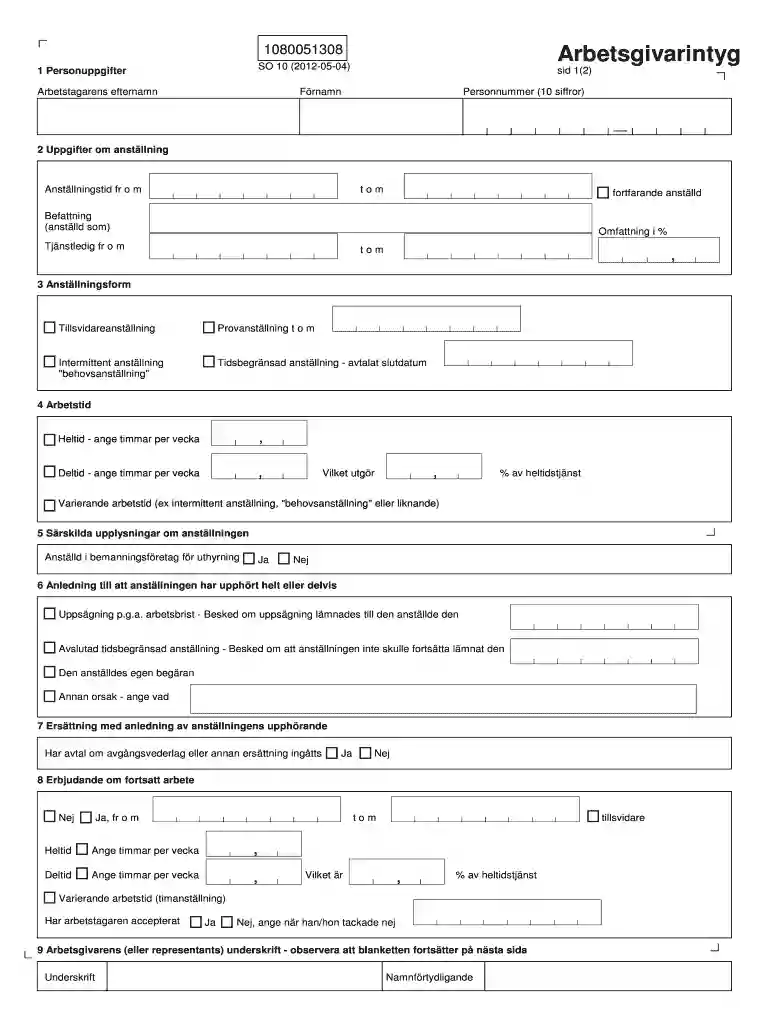
Arbestgivare intyg form 2026

Get Form
arbetsgivarintyg på engelska mall Preview on Page 1

Here's how it works

01. Edit your arbetsgivarintyg på engelska mall online
Type text, add images, blackout confidential details, add comments, highlights and more.

02. Sign it in a few clicks
Draw your signature, type it, upload its image, or use your mobile device as a signature pad.

03. Share your form with others
Send arbetsgivarintyg på engelska via email, link, or fax. You can also download it, export it or print it out.

How to use or fill out arbestgivare intyg form with our platform

Form edit decoration
9.5
Ease of Setup
DocHub User Ratings on G2
9.0
Ease of Use
DocHub User Ratings on G2
  1. Click ‘Get Form’ to open the arbestgivare intyg form in the editor.
  2. Begin by filling in the 'Personuppgifter' section. Enter the employee's first name, last name, and personal identification number (10 digits).
  3. Proceed to 'Uppgifter om anställning'. Specify the employment period, position held, and percentage of full-time work. Indicate if the employee is still employed.
  4. In 'Anställningsform', select the type of employment: permanent, probationary, intermittent, or fixed-term with an end date.
  5. Fill out 'Arbetstid' by indicating whether the employee worked full-time or part-time and specify hours per week.
  6. Complete any additional sections such as 'Särskilda upplysningar om anställningen' and 'Anledning till att anställningen har upphört'.
  7. Finally, ensure all required signatures are provided in the last section before saving your document.

Start using our platform today for free to streamline your document editing and signing process!

See more arbestgivare intyg form versions

We've got more versions of the arbestgivare intyg form form. Select the right arbestgivare intyg form version from the list and start editing it straight away!
Versions Form popularity Fillable & printable
2016 4.8 Satisfied (80 Votes)
2012 4.4 Satisfied (113 Votes)
be ready to get more

Complete this form in 5 minutes or less

Get form

Got questions?

We have answers to the most popular questions from our customers. If you can't find an answer to your question, please contact us.
Contact us
In order to receive benefits, you must have worked. To show that you have worked, you need a signed employer certificate (arbetsgivarintyg) that you request and receive in Mina sidor.
Did you choose to resign? If you cause your unemployment by choosing to resign, your right to unemployment benefit may be suspended for 45 benefit days. This is if you have quit your job without an acceptable reason. The suspension days will be deducted in connection to us receiving your time report.
The certificate of employment is issued to employees who have left but can also be requested anytime during ongoing employment. Like the employers certificate, it should contain personal details and facts about employment and position but must also provide a detailed account of the employees duties.
This form is used for proof of group health care coverage based on current employment. This information is needed to process your Medicare enrollment application. The employer that provides the group health plan coverage completes the information about your health care coverage and dates of employment.

Security and compliance

At DocHub, your data security is our priority. We follow HIPAA, SOC2, GDPR, and other standards, so you can work on your documents with confidence.

Learn more
ccpa2
pci-dss
gdpr-compliance
hipaa
soc-compliance