






Definition and Purpose of the Wage Verification Form
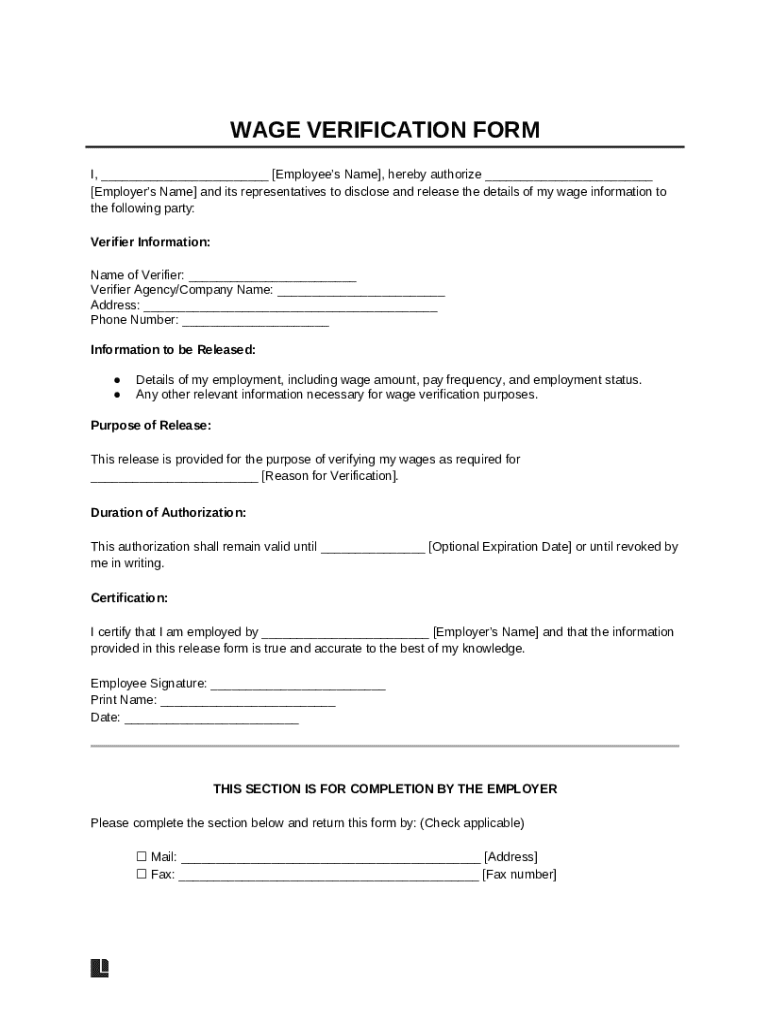
The Wage Verification Form is a critical document used to authenticate an individual's wage information, typically employed when an employer needs to confirm an employee's earnings with a third party. This form is commonly requested by lending institutions, government agencies, or potential employers as part of their evaluation procedures. The primary purpose of this document is to ensure that the reported income is accurate and trustworthy, serving as a reliable source for financial assessments, loan applications, or government assistance programs.
How to Use the Wage Verification Form
To effectively use the Wage Verification Form, individuals must first understand its structure and the specific information required. Here are the key steps involved in utilizing this form:
-
Complete Personal Information: Begin by filling out your personal details such as name, address, and contact information.
-
Authorize Employer: Approve your employer to disclose your income details to the requested third party by signing the authorization section on the form.
-
Submit to Employer: Provide the completed form to your employer, who will fill out the sections related to your wages, including salary, hourly rate, bonuses, and other relevant financial details.
-
Employer Submission: Once the employer completes their portion, they will send the form directly to the requesting party, maintaining confidentiality and providing official verification of your income.
Steps to Complete the Wage Verification Form
Completing the Wage Verification Form involves a structured approach to ensure all sections are accurately filled out:
-
Review the Form: Carefully read through the entire form to understand which sections are applicable to you and your employer.
-
Gather Necessary Documents: Collect any required documents such as pay stubs, W-2 forms, or employment contracts to provide accurate information.
-
Fill Out Personal Details: Enter your name, address, and employee ID, if applicable.
-
Sign the Authorization: Provide your signature to authorize your employer to release your wage information.
-
Employer's Section: Ensure your employer correctly completes the wage details, including the rate of pay, overtime, and total earnings for the relevant period.
-
Final Review: Double-check all entries for accuracy before submission to avoid delays or discrepancies.
Key Elements of the Wage Verification Form
The Wage Verification Form comprises several critical components:
- Employee Information: Details such as name, contact information, and employee number.
- Employer Details: Information about the employer, including the company's name, contact information, and authorized signatory.
- Wage Information: Comprehensive income data, including base salary, bonuses, commission, and any other compensations.
- Authorization for Release: Section where the employee consents to the release of their wage details.
- Verification Method: Indications of how the employer will submit the form to the requesting entity, maintaining a secure transfer of information.
Who Typically Uses the Wage Verification Form
The Wage Verification Form is utilized by a variety of entities, including:
- Financial Institutions: Banks and credit unions use it to verify income for loan applications.
- Government Agencies: Used in assessing eligibility for welfare programs or subsidies.
- Employers: When hiring new employees or during internal audits.
- Rental Agencies: Landlords might request it to verify a tenant's income during the rental application process.

Legal Use of the Wage Verification Form
The legal use of the Wage Verification Form rests on obtaining proper authorization from the employee and adhering to privacy regulations. Both the employee and employer must comply with federal laws such as the Fair Labor Standards Act (FLSA) and the Privacy Act, ensuring the employee's consent to release their wage information. Unauthorized disclosure can result in legal penalties, emphasizing the importance of the consent clause and secure handling of the form.
State-Specific Rules for the Wage Verification Form
While the Wage Verification Form is widely used across the United States, specific rules can vary by state. These variations may include:
- Minimum Wage Disclosures: States with different minimum wage laws might require additional information to ensure compliance.
- Privacy Regulations: Certain states have stricter laws concerning data privacy and employee consent.
- Submission Protocols: Some states mandate specific methods for submitting wage verification, such as electronic rather than paper submission.
Required Documents for Completing the Wage Verification Form
To accurately complete the Wage Verification Form, certain documents may be necessary:
- Recent Pay Stubs: To provide up-to-date wage information.
- W-2 Forms: For verifying annual earnings.
- Employment Contracts: Highlighting agreed-upon wage terms.
- Authorization Documents: Any additional consent forms as required by law or company policies.
By ensuring these documents are readily available, both employees and employers can facilitate a more efficient verification process.