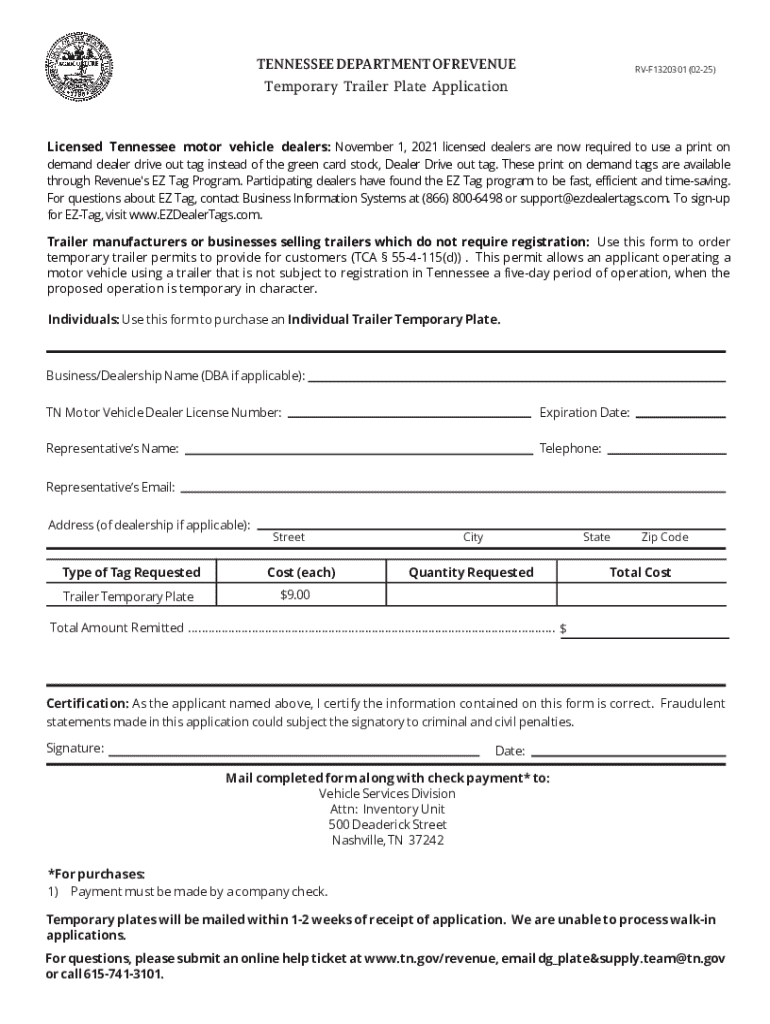







Definition and Purpose
The "Tennessee Drive Out Tag Template" is specifically designed for use by licensed motor vehicle dealers and individuals seeking temporary trailer permits in Tennessee. This form assists with the application process for securing temporary drive-out tags that allow trailers to be legally operated for up to five days without requiring full registration in the state. The form outlines crucial certification requirements and payment information necessary for obtaining these temporary permits.
How to Use the Tennessee Drive Out Tag Template
Utilizing the drive-out tag template involves several key steps. First, users must download the template from a trusted source, such as DocHub, which provides an editable and signable version online. After downloading, users can fill in necessary information, including details about the vehicle, the applicant, and the period for which the tags are needed. Once completed, users must submit this form according to specific guidelines provided by the Tennessee Department of Revenue.
Obtaining the Tennessee Drive Out Tag Template Online
To acquire the Tennessee Drive Out Tag Template online, individuals can access platforms like DocHub. Through DocHub, users can conveniently locate the form using the primary keyword "Tennessee drive out tag template." After locating the template, users can directly fill out and sign the document online, which streamlines the process and reduces the need for manual paperwork. This method is particularly beneficial for those who require quick access without visiting physical offices.
Steps to Complete the Tennessee Drive Out Tag Template
- Access the Template: Visit a reliable document editing platform such as DocHub to find the Tennessee Drive Out Tag Template.
- Input Vehicle Information: Enter detailed information about the vehicle or trailer for which the drive-out tag is needed, including make, model, and vehicle identification number (VIN).
- Provide Personal or Dealership Information: Fill out sections pertaining to the applicant, including name, address, and contact information.
- Specify the Duration: Indicate the start and end dates for which the temporary tag will be valid, ensuring it does not exceed the five-day limit.
- Signing the Document: Utilize electronic signature tools within the platform to sign the completed template. Ensure that any required signatures from other parties are also collected.
- Submit the Form: Follow the specific submission guidelines outlined by the Tennessee Department of Revenue to finalize the application process.
Who Typically Uses the Tennessee Drive Out Tag Template
Primarily, licensed motor vehicle dealers and individuals who sell or transport vehicles temporarily use the Tennessee Drive Out Tag Template. This form is essential for anyone needing to lawfully operate a non-registered trailer or vehicle within Tennessee for a short duration. The drive-out tags serve as a temporary measure for vehicles being moved across state lines or for customers awaiting formal registration.


Key Elements of the Tennessee Drive Out Tag Template
Several crucial components must be accurately completed within the Tennessee Drive Out Tag Template:
- Applicant Details: This includes names, contact information, and dealership license numbers for motor vehicle dealers.
- Vehicle Specifics: Precise vehicle information such as VIN, make, and model to ensure the temporary tag is appropriately assigned.
- Operational Period: Clearly defined start and end dates for the usage of the temporary tag.
- Signature Fields: Spaces for the applicant and any other necessary parties to provide electronic signatures, guaranteeing the form's authenticity.
Legal Use of the Tennessee Drive Out Tag Template
The legal use of this form is governed by the Tennessee Department of Revenue, which mandates compliance with state-specific laws associated with temporary vehicle tags. Users must ensure the template is filled out accurately and submitted within the stipulated timelines to avoid any legal repercussions. Tags must only be used for the temporary purpose as described and not as a substitute for full vehicle registration.
State-Specific Rules for the Tennessee Drive Out Tag Template
Tennessee enforces specific rules regarding the issuance and use of drive-out tags:
- Time Limitation: The tag is valid for exactly five days, after which full registration is required if the vehicle remains in use within Tennessee.
- Non-Transferable: Tags are strictly non-transferable and are issued for a single, specific vehicle.
- Required Compliance: Adhering to all state regulations, including proper submission procedures and lawful usage of the tags, is critical to avoid fines and penalties.
These regulations ensure that all temporary vehicle movements are properly documented and legally aligned with Tennessee’s vehicular laws.