Definition and Meaning of Car Sublease Agreement Template
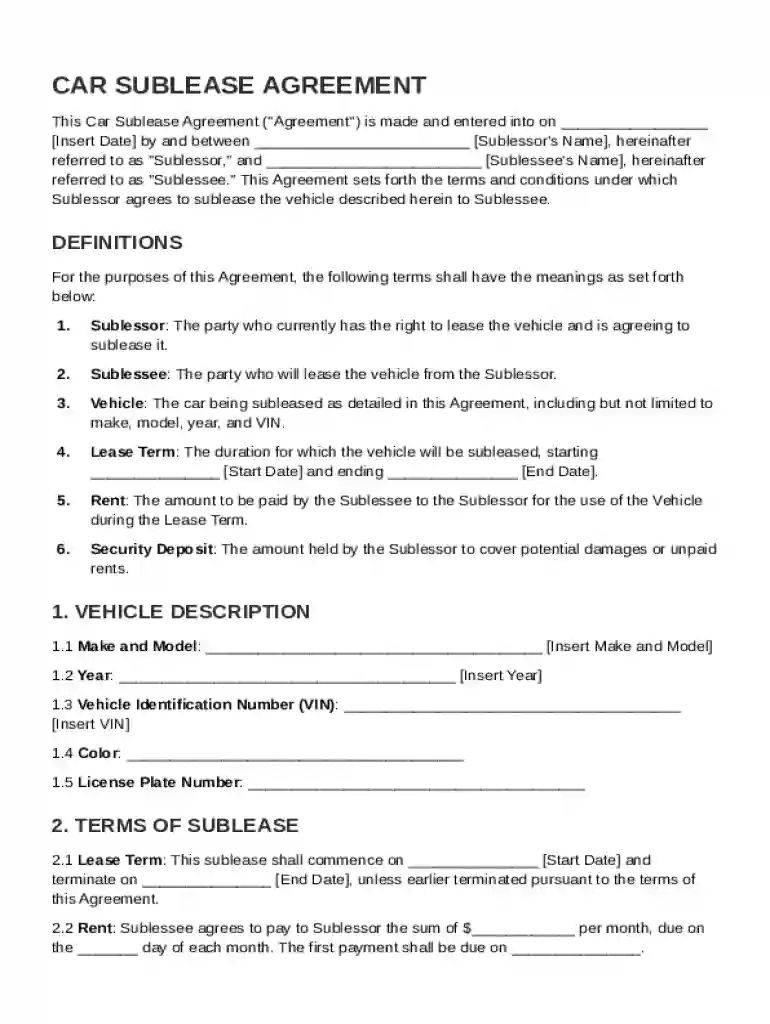
A Car Sublease Agreement Template is a legal document used to facilitate the sublease of a vehicle between the original lessee (sublessor) and another party (sublessee). This agreement defines the rights and responsibilities of both parties involved, aiming to ensure transparency and compliance with applicable laws. The template includes essential components like descriptions of the vehicle, terms of use, sublease duration, rent payments, and stipulations for sublease termination.
- Vehicle Description: Detailed specifics about the vehicle in question, including make, model, VIN, and current condition.
- Lease Duration: Specific dates marking commencement and termination of the sublease, which dictates the time frame of the agreement.
- Rent Payment Details: Terms regarding the amount, frequency, and method of rent payment, ensuring clarity for financial transactions.
- Responsibilities and Use: Each party's obligations concerning vehicle maintenance, insurance, and permissible use conditions.
How to Use the Car Sublease Agreement Template
Using the Car Sublease Agreement Template involves a series of strategic steps to customize the document per the specific requirements of the sublease arrangement. This customization ensures all the unique elements of the transaction are properly documented.
- Gather Information: Collect all relevant details about the vehicle, parties involved, sublease period, and financial considerations.
- Customize the Template: Input gathered details into the appropriate sections of the template, ensuring accuracy in terms such as dates, names, and addresses.
- Review Legalities: Ensure compliance with local regulations by checking the document against applicable state laws and consulting legal counsel if necessary.
- Finalize Document: Use DocHub to make any necessary edits and prepare the document for signatures.
By efficiently employing the template, users can create a comprehensive and legally sound sublease agreement tailored to their specific needs.
Key Elements of the Car Sublease Agreement Template
The Car Sublease Agreement Template encompasses multiple critical elements fundamental to a robust legal document, each designed to protect the interests of both the sublessor and sublessee.
- Security Deposit Clause: Specifies any security deposit required, including amount, purpose, and conditions for refund.
- Insurance Requirements: Outlines the insurance policies each party must hold, ensuring adequate protection in case of accidents or damage.
- Termination Conditions: Details under which circumstances the agreement can be prematurely terminated, providing clarity on default scenarios.
- Governing Law: Identifies the state laws that apply to the agreement, crucial for resolving disputes.
- Miscellaneous Provisions: Includes any additional terms, such as late payment penalties or restrictions on vehicle modifications.
Each element plays a vital role in ensuring the sublease arrangement is thoroughly documented and legally enforceable.
Steps to Complete the Car Sublease Agreement Template
Completing a Car Sublease Agreement involves several meticulous steps to ensure the document’s accuracy and enforceability. The process can be streamlined using tools like DocHub, known for facilitating document management workflows.
- Review Instructions: Familiarize yourself with the instructions provided in the template to understand each part's purpose.
- Fill in Party Information: Enter the names, addresses, and contact information of both sublessor and sublessee.
- Enter Vehicle Details: Provide comprehensive vehicle information, as it forms the basis of the sublease.
- Detail Financial Terms: Specify the financial elements, such as rent amount and security deposit specifics, ensuring all financial obligations are clear.
- Designate Lease Terms: Highlight the duration, beginning and end dates, and any notable milestones within the lease period.
- Sign and Finalize: Use DocHub to apply electronic signatures, making sure both parties digitally acknowledge and agree to terms.
Effective completion of these steps produces a clear and enforceable sublease agreement.
Important Terms Related to the Car Sublease Agreement Template
Understanding the key terms related to a Car Sublease Agreement is essential for both sublessors and sublessees to avoid misinterpretations and disputes.
- Sublessor and Sublessee: The original lessee seeking to sublease the vehicle, and the party taking on the lease, respectively.
- Default: Failing to meet obligations outlined in the agreement.
- Indemnity: Assurance that one party will cover certain costs the other may incur, such as legal fees or claims.
- Modification Clause: A stipulation about whether the sublessee can make alterations to the vehicle.
These terms are integral to the effective communication and fulfillment of a sublease agreement.
Legal Use of the Car Sublease Agreement Template
The Car Sublease Agreement Template serves to establish a legally binding contract, enforceable under the jurisdiction stipulated within the agreement. Understanding its legal implications requires attention to specific provisions and state regulations.
- Compliance with State Laws: Ensure the agreement adheres to local legislation, as jurisdictions may have unique requirements.
- Contractual Obligations: Both parties must perform duties as outlined to avoid legal disputes, which can be enforceable in court.
- Signatures and Authentication: Utilize electronic signature tools, such as DocHub, to capture valid endorsements from all parties involved.
Through these legal stipulations, the agreement aims to protect both the sublessor's and sublessee's interests.
State-Specific Rules for the Car Sublease Agreement Template
State-specific regulations can significantly impact the application and enforcement of a Car Sublease Agreement, making knowledge of these rules indispensable.
- Insurance Requirements: Varying by state, insurance minimums must be met, with coverage details included within the contract.
- Disclosure Obligations: Some states mandate the disclosure of the original lease terms and any conditions affecting the vehicle's use.
- Lease Registration: Local laws may require that vehicle leases, including subleases, are registered with state authorities or agencies.
By tailoring the template to align with these state-specific mandates, parties ensure the agreement is both valid and enforceable.
Examples of Using the Car Sublease Agreement Template
The Car Sublease Agreement Template is utilized across various scenarios where one party temporarily requires the use of another person’s leased vehicle.
- Temporary Assignments: When the sublessor is unable to use their vehicle for a period but still holds a lease.
- Business Purposes: Companies temporarily reallocating leased vehicles to different departments or locations.
- Financial Constraints: To reduce rental costs when a lessee's financial situation temporarily restricts their ability to make payments.
These examples highlight the flexibility and practicality of using a structured sublease template to manage vehicle leasing arrangements.
Each of these blocks serves to comprehensively guide users in understanding, utilizing, and navigating the complexities of the Car Sublease Agreement Template while ensuring adherence to appropriate legal and practical requirements.