






Definition and Purpose of the Squarespace Contract Template
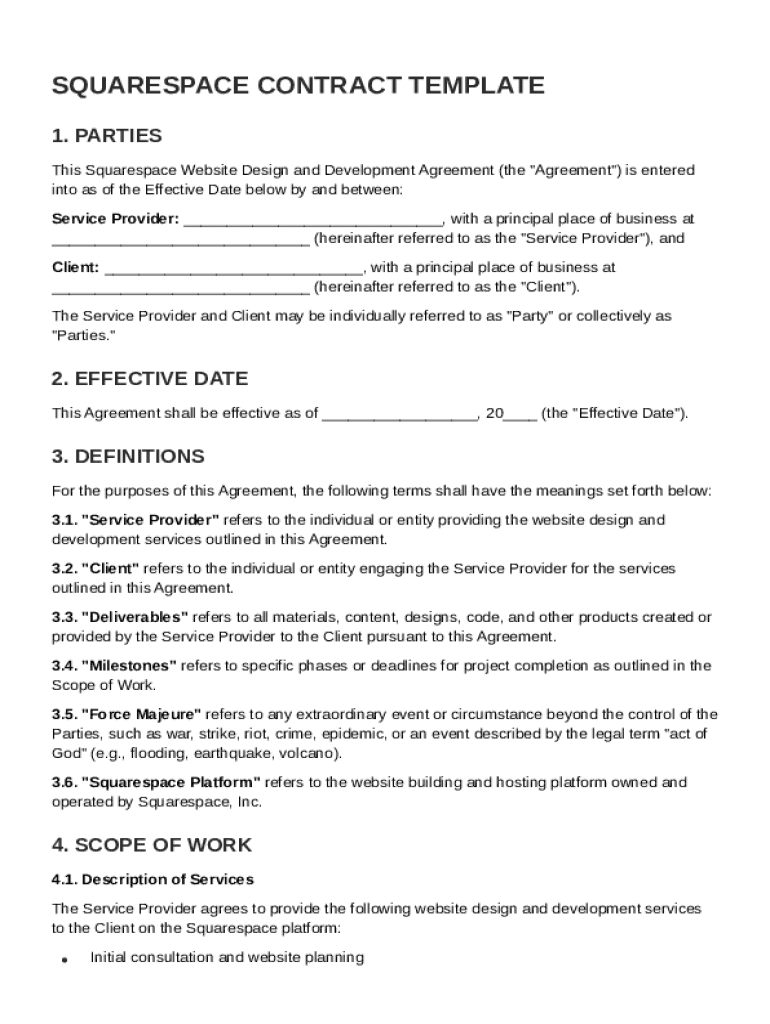
The Squarespace Contract Template is a legally binding document used to establish terms between a service provider and a client for website design and development services. This template is tailored for engagements involving Squarespace projects, serving to define expectations and responsibilities. The document covers fundamental areas such as deliverables, timelines, payment terms, and intellectual property rights, ensuring clear communication and reducing the potential for misunderstandings. It is specifically useful for freelancers, agencies, and businesses engaged in creating or modifying Squarespace websites, providing a structured framework for their professional arrangements.
How to Use the Squarespace Contract Template
Using the Squarespace Contract Template involves several straightforward steps, designed to ensure all relevant aspects of the service agreement are captured accurately. Here's a step-by-step guide:
-
Review the Template: Begin by reading through the entire document to understand its structure and components. Familiarity with each section is key to making necessary adjustments.
-
Customize the Content: Modify the template to reflect specific project details. Input client and provider information, define the scope of work, and outline specific deliverables and deadlines.
-
Update Payment Terms: Clearly specify the payment schedule, including milestones, amounts, and due dates to ensure there’s no confusion regarding financial obligations.
-
Set Legal and Technical Terms: Adjust sections covering intellectual property rights, confidentiality, and liability clauses according to the project's nature and parties' preferences.
-
Review and Revise: Check the changes for accuracy and completeness. It may be beneficial to have legal counsel review the document to ensure compliance with relevant laws.
-
Sign and Distribute: Once finalized, both parties should sign the agreement. Share copies with all involved parties to formalize the business relationship.
Key Elements of the Squarespace Contract Template
The Squarespace Contract Template encompasses several critical components. Understanding these elements is essential for creating a comprehensive and effective agreement:
-
Parties Involved: Details of both the service provider and the client, including names and contact information.
-
Scope of Work: A precise description of tasks, deliverables, and project objectives that the service provider will accomplish.
-
Payment Terms: Specifications regarding compensation, such as rates, payment methods, and due dates for each project phase.
-
Intellectual Property Rights: Clauses outlining ownership and usage rights of the completed website and its components.
-
Confidentiality: Provisions to protect sensitive information disclosed during the project.
-
Liability and Indemnification: Terms defining the extent of responsibility and protection against potential claims.
-
Termination Clause: Conditions under which the contract can be terminated by either party and the implications thereof.
Steps to Complete the Squarespace Contract Template
Completing a Squarespace Contract Template requires careful attention to detail. Here is a detailed process to ensure a thorough completion:
-
Gather Necessary Information: Collect all relevant data about the project, involved parties, and specific terms needed for the agreement.
-
Fill in Standard Sections: Populate the template with general information regarding client and service provider details, project duration, and objectives.
-
Detail the Scope and Deliverables: Define the precise activities and outcomes expected, including design drafts, iterations, and final website specifications.
-
Set and Align Timeframes: Clearly outline schedules for each phase of the project to manage expectations about timing and delivery.
-
Outline Legal Conditions: Ensure legal sections are accurate, particularly regarding intellectual property and confidentiality concerns.
-
Finalize and Review: Proofread the entire document to avoid any errors, ensuring clarity and legality before the agreement is signed.
Who Typically Uses the Squarespace Contract Template
The Squarespace Contract Template is widely used by a variety of individuals and entities involved in website design and development:
-
Freelancers/Independent Contractors: Often utilize this template to formalize agreements with clients seeking custom Squarespace solutions.
-
Digital Agencies: Agencies offering comprehensive web design services prefer such templates to ensure clear communication with multiple clients simultaneously.
-
Small Businesses/Entrepreneurs: Small business owners and entrepreneurs engage in setting up or redesigning Squarespace sites frequently use this contract framework.
-
Consultants/Project Managers: Professionals managing web development projects use this template to streamline agreements and maintain consistent standards across projects.


Examples of Using the Squarespace Contract Template
The Squarespace Contract Template can be applied in diverse scenarios, providing tailored agreements for different types of projects:
-
E-commerce Websites: When designing an online store on Squarespace, the contract will include additional clauses specific to e-commerce functionalities, like product pages and payment gateways.
-
Portfolio Sites for Creatives: Contract terms may emphasize aesthetic design and user experience, crucial for artists or photographers seeking to showcase their work online.
-
Blog Platforms: Customization for content management systems may be required, reflected in the specified deliverables and scope of work.
-
Corporate Websites: Large organizations needing detailed and polished web presence benefit from contracts ensuring high usability and compliance standards.
Legal Use of the Squarespace Contract Template
When employing the Squarespace Contract Template, legal adherence is crucial:
-
Compliance with Laws: Ensure the contract meets all federal and state legal requirements in the United States.
-
Enforcement of Terms: Clearly outline enforcement mechanisms for each contract clause to anticipate and resolve disputes.
-
Modifications and Amendments: Establish a procedure for modifying contract terms should the project scope or requirement change.
-
Mediation and Dispute Resolution: Incorporate an alternative dispute resolution option, such as mediation, to handle disagreements amicably.
State-Specific Rules for the Squarespace Contract Template
Understanding state-specific legal requirements is vital when using contract templates:
-
Regulatory Differences: Each state may have unique laws concerning digital contracts, especially about services, payments, and intellectual property rights.
-
Notarization Requirements: Some states might demand notarization for contracts exceeding specified monetary thresholds.
-
Consumer Protection Laws: Protect clients using specific state provisions regarding service delivery and statutory compliance, especially relevant in consumer-focused projects.
By adhering to these guidelines, users can effectively leverage the Squarespace Contract Template to create reliable, legally sound agreements that cater to the nuanced needs of web design and development projects.